


Synthesia is one of the most established AI video platforms on the market, designed to turn written scripts into presenter-style videos without cameras, actors, or traditional editing.
I tested the platform hands-on to see how well it delivers for teams looking to create training content, explainers, and corporate videos at scale.
Our research team has evaluated multiple AI video generators, and Synthesia consistently stands out for enterprise workflows, but it comes with trade-offs that matter depending on what you need.
In this review, I’ll walk through Synthesia’s pricing, features, avatar quality, and limitations so you can decide whether it’s the right fit.
Why you can trust this review
We’ve spent extensive time researching and hands-on testing AI video platforms to bring you accurate and fair reviews.
Our testing ensures our recommendations remain independent and backed by real usage data, giving you what you need to make the right choice.
Synthesia Pros & Cons
Pros 👍
- Fast, scalable video production from text scripts
- 120-160+ languages and accents for multilingual content
- Corporate-ready templates, brand kits, and LMS exports
- Strong security and compliance features for enterprise use
Cons 👎
- Avatars still have an “uncanny valley” feel in some movements
- Minute-based pricing gets expensive for longer or frequent videos
- Limited creative flexibility for social clips or cinematic content
- Enterprise pricing is opaque and can be hard to forecast
What I Like
✔️ The text-to-video workflow is genuinely fast. I pasted a script, selected an avatar and language, and had a finished video in minutes, not hours. For teams producing training modules or product explainers, this cuts production time dramatically compared to filming, editing, and post-production.
✔️ The multilingual and localization features are a standout. Synthesia supports 120-160+ languages and accents, and you can re-use the same avatar and visuals while swapping the language. For global L&D teams, this alone can justify the cost since localizing a single training video the traditional way is expensive.
✔️ Corporate-ready templates and LMS-compatible exports (SCORM, etc.) mean the platform fits directly into existing training workflows. I didn’t have to hack things together or export and reformat. PowerPoint import is also a nice touch for teams that already have slide-based training decks.
✔️ Security and compliance features, including SSO, brand governance, and regular audits, are frequently cited as a key differentiator over newer, more creator-focused competitors. If your organization has strict data handling requirements, this matters.
What I Dislike
❌ Avatar realism is good, but not flawless. During testing, I noticed that while the avatars look high quality in still frames, their movements and lip-syncs can feel slightly stiff or unnatural, especially during longer clips. Reviewers consistently describe this as an “uncanny valley” effect. Consumer-facing audiences expecting natural expression will notice it.
❌ Voice quality is solid but recognizable as synthetic. Compared to platforms that integrate more advanced TTS engines (like tools pairing with ElevenLabs), Synthesia’s voices sound clear but lack the warmth and cadence of a real narrator.
❌ The minute-based pricing structure is the biggest practical constraint. If you want to produce frequent or long-form video content, you’ll burn through your monthly allocation quickly, and upgrading tiers gets expensive fast.
❌ Creative flexibility is limited. This is not a full video editor. You can arrange scenes, add text and media, and work with layouts, but complex timeline editing, effects-heavy social clips, or YouTube-style vlogs are outside what Synthesia does well.
Author’s Testing Notes
Synthesia is at its best when you treat it as a production tool for structured, repeatable content, not a creative playground.
If I needed to turn 10 SOPs into multilingual training videos with the same branded avatar, Synthesia would be my first choice. If I needed a punchy TikTok ad or a highly stylized brand film, I’d look elsewhere.
How Much Does Synthesia Cost?
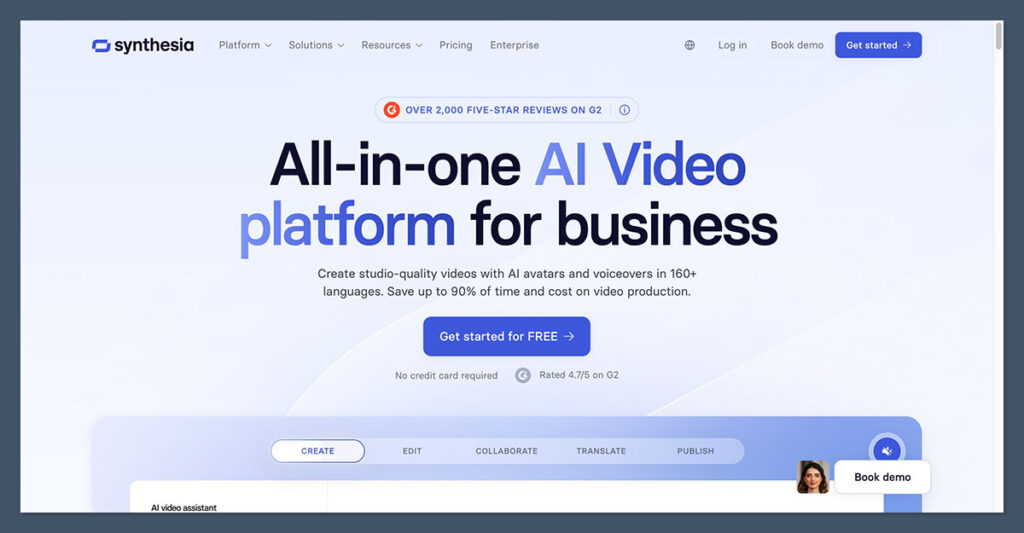
Synthesia uses a freemium model with tiered pricing based on video minutes, avatars, and collaboration features.
The minute caps are the key detail to pay attention to, since they’re what determines whether Synthesia is affordable or expensive for your specific use case.
| Plan | Price | Video Minutes | Avatars | Key Features | Best For |
|---|---|---|---|---|---|
| Free | $0/month | ~3 min/month | 9 stock avatars | Watermarked output, basic editor, no custom avatar | Testing the UX and avatar quality before committing |
| Starter | ~$29/month (monthly) / ~$22/month (annual) | ~10 min/month | 90-125+ stock avatars | No watermark, AI script assistant, PowerPoint import, 120+ languages, 1 editor + guests | Solo creators or small businesses publishing a few short videos monthly |
| Creator | ~$89/month (monthly) / ~$67/month (annual) | ~30 min/month | 180+ stock avatars | More templates, priority support, better collaboration tools, more guest seats | Small teams producing a consistent stream of training or marketing videos |
| Enterprise | Custom pricing (estimated median ~$30,000/year) | Effectively unlimited (negotiated) | 230+ stock + unlimited custom avatars | Brand kits, SSO, security/compliance, dedicated support, governance controls | Large organizations with global L&D, comms, and compliance needs |
Is Synthesia Good Value for Money?
That depends entirely on how many video minutes you need and what tier of features your team requires.
For a small team producing a handful of short training clips each month, the Starter plan at ~$29/month is reasonable and competitive. But the minute caps mean costs escalate quickly if your needs grow.
The Enterprise tier is where the pricing becomes harder to evaluate. Some marketplace analyses estimate a median around $30,000/year across verified customers, but the actual cost varies significantly based on minutes, custom avatars, add-ons, and contract terms.
Several sources note that understanding Synthesia’s true enterprise cost can be tricky because of this variability.
Author’s Testing Notes
I’d recommend starting with the Starter plan if you’re evaluating Synthesia for your team. The ~10 minutes per month is enough to produce 2-3 short training modules and gauge avatar quality, voice output, and template fit before upgrading. The free tier’s watermark and 3-minute cap make it useful for a quick look but not for any real production work.
Avatars and Voice Quality
Synthesia’s avatar library is one of its flagship features. Depending on your plan, you get access to anywhere from 9 (Free) to 230+ stock avatars (Enterprise), with the option to create custom avatars of yourself or colleagues on higher tiers.
The custom avatar feature is particularly attractive for organizations that want a consistent, on-brand presenter. An executive or trainer can record a short video of themselves, and Synthesia generates a digital clone that can deliver any script in any supported language.
This is useful for scaling a recognizable face across dozens of training modules without booking repeat filming sessions.
That said, avatar realism remains a known limitation. The avatars are high quality compared to the market two years ago, but they still occasionally look stiff, especially during hand gestures or longer monologues.
The lip-sync technology works well for most languages but can feel slightly off on faster speech or less common accents. Reviewers consistently note that while the avatars are impressive, they don’t quite pass for real humans in motion.
On the voice side, Synthesia offers hundreds of AI voices across 120-160+ languages and accents. Pronunciation and clarity are strong, and the selection is broad enough to cover most localization needs. However, the voices are still recognizably synthetic.
Competitors that integrate more advanced text-to-speech engines may deliver more natural-sounding narration, particularly for consumer-facing content where voice warmth matters.
Top Tip 💡
If avatar realism is critical for your use case, take advantage of the free tier to test how the avatars look and sound with your actual scripts before committing to a paid plan. The quality difference between stock avatars and custom avatars is also significant, so factor that into your tier decision.
Text-to-Video Workflow
Synthesia’s core workflow is straightforward: paste a script, select an avatar and voice, choose a language, add any supporting media or slides, and generate the video. The platform handles lip-syncing, speech generation, and scene composition automatically.
The AI script assistant is a helpful addition. It can summarize, rewrite, or restructure input text from documents, URLs, or raw copy, which speeds up content creation if you’re working from existing materials like SOPs, knowledge base articles, or presentation decks.
Template selection is extensive for corporate use cases. The library leans heavily toward training, onboarding, sales enablement, and explainer formats. If you’re producing internal comms or structured learning content, you’ll find templates that match. If you’re looking for social media or marketing-style templates, the selection thins out.
PowerPoint import is worth highlighting. For L&D teams that already have slide-based training content, the ability to import a deck and have Synthesia layer an avatar presenter on top is a genuine time-saver.
Multilingual and Localization
This is one of Synthesia’s strongest selling points. You can take an existing video and instantly translate and dub it into another language, keeping the same avatar and visual layout while swapping the audio and lip-sync.
For organizations that need to deliver the same training or messaging across multiple regions, this feature alone can replace costly manual localization workflows.
Who Synthesia Is Best For
Based on my testing, Synthesia is best suited for:
L&D teams producing standardized training modules across multiple languages and regions. The combination of templates, LMS exports, and multilingual support makes it a natural fit.
Mid-to-large companies that need consistent explainer, onboarding, or internal communications videos with minimal production friction and strong brand governance.
Agencies and internal comms teams that value speed, brand consistency, and security over maximum creative control. If you need 50 videos that all look and feel the same, Synthesia delivers.
Who Should Look Elsewhere
Synthesia is less ideal for individual YouTube creators, TikTok or short-form content producers, or brand campaigns where human authenticity, emotional expression, and bespoke editing matter more than scale.
If your content needs to feel personal and spontaneous rather than polished and repeatable, a different tool (or a real camera) will serve you better.
How Does Synthesia Compare to Competitors?
| Platform | Best For | Avatar Quality | Pricing Feel | Notable Edge Over Synthesia |
|---|---|---|---|---|
| Synthesia | Corporate training, internal comms, L&D | High quality but slightly stiff in motion | Higher, minute-based, enterprise-oriented | N/A |
| HeyGen | Marketing and social videos | Often more expressive and natural avatars | More competitive and creator-friendly | Better for marketing-style and social content |
| Colossyan | Structured e-learning modules | More rigid, slide-based feel | Similar mid-range SaaS pricing | Strong SCORM and LMS integration with built-in quizzes |
| DeepBrain | Broadcast-style studio avatars | Very high for studio-quality avatars | Typically higher with a broadcast focus | TV-grade quality, virtual news anchors |
If you’re focused on corporate training and need enterprise-grade security, Synthesia is the most mature option.
If your priority is marketing content with natural-looking avatars, HeyGen tends to deliver more expressive results at a more creator-friendly price point.
And if structured e-learning with quizzes and SCORM packaging is your main need, Colossyan is worth evaluating alongside Synthesia.
How We Test AI Video Platforms
To bring you fair and accurate reviews, we test AI video platforms through hands-on use and structured evaluation. Our process covers the key areas that matter for teams evaluating these tools:
| Testing Area | What We Evaluate |
|---|---|
| Avatar & Voice Quality | Realism of avatar movements, lip-sync accuracy, voice naturalness across languages |
| Ease of Use | Onboarding experience, script-to-video workflow, template quality, learning curve |
| Features & Integrations | Multilingual support, localization, LMS exports, PowerPoint import, collaboration tools |
| Pricing & Value | Cost per video minute, plan limits, transparency of enterprise pricing, add-on costs |
| Security & Compliance | SSO, data handling, brand governance, audit features |
| Support | Available channels, response time, quality of documentation and resources |
Synthesia Review: Should You Use It for AI Video?
Synthesia is the most mature AI video platform for enterprise and corporate use cases. It delivers fast, scalable video production with strong multilingual support, corporate-ready templates, and the security features that larger organizations require.
Where it falls short is creative flexibility and avatar naturalness. If your content needs to feel human and spontaneous, or if you’re producing social-first content where authenticity matters more than consistency, Synthesia’s structured approach will feel limiting.
The minute-based pricing also requires careful planning. It’s affordable for teams producing short, focused modules, but costs add up quickly if you need high-volume or long-form output.
I recommend Synthesia for L&D teams, corporate comms departments, and mid-to-large businesses that need a repeatable, branded video production workflow at scale. If that describes your use case, the platform delivers on its promise.
If you’re a solo creator or a small team making social content, explore HeyGen or a more flexible editing tool first.
You can get started with Synthesia’s free tier to test the UX and avatar quality before committing to a paid plan.
Frequently Asked Questions
Is Synthesia free to use?
Synthesia offers a free tier that includes approximately 3 minutes of video per month, 9 stock avatars, and a watermark on all output. It’s useful for testing the platform’s interface and avatar quality, but the minute cap and watermark make it impractical for any production use. Paid plans start at around $29/month.
How realistic are Synthesia’s AI avatars?
Synthesia’s avatars are among the higher quality options in the AI video space, but they’re not perfectly lifelike. Lip-sync and facial expressions are solid for most scripts and languages, but movements can appear slightly stiff during longer clips or complex gestures. Reviewers frequently describe a mild “uncanny valley” effect. Custom avatars (available on higher tiers) tend to look more natural than stock options.
Can I create a custom avatar of myself on Synthesia?
Yes, but custom avatar creation is restricted to higher-tier plans. The Starter plan does not include custom avatars. On Creator and Enterprise tiers, you can create digital clones of yourself or colleagues that can deliver any script in any supported language, which is useful for maintaining a consistent on-brand presenter across multiple videos.
How many languages does Synthesia support?
Synthesia supports 120-160+ languages and accents, depending on the plan and the specific voices available. The platform also offers AI dubbing and translation features, allowing you to take an existing video and re-render it in a different language while keeping the same avatar and visuals.
Is Synthesia good for YouTube or social media content?
Synthesia is not optimized for social-first content. Its strengths are in structured, corporate-style videos like training modules, explainers, and internal communications. For YouTube vlogs, TikTok clips, or fast-paced social content where personality and creative editing matter, tools like HeyGen or traditional video editors are a better fit.
How does Synthesia compare to HeyGen?
Synthesia is more enterprise-focused with stronger security, compliance, and LMS integration features. HeyGen tends to offer more expressive avatars and a more creator-friendly pricing structure, making it better suited for marketing and social video content. The right choice depends on whether your priority is corporate workflows and governance (Synthesia) or marketing flexibility and avatar expressiveness (HeyGen).

Comments 0 Responses