

Playphrase.me is an AI-powered tool that lets you search for real film and TV clips by typing in a phrase.
I tested it to see if it’s actually helpful beyond just entertainment.
After using the free version, digging into the features, and reading up on the limitations, I found that Playphrase.me offers strong value for language learners and writers, but comes with restrictions for commercial use.
In this review, I’ll walk you through my experience with Playphrase.me, including how the tool works, how much it costs, who it’s best for, and how it compares to similar phrase search tools.
Quick verdict
Playphrase.me is a search engine that uses AI to browse through clips from movies and TV shows based on the text prompt you enter. You can enter a dialog you remember from a movie and it will play out that scene for you.
If you’re out of ideas, it also lets you go through the most common phrases to search for. And it will fetch results within a second.
This has changed the horizons of the world of media exploration. Playphrase.me has an extensive library of movies and TV shows, and its ability to search is super fast and efficient. And it also lets you download the clips you like.
In this article:
- Quick verdict
- Research Methodology
- What is Playphrase.me
- How to use Playphrase.me
- How Much Does Playphrase.me Cost?
- Who is Playphrase.me best for
- Is It Legal to Use PlayPhrase.me?
- What I Like About Playphrase.me
- What I Don’t Like About Playphrase.me
- Who Should Use Playphrase.me?
- Alternatives to Playphrase.me
- Playphrase.me hacks
- Final Verdict: Is Playphrase.me Worth It?
Research Methodology
My research methodology for this article was playing with Playphrase.me, which I loved! I’ve evaluated its result timings, sharing options, ease of use, and price options. I have searched for some very memorable and some very forgettable dialogs on this tool and it has always returned accurate results.
I entered different phrases from movies as well as TV shows and checked how many results it offered for each phrase. I used Playphrase.me on different devices to see how it performs on various platforms.
I also used different networks to check its speed on a slow network. I’ll discuss my findings in this article.
What is Playphrase.me
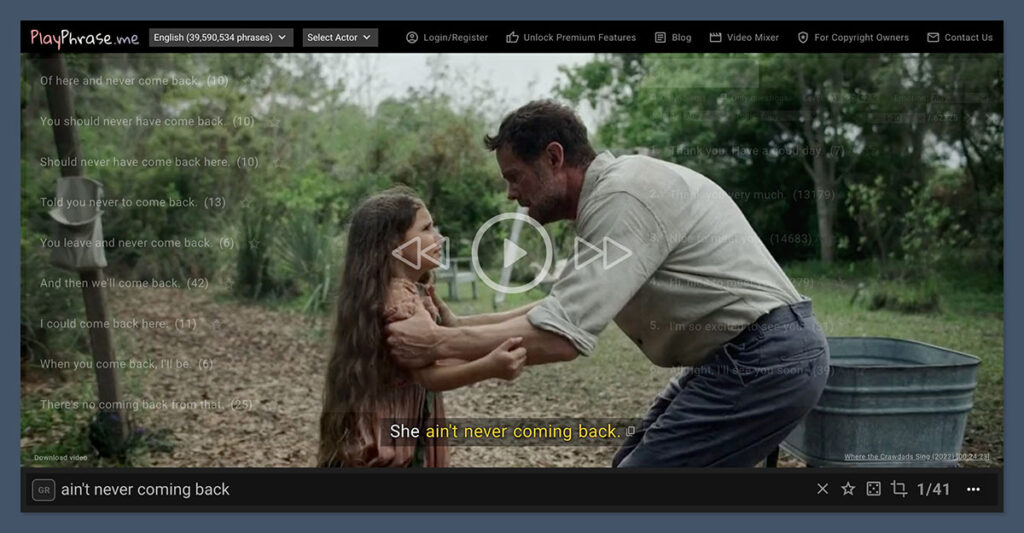
It’s a rather new concept – Playphrase.me is a tool that helps you find the right scene from a movie or TV show. It runs on artificial intelligence and scans through an extensive library of videos to search for that one particular scene you were looking for.
What you have to do is enter a phrase, such as a dialog from a movie, and it returns the exact scene or scenes where that dialog was spoken. It works with English movies and TV shows, which means it can become an excellent tool to learn this language.
If you’re learning English and you want to know how a particular phrase is used in a sentence, you can enter it in the prompt and then see how it’s being spoken in movies and TV shows. It’s an innovative way to learn English.
While it’s great for movie buffs, its primary purpose was to learn language. This is why it offers grammar options, which I will discuss later. I tested this tool with over a hundred dialogs and it returned the right results each time.
The company claims that they’re growing at the rate of 2,000-5,000 phrases per day, which means you’ll definitely find results for your phrase. Their database currently has 7,600,186 phrases, as I’m writing this article.
For now, they have clips in English only but they plan to add more languages, including Spanish, German, Italian, and French. They also plan to add Japanese later on. They have generated over 2 million phrases from these languages and will launch them soon.
Here’s a quick overview of what you can expect:
| Feature | What It Does |
|---|---|
| Phrase search | Finds clips of dialogue from shows/movies |
| Context mode | Shows full conversation around your search phrase |
| Focus playback | Loops only the key phrase for faster practice |
| Actor filter | Lets you search by speaker (useful for accent or tone practice) |
| Video mixer | Allows you to combine clips for educational or social sharing |
| Mobile app | Android version available with the same search features |
How to use Playphrase.me
To use this tool, just open playphrase.me in your preferred browser. In the text box, type the phrase or dialog you’re looking for. It will show you clips that are related to your phrase. You can click on the screen and it will display the most common phrases in their database.
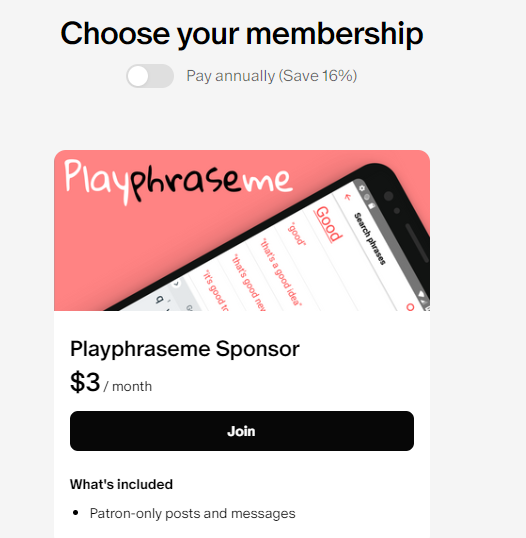
While you can search for a phrase without registering on your website, your search will be limited to just 5 phrases per search. To register on their website, you’ll have to sponsor their project on Patreon.
It costs just $3/month to become a sponsor. You can also select their annual plan which costs $2.52/month. With that payment, you can access as many phrases per search. Other than that, it’s pretty much the same for free and paid users as they both can download their favorite clips.
If you want to learn English, Playphrase.me will be a great tool as it offers a fun and efficient learning experience where you can see native speakers use some common and some not-so-common phrases in their speech.
I tested Playphrase.me on Windows desktop, Android, and iOS. It gave consistent results on all these platforms. However, when I switched to a slower network, its results became slower, which was expected.
How Much Does Playphrase.me Cost?
Playphrase.me offers both a free and a paid version.
The free version is limited to a small number of searches or clips per session. If you want full access, you’ll need to subscribe via Patreon or Google Play (if you’re on Android).
Here’s a breakdown of the pricing:
| Plan | Price | Access Method | Notes |
|---|---|---|---|
| Free | $0 | Browser | Limited clips and searches |
| Patreon | $4.50/month | Desktop | Paid via Patreon (local currency) |
| Android | $5/month or $42/year | Google Play | Subscription handled through the app |
It’s worth noting that pricing may vary by region. The Android app uses Google Play regional pricing, so users in different countries may see different amounts.
The lack of centralized pricing info on the website makes it a bit confusing, especially for international users.
Who is Playphrase.me best for
While Playphrase.me can be used by anyone, it’s best for you if you are a:
1. Language student
English is a language that keeps evolving and new slang and casual phrases come up every day. If you’re feeling stuck with a particular phrase, you can enter it in the text prompt and the tool will play out a scene for you with that phrase. By watching these scenes, you can learn how to use it in a sentence and speak like a native speaker.
2. Movie buff
If you’re a fan of movies or TV series, this would be the best tool for you. Thinking about a dialog from a movie you watched but can’t remember its name? Just enter the dialog into the text prompt and it will play out that scene for you and display the movie name.
3. Content creator
Whether you’re a YouTuber or any other content creator, you might be looking for movie scenes to add to your video to keep it fresh and entertaining. All you have to do is enter the specific dialog you’re looking for into the text prompt box and get the clip to be added to your video.
4. Memer
If you’re a memer and enjoy making video memes, you’d be looking for specific meme templates. With Playphrase.me, you can get the exact dialog you’re looking for. And since the tool lets you download the scene you’re watching, you can create a meme with it in no time.
The social media page of Playphrase.me says that the purpose of this service is to learn English using TV series. But there are several other use cases as well. It’s a fun tool to play with so I recommend opening and trying it at least once.
Is It Legal to Use PlayPhrase.me?
Using Playphrase.me is legal. However, when you download its content, it might be copyright protected. Before you use its content in your videos or presentations, it’s best to check the copyright laws to be on the safe side.
What I Like About Playphrase.me
After spending time with the tool, there are a few things I think it does really well.
Accurate Phrase Search
The core feature is extremely reliable. I tested it with dozens of common and less-common phrases, and Playphrase.me returned relevant clips almost every time. It doesn’t just match words—it finds them used naturally in conversation, with correct delivery.
Strong for Language Learning
This tool is ideal for English learners or anyone trying to improve listening skills. You can hear how native speakers deliver common phrases in different tones and situations. Repeating those clips helps reinforce usage and pronunciation.
Context and Cropped Playback
The ability to hear the full conversation around a phrase, then zoom in on just that one line, is a big win. I appreciated how easy it was to switch between viewing modes depending on what I was studying.
Video Mixer for Quick Projects
I liked being able to create short video compilations for non-commercial use. It’s a great feature for educators, ESL tutors, or anyone creating language content for social media.
What I Don’t Like About Playphrase.me
While Playphrase.me has some impressive features, there are a few limitations worth considering.
No Commercial Use Allowed
If you’re a content creator or business owner, you won’t be able to use Playphrase.me clips in client work or monetized videos. Their Fair Use Policy makes this very clear: it’s only allowed for personal, educational, or social use.
No API Access
There’s no developer access or way to automate usage of the platform. This limits the tool’s usefulness for app developers, product integrations, or automation workflows.
Unclear Pricing Details
Playphrase.me doesn’t provide an upfront pricing page. Pricing information is spread across Patreon pages and blog posts, which can make things harder to track—especially if you’re trying to budget across different platforms.
No iOS App
There is an Android app with full features, but iOS users are limited to using the mobile website. While the mobile experience is usable, it doesn’t offer the same flexibility or performance as the dedicated Android app.
Who Should Use Playphrase.me?
Playphrase.me is not built for everyone. But if you fall into one of these user groups, I think it’s worth trying:
| Audience | Why It Works |
|---|---|
| Language learners | Hear native speakers deliver real dialogue in context |
| ESL tutors | Use video clips to reinforce grammar and vocabulary |
| Writers | See how specific phrases are delivered on screen |
| Voice actors | Practice delivery by mimicking actors’ tone and rhythm |
| Social media editors | Create fair-use clips for posts or reactions (non-commercial) |
This tool is especially useful if you’re working on improving speech, tone, or expression. The cropped playback and context switching make it easy to study one phrase at a time.
Alternatives to Playphrase.me
If Playphrase.me doesn’t quite fit your needs, here are some similar tools you might want to look into:
| Tool | What It Does | Strengths | Weaknesses |
|---|---|---|---|
| Yarn | Search video quotes | Fun, casual, good clip range | Not as precise |
| Flim.ai | AI visual scene search | Great for visuals, not text | No phrase-level search |
| Youglish | Search pronunciation on YouTube | Very strong for language | No curated clips |
| QuoDB | Subtitle-based movie search | Good database | Outdated design |
| Clip.cafe | Quote search tool | Easy to use | Fewer features |
While a few offer some overlap, none of them provide the same precise, phrase-to-clip delivery that Playphrase.me specializes in. That’s where it still holds a unique position.
Playphrase.me hacks
If you love Playphrase.me, let me show you some shortcuts (a.k.a hacks) that will make it easier for you to get the desired results.
- When you enter the phrase in the prompt box, it starts playing clips back to back.
- Click on the video to stop or restart the playback.
- If you hover the pointer on the video, you’ll see some most common database phrases. Each phrase is a link and you can click on it to make the system search for it.
- The number shown next to the common phrases is the times it occurred in their database.
- To stop the currently playing clip, you can press Esc on your keyboard.
- To pause/resume the video, you can click on the screen on press the Enter/Space key.
- If you want to jump through the clips, use the Up/Down arrow keys on your keyboard.
- To navigate between words, use the Left/Right arrow keys on your keyboard.
- The dice symbol on the phrase text box will generate a random clip for you.
- If you want to turn subtitles on/off, you can go to the settings button given in the prompt box.
There are special grammar hacks for English students.
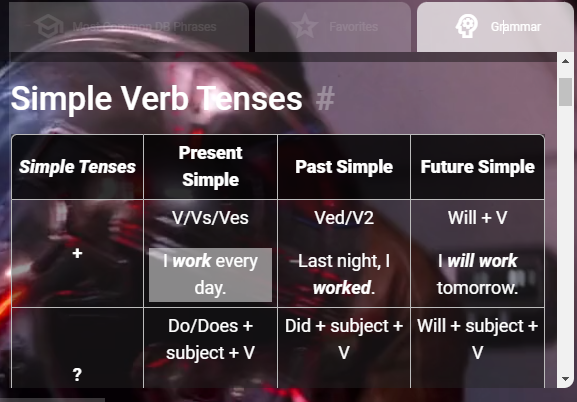
For example, if you prefix your phrase with “gr: “ or click the disabled GR button on the prompt box, it will show variations with simple verb tenses, perfect verb tenses, continuous verb tenses, and perfect continuous verb tenses. These options make it an excellent tool for English learners. If you don’t know what these verb tenses are, there is a short tutorial in tabular format on the Playphrase.me website.
Other than these hacks, there are some other useful titbits as well. For example, you can click on the star on the prompt box to mark your favorite phrases. However, this feature is available only to sponsored users.
Final Verdict: Is Playphrase.me Worth It?
After thoroughly testing Playphrase.me, I can say that it delivers on its core promise.
If you want to find how a specific phrase was used in film or TV, you’ll get fast, accurate results. It’s a well-built tool that does one job extremely well.
It’s best suited for language learners, educators, and writers. The ability to hear real dialogue delivered by actors offers a level of nuance you just can’t get from a script or dictionary.
However, it’s not for everyone. If you’re trying to use it for commercial projects or build custom integrations, you’ll hit limitations.
There’s no API, the pricing model is a bit scattered, and the mobile support is only fully available on Android.
If you’re okay with those trade-offs, I recommend starting with the free version to see if it fits your needs.
And if you like what you see, the paid plans are reasonably priced, especially for the value they offer in terms of language practice and content inspiration.

Comments 0 Responses