

Bottom line: HubSpot AEO is the most practical and affordable way for marketing teams to track and improve how AI search engines describe their brand — starting at $50/month with a 28-day free trial.
Just when you think you’ve figured out how to stay visible online, something changes. For years it was the constant updates to Google search algorithms forcing marketers to constantly play catch up. Now it’s the fact that a good chunk of your audience is probably skipping Google entirely, and starting to trust AI to take them wherever they need to go.
About 37% of consumer searches start with an AI app these days. Which is why many of the market leaders that used to focus on helping businesses improve their SEO results, are starting to look at “Answer Engine Optimization”, too.
HubSpot AEO is just one example of a smart tool brands can use to understand how AI engines view their business, and send traffic their way. Companies can get insights into which questions are driving results, and what’s building (or damaging) their presence in AI search, and use those details to drive growth. Already, HubSpot says the system can increase leads from AI by 1,850%.
That’s a big enough promise to warrant a serious review.
Quick Verdict: Is HubSpot AEO Worth It?
I’m a big fan of HubSpot in general. The CRM is easy to use, intelligent, and designed to get businesses to valuable outcomes faster. The AI features are genuinely useful, whether you’re using Breeze Assistant as everyday support, designing your own agents, or cleaning up data.
The AEO tool just adds to what you can accomplish with HubSpot at the center of your marketing strategy. It’s surprisingly affordable (for around $50 per month), easy to understand, and perfect if you already use the HubSpot ecosystem on a day-to-day basis.
Pros:
- Affordable pricing (compared to some tools)
- Free trial for 28 days
- Tracks three of the biggest answer engines
- Shows sentiment alongside mentions
- Quickly finds competitor gaps and content opportunities
- Turns ideas into immediate action
- Doesn’t require HubSpot CMS to use
Cons:
- The 25 prompts can run out quickly for some brands
- Doesn’t replace SEO tools (just augments them)
- Works best with other HubSpot tools
What Is HubSpot AEO?
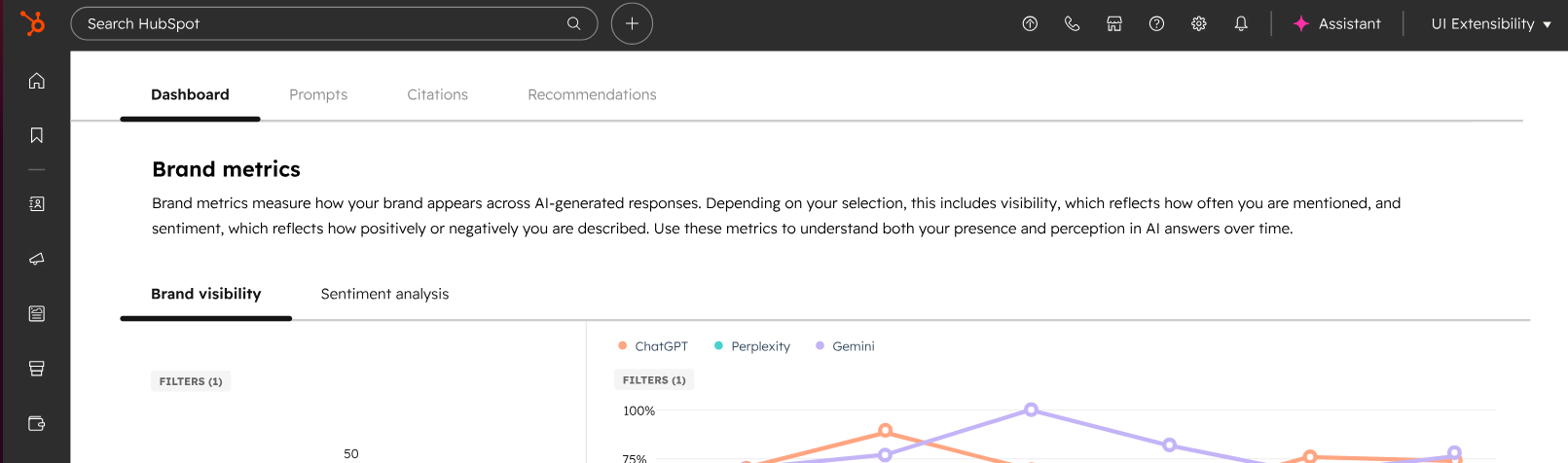
HubSpot AEO, introduced in April 2026, is an Answer Engine Optimization tool that shows you how often AI tools (like Gemini, ChatGPT, and Perplexity) mention your brand, how they describe it, and what kinds of questions prompt those mentions.
The AEO tool is available within Marketing Hub, or as a standalone add-on, and it can also use your CRM data to suggest buyer-specific prompts for content and competitor gaps. Notably, this is different from the free “AEO Grader” tool, which is a kind of one-time diagnostic that gives you an overarching idea of how AI platforms tend to characterise your company.
For companies used to big SEO tools, like Ahrefs or Semrush, this will feel a little different. The platform really focuses on five big questions:
- Does AI mention us for buyer-intent prompts?
- Are those mentions positive, negative, or neutral?
- Which competitors appear beside us, or instead of us?
- Which pages, domains, and content types are AI engines citing?
- What should we create, fix, update, or promote next?
What’s really great is how much direction you actually get. HubSpot doesn’t just give you data, it makes sure you can use it. That means it might suggest something like creating a new page, fixing a technical gap, or collaborating with third-party sites to boost your visibility.
The results are pretty impressive. For instance, Discovered went from 575 to 3,500+ trials per month with a little AEO help, and Apollo increased its brand citation rate by 63%.
How HubSpot AEO Works
HubSpot AEO works by checking real AI answers against the prompts your buyers might give a bot. You give it your brand, competitors, and business context. HubSpot then tracks how ChatGPT, Gemini, and Perplexity mention you, cite you, compare you, and describe you.
First, you set the business context. HubSpot looks at things like your company’s industry, competitors, categories, and target audience. Then, you choose the prompts. The AEO tool can suggest prompts based on what it knows about your company (if you’re struggling).
Once those prompts are set, HubSpot checks how your brand appears in answers generated by ChatGPT, Perplexity, and Gemini. The dashboard shows you whether you’re appearing at all, how often you appear, and how your main competitors are faring for the same prompts.
You end up with a brand visibility score, as well as an insight into sentiment (whether AI presents your brand in a positive, negative, or neutral way). You also get a citation analysis, which shows you which domains, pages, and content types AI engines reference for your category.
From there, you can turn the data into work. HubSpot recommends what you should do next, whether that’s creating a product page, updating an FAQ, or writing a new piece of content.
Unsurprisingly, all of this is a lot smoother if you’re already using HubSpot Marketing Hub. You’ll already have your CRM data connected there, so the AEO recommendations can be more specific, and easier to act on straight from the tools you’re already using.
What HubSpot AEO Tracks and Why It’s Helpful
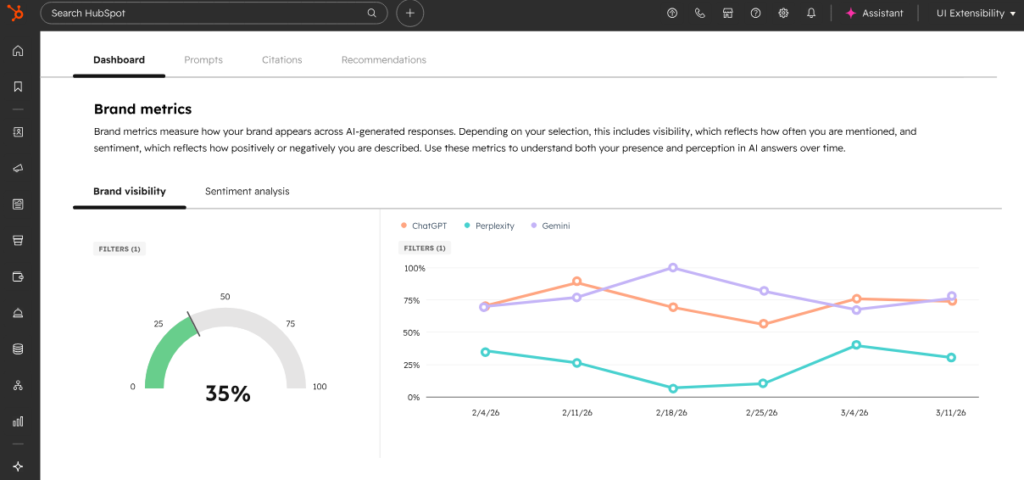
HubSpot AEO really just tracks all the things that determine whether AI search is actually helping your business, or derailing your entire digital marketing strategy. You get:
- A brand visibility score: A number that tells you how often your brand appears across tracked AI answers (for ChatGPT, Gemini, and Perplexity)
- Prompt performance insights: Which questions lead to answers that mention you, miss you, or favor competitors.
- Prompt suggestions: Ideas into the new AI search questions you should probably be tracking.
- Sentiment analysis: Whether AI describes your brand in a good way, neutral way, or a bad way.
- Competitor analysis: Which rivals appear above, after, or instead of you.
- Share of voice: A score showing your presence compared to competitors.
- Citation insights: Which pages, content types, and domains are cited by AI.
- Recommendations: What HubSpot thinks you should fix, create, or update.
The citation insights are particularly valuable. HubSpot’s own AEO case study reported a 433% lift in citations after it worked on AI-search-focused content, and its industry pages with FAQ and Breadcrumb schema were cited in answer engines 92% of the time.
HubSpot AEO Pricing: How Much Does it Cost?
There are two ways to get HubSpot’s AEO tool. If you already have Marketing Hub (the Professional or Enterprise versions), this tool comes included at no extra cost.
If you want to use the tool as a standalone system, or alongside a cheaper HubSpot plan, it costs $45 per month annually, or $50 per month (paid monthly).
That might seem expensive, but it’s actually good value for money if you consider what you’re getting. The plan includes multi-engine coverage, brand visibility and sentiment analysis, prompt tracking and suggestions, competitor and citation analysis, and priority recommendations. Plus, you get 25 prompts per month (although you can buy more at any time).
I do think the best value comes from getting a Pro or Enterprise Marketing Hub plan though, not just because the AEO tool is included for free. With those plans, you’ve got all the data already plugged into the system you need to make recommendations more specific. Plus, content creation tools and other features are built in, so you’re not just paying for a new score or dashboard.
What HubSpot AEO Does Well
HubSpot AEO really is an excellent tool, just like most of the solutions you can get from HubSpot these days. Its main benefit, if you ask me, is that it makes AEO insights actually usable for marketers. That sounds odd, but a lot of AI visibility tools still seem like they’re built for analysts.
HubSpot’s AEO tool is more practical, giving you the straightforward insights and recommendations you need to go from “Why is no one mentioning us?”, to optimizing your AI-generated leads.
I like it because:
- The recommendations are really actionable: You get suggestions that point you directly towards pages to create, content to update, technical fixes, or video ideas.
- CRM data adds nuance: With your CRM data connected, the AEO tool can make suggestions more specific. The AI tools, like Breeze Assistant, become more helpful too, particularly when you’re asking questions about marketing opportunities.
- All the major AI engines are covered: HubSpot doesn’t track every AI assistant, but you get the big ones: Perplexity, Gemini, and ChatGPT.
- The competitor comparisons really help: You get deeper insights into where you’re actually falling behind your competition, and the gaps you can fill.
- Citation analysis helps with strategy prioritization: When you can identify which sources AI platforms trust most, you can build a stronger strategy around owned content, third party mentions, reviews, PR, and more.
Plus, it all fits really well into the wider HubSpot ecosystem.
Where HubSpot AEO Might Fall Short
There aren’t a lot of downsides to this tool, but there are some caveats. First of all, it’s really best for HubSpot-centered marketing teams. You don’t need to use HubSpot’s CMS to use this tool, but it does help, especially if you’re sick of jumping between different apps and dashboards.
Beyond that, some teams may struggle with:
- The prompt limits: You get 25 prompts per month. You can buy more, but if you’re tracking a lot of prompts or brands, you can run out quickly.
- Coverage: The three main AI engines are covered, but you won’t get insights into how you’re appearing on things like Meta AI, Grok, or DeepSeek, for instance.
- Brand visibility score limits: It’s useful as a direction-of-travel metric. It is not the same as a Google ranking. AI answers shift, prompt phrasing changes results, and different engines cite different sources.
Also, it’s worth noting this is a more entry-level tool with one specific focus. You’ll still need an SEO strategy, and a good plan for how you’re going to track prompts.
HubSpot can’t do all the work for you.
HubSpot AEO vs Other AEO Leaders
Even with its limitations, HubSpot is still probably going to be the best AEO tool if you want something affordable, tied to your marketing work, and easy to use. Compared to a few of the other market leaders in this category, here’s how I’d place it:
| Tool | Best For | Strengths | Limitations | Price |
|---|---|---|---|---|
| HubSpot AEO | HubSpot users, and small businesses | Easy to use, low pricing, free trial, valuable suggestions, citation and competitor analysis and CRM connections | 25 prompt limited, slightly smaller AI engine coverage | $50 per month (monthly), or $45 per month (annually) |
| SEMRush AI Visibility toolkit | Teams using SEMRush | AI visibility reports, 25 custom prompts, prompt research, AI readiness audit | More SEO-focused than CRM-led. | $99 per month |
| Ahrefs Brand Radar | SEO analysts who need AI insights | Large prompt database, custom prompt checks, and lots of engine coverage | More expensive and complicated than alternatives | From $129 per month |
| Profound | Enterprise teams | Extensive engine coverage, deeper monitor, agent analysis, and shopping visibility | Can be too much for smaller teams | Starting at $99 per month for ChatGPT tracking only |
Semrush AI Visibility Toolkit: Best for SEO teams already using Semrush
If your whole AEO strategy is part of a bigger SEO program, Semrush is a good choice. Its AI visibility toolkit monitors mentions from Google AI, Gemini, Perplexity, and ChatGPT, and includes prompt research and competitor analysis.
This does cost a bit more than HubSpot’s AEO tool, and it’s definitely more focused on rankings than customized strategies for visibility. Still, it’s a good pick if you’re already using Semrush to inform a good portion of your marketing strategy.
Ahrefs Brand Radar: Best for big AI visibility research
Ahrefs Brand Radar is ideal for teams that love having access to lots of data. It maps brand visibility across AI Overviews, AI Mode, ChatGPT, Copilot, Gemini, Perplexity, and Grok, with a massive search-backed prompt database. The system covers hundreds of millions of monthly prompts, which makes it a better fit for serious AEO enthusiasts.
I’d use Ahrefs Brand Radar when the question is, “Where does this brand appear in the digital world?” I’d use HubSpot AEO when the question is, “What should our marketing team fix to get better results right now?”
Profound: Best for enterprise AI search monitoring
Profound is more intended for larger brands taking advantage of AI insights. Its platform tracks how brands and sites appear across ChatGPT, Gemini, Claude, Perplexity, and more, and it offers features like agent analytics, AI search monitoring, and enterprise reporting. It’s incredibly useful, but it’s also more complicated than HubSpot’s AEO tool.
If you’re running an enterprise team with a bigger budget, and a real AI search strategy, Profound might be a good pick. HubSpot AEO seems like the better choice if you want to know more about your AI visibility, and what you can optimize, without taking on too much extra work.
Should You Use HubSpot AEO?
I’d definitely recommend trying HubSpot AEO if AI search has a say in how well your business grows over the next few months. It’s affordable, and there’s a free trial so you can test the impact before you commit to anything. It’s also extremely easy to use, and genuinely helpful if you’re looking for quick suggestions and opportunities.
Of course, this tool is going to be particularly useful if you’re already using HubSpot’s CRM or marketing tools. Those systems make it much easier to transform the insights you get into real, brand-boosting activities. That being said, you don’t need to be a die-hard HubSpot fan to take advantage.
Anyone ready for a closer look at how AI judges them can benefit from this tool. My advice? Start with a free trial. If the prompt data exposes real gaps, keep using it.
Frequently Asked Questions
Is HubSpot AEO worth it for small businesses?
Yes, at $50/month with a 28-day free trial, it’s one of the most affordable AI visibility tools available, and it doesn’t require a full HubSpot subscription to use.
How many prompts do you get with HubSpot AEO?
The standalone plan includes 25 prompts per month. You can purchase additional prompts, and the tool suggests prompts based on your CRM data if you’re connected to Marketing Hub.
Does HubSpot AEO replace SEO tools?
No, it’s designed to work alongside your existing SEO strategy, not replace it. Traditional SEO and AEO address different parts of how buyers discover your brand.
Which AI platforms does HubSpot AEO track?
ChatGPT, Gemini, and Perplexity. Other platforms like Grok, Meta AI, and DeepSeek are not currently tracked.
Q: Do you need to use HubSpot’s CRM to use HubSpot AEO?
A: No — it works as a standalone tool. However, connecting your CRM data makes the prompt suggestions and recommendations significantly more specific and actionable.

Comments 0 Responses