

Dezgo’s the easiest AI image generator I’ve played with so far.
It works straight from your browser, doesn’t require you to sign up to even use it, and manages to knock out some pretty high-quality images thanks to Stable Diffusion. If you’re after a hassle free AI art tool, Dezgo’s definitely worth a look.
In this review, I’ll be taking you through how Dezgo works, what you can get for free, what the paid options look like, and whether it’s worth spending your time and cash on.
I’ve put dozens of AI image generators through their paces over the past year, and while many of them require fancy signups, Discord access, or clunky workflows, Dezgo skips all that nonsense.
Why You Can Trust This Review
I’ve spent the last year testing out over 25 different AI image generation tools for my ongoing AI software coverage.
That includes everything from free browser-based apps to high-end tools like Midjourney and Adobe Firefly.
For this review, I dedicated 8+ hours to using Dezgo’s free and paid versions, putting them through a range of tests – including prompt responsiveness, ControlNet, model selection, output quality, and speed.
Dezgo: The Good and the Bad
The Good:
- No need to sign up to use the basics
- Powered by Stable Diffusion 1.5 and 2.1
- Offers ControlNet, inpainting, and upscaling
- Fast as lightning – generation times are under 5 seconds
- Works entirely in-browser
- Offers a few model options
The Not-So-Good:
- Outdated interface design
- Credits system’s a bit confusing
- Commercial rights depend on model used
- Limited community or creative presets
- Fewer model options than some of its competitors
What on Earth is Dezgo?
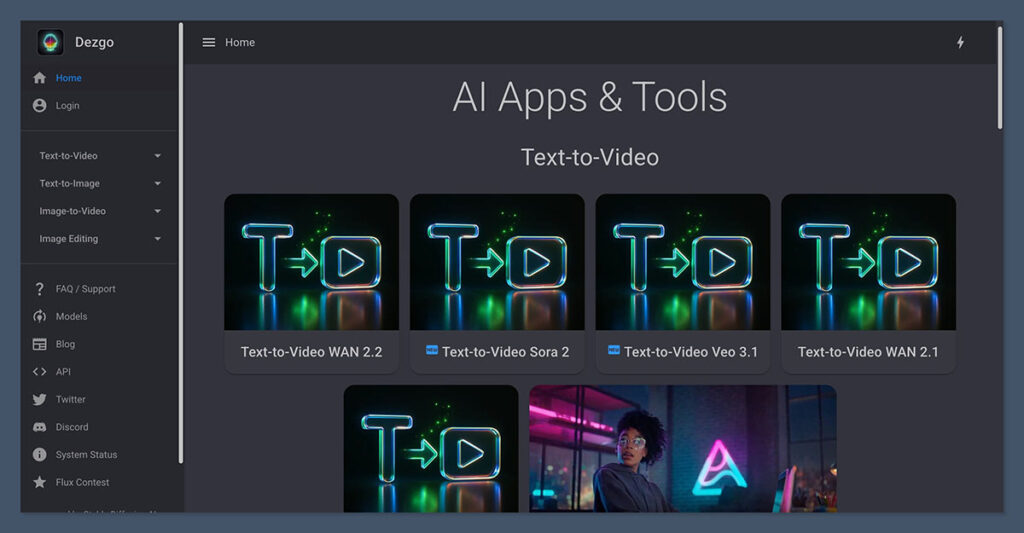
Dezgo is an AI art generator that leans on Stable Diffusion, a text-to-image engine that can create some pretty impressive photorealistic and stylized art based on your prompts.
Unlike a lot of other tools out there, Dezgo doesn’t try to confuse you with a million options – just type in your prompt and go.
Dezgo’s the brainchild of Getimg.ai, a company with a history of delivering simple, user-friendly AI tools. There’s no setup process, no email to sign up for, and no clunky software install – just fire up the browser and start playing.
From the homepage, you can access all the different generation modes, including:
- Text to Image
- Image to Image
- ControlNet (for structural input)
- Upscaler
- Inpainting (for editing parts of an image)
The engine defaults to Stable Diffusion 1.5, but you can switch over to SD 2.1 if you want. You can also tweak all the usual settings – inference steps, guidance scale, negative prompts, and image dimensions.
My First Foray into Dezgo
I fired up Dezgo in my browser, typed in a simple prompt – “cyberpunk city skyline at night with rain” – and hit generate.
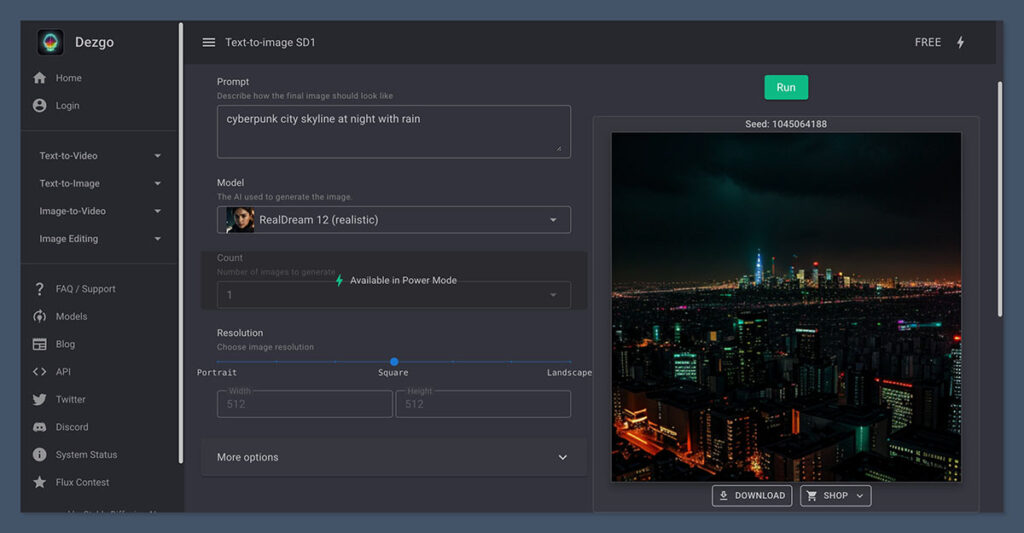
In about 4 seconds, I had four different versions of the image.
And here’s the best bit – no signup required, no loading delays, and no pesky popups. It’s an experience that’s becoming rarer and rarer in the AI tools world.
What stood out to me right away:
- Speed: Most images rendered in 3 to 5 seconds\
- Accuracy: The prompt results were pretty much on-point, although complex concepts needed a bit of tweaking\
- Usability: The tool just works, no fuss or muss. It’s a straight browser-based experience with no UI lag or distractions
The Interface: Simple but Functional
Dezgo’s got a lot to be said for it in the usability department. It’s a bit of an ugly duckling compared to some of the other platforms out there – it looks a bit dated and lacks polish. But don’t let that put you off – everything’s where it should be.
There’s a clear prompt box, simple dropdowns for settings, and a side panel for output images.
And don’t even get me started on tutorials – Dezgo doesn’t need one. It’s just very easy to figure out.
Trying out ControlNet
I was particularly excited to try out ControlNet, which lets you guide image generation with structural inputs like depth maps or edge detection.
It’s especially useful if you need to keep the same composition across multiple images or get precise control over the layout.
You can upload a base image, select a detection model (Canny, Pose, Depth, etc.), and generate variations that stick to that structure. It worked a charm in my tests, and it’s a real standout feature given the price.
Dezgo’s Core Features: What You Get
So what does Dezgo have to offer? Here’s a breakdown of its key tools and what they can do:
1. Text to Image
The default generation mode. Just enter a description and generate up to 512×512 images for free.
You can also tweak some advanced settings:
- Model (SD 1.5 or 2.1)
- Prompt strength
- Negative prompts
- Steps
- Sampler type (Euler, DDIM, etc.)
- Guidance scale
2. ControlNet
If you’re a seasoned pro, you can upload an image and use structural maps to guide generation. It’s a real game-changer for concept artists and creators who need to keep things consistent.
Supports all sorts of modes, including:
- Depth* OpenPose: The Best of AI Image Tools
- Canny: Doing Some Editing\
- LineArt: Getting Your Image Into Shape\
- Scribble: And Sometimes Just Creating From Scratch
3. Upscaler – Where Image Resolution Meets Power
Available in paid mode – a game-changer for those who want to boost their image resolution up to 4x without losing quality in the process.
4. Inpainting (Edit Tool) : Removing the Clutter
Take the bits of an image you don’t need, and get rid of them! Dezgo lets you erase or mask areas you don’t want, then regenerates them with surprising accuracy. Great for removing objects or editing faces.
5. API Access – Where Developers Can Take Over
Dezgo’s models are available to developers via API, meaning you can tap into the power of Dezgo for your own apps, automation tools and whatever else you can imagine.
And yes – there’s full documentation on the site to get you started.
How Does Dezgo Stack Up Against Other AI Image Tools?
| Feature | Dezgo | Midjourney | Leonardo AI | Playground AI | Bing Image Creator |
| Requires Login | No | Yes (Discord) | Yes | Yes | Yes |
| Free to Use | Yes (limited) | No (trial gone) | Yes (credit-based) | Yes | Yes |
| ControlNet Support | Yes | No | Yes | Yes | No |
| Fast Image Generation | Yes (under 5 sec) | No (15–30 sec) | Yes | Yes | Yes |
| Commercial Rights | Model-dependent | Yes | Yes (limited) | Yes | No (not clearly defined) |
| API Access | Yes | No | Yes | Yes | No |
If what you’re after is fast image generation with no logins – and perhaps a few advanced features like ControlNet, Dezgo is worth taking a closer look at.
It may not have the polish of Midjourney, or the creativity of DALL·E 3 – but it delivers results fast and you can use it all in your browser.
Dezgo Pricing: How Does It Stack Up?
Dezgo runs on a credit system, where every image generation depends on a few variables – including your settings.
Free Tier – Get Started with Ease (But Don’t Expect Too Much)
- No login required
- Limited to lower resolutions (512×512)
- Fewer sampling steps
- Don’t expect to get much out of upscaling or ControlNet
Paid Credits – It’s Pay-As-You-Go
| Package | Price (USD) | Credits | Use Case |
| Small | $3.49 | 50 | Casual or testing use |
| Medium | $9.49 | 200 | Moderate usage, blog thumbnails |
| Large | $19.99 | 500 | Designers, marketers |
| Custom / API Tier | Varies | Custom | Devs or agencies |
Each image generation usually costs 1-2 credits for 512×512 images. If you want to upscale or use ControlNet then it will set you back 3-4 credits per use.
You can pay via Stripe or PayPal. There are no subscriptions – just pay as you go.
Image Quality: Can It Cut It?
I tested Dezgo on 30+ prompts with both SD 1.5 and SD 2.1. What I found was:
- Photorealism: The 2.1 model is where it’s at – especially for nature and people shots\
- Fantasy/Stylized: SD 1.5 actually does better here – especially with really bright colours\
- Faces: Not bad, but sometimes a bit hit-or-miss, especially without the face correction tool\
- Text in Images: One of the weak spots – as with most SD-based models
Sample Prompts Tested: What Did I Get Out of It?
| Prompt | Accuracy | Time to Generate |
| “Cyberpunk Tokyo alley at night, rain, neon lights” | 8/10 | 4 sec |
| “Ultra-realistic portrait of woman in natural light” | 9/10 | 5 sec |
| “Cute anime cat wizard, full body, 4k, magic staff” | 10/10 | 4 sec |
| “E-commerce website homepage mockup, clean UI” | 6/10 | 5 sec |
Who Is Dezgo Best For?
After playing around with it, I reckon Dezgo is best suited for:
- Bloggers and content creators: Perfect for quick thumbnails, hero images or concept art
- Students or educators: Simple and fast for presentations or for getting creative with tech
- Marketers: Great for speedy visuals in ad concepts, mockups – or even presentations
- Designers: Handy for concept designs, ideation
- Developers: The API access is a massive plus for building your own apps or workflow
If you’re building a brand, Dezgo can help you create quick, custom images fast – without needing to hire a designer.
Final Verdict: Is Dezgo Worth Your Time?
Yes – Dezgo is worth checking out, especially if you’re new to AI image tools or want a fast, browser-based option that doesn’t require a login.
Plus, it’s got plenty of useful features like ControlNet and gets the job done quickly – what more could you ask for?
It’s not as pretty or as community driven as other platforms, but hey – it delivers the goods.
What I Liked the Most
- Extremely easy to get started (no login needed)
- Cheap, yet full-featured
- Accurate results with a little bit of know-how
- That ControlNet access at a low cost
- Fast Image Generation
- Affordable Pricing for Casual Use – won’t break the bank for a casual user
What I Don’t Like About Dezgo
- The interface could really use a bit of a makeover
- Don’t know about you, but the credit system was a bit of a puzzle to me, took some time to figure out how it all works
- I have to say I’m a bit disappointed by the community, it’s just not as lively as some of the other AI art platforms like Midjourney or Leonardo
- The quality of faces and hands can be super hit-or-miss, sometimes comes out looking a bit off
Dezgo is a pretty good option, quick, easy to pick up and get running, and actually delivers some okay results without needing to sign up for an account.
Now, its not exactly a looker, and it wont blow your mind with fancy graphics, but for super simple and affordable image generation, it gets the job done. If your just looking for some basic AI art then Dezgo is worth checking out.

Comments 0 Responses