

Craiyon is one of the most accessible free AI image generators available, built around an unlimited free tier and a playful, beginner-friendly interface that turns text prompts into batches of images in under a minute.
I’ve spent hours testing Craiyon alongside other popular AI image tools, so I can give you an honest take on where it fits in the current landscape.
In this review, I’ll walk through Craiyon’s pricing, features, output quality, and real-world use cases, so you can decide whether it deserves a spot in your creative toolkit or whether you should look elsewhere.
Why you can trust this review
This review is based on hands-on testing of Craiyon’s free and paid features, cross-referenced with current pricing and feedback from active users in 2026. I test AI image generators regularly to keep comparisons fair, independent, and useful, rather than recycling marketing copy from the vendors themselves.
Craiyon Pros & Cons
| Best for | Free AI image brainstorming |
|---|---|
| Rating | Good, 3.6 out of 5 |
| Ideal users | Beginners exploring AI art, casual social and blog visuals, prompt-engineering practice |
| Free tier | Available |
| Paid plans | $6 to $24 per month |
Pros
- Unlimited free image generation
- Nine images per prompt for fast ideation
- Commercial use allowed on all tiers
Cons
- Inconsistent output quality
- Weak on faces, hands, and text
- Ads and watermarks on the free plan
Need a quick summary of Craiyon? Here are the best and worst things about the tool based on my testing:
What I Like
- ✔️ Craiyon generates nine images from a single prompt, which makes comparing directions and refining ideas fast and painless
- ✔️ The free tier genuinely gives you unlimited generations, unlike most competitors that cap you at a few free images per day or per month
- ✔️ You get useful controls for a free tool, including negative prompts, style presets, and the option to upload a reference image to guide the result
- ✔️ The interface is simple enough that absolute beginners can get their first image within seconds of landing on the site, with no signup required
What I Dislike
- ❌ Output quality is inconsistent and often falls well short of what you’d get from Midjourney, DALL·E 3, or other premium generators
- ❌ Craiyon struggles with the usual AI weak points like hands, faces, typography, and complex scenes with multiple objects
- ❌ The free interface is ad-supported and watermarks your images, which makes it less appealing for client-facing work
- ❌ Licensing is technically permissive, but the terms of use are worth reading carefully before putting any output into commercial projects
My Experience With Craiyon
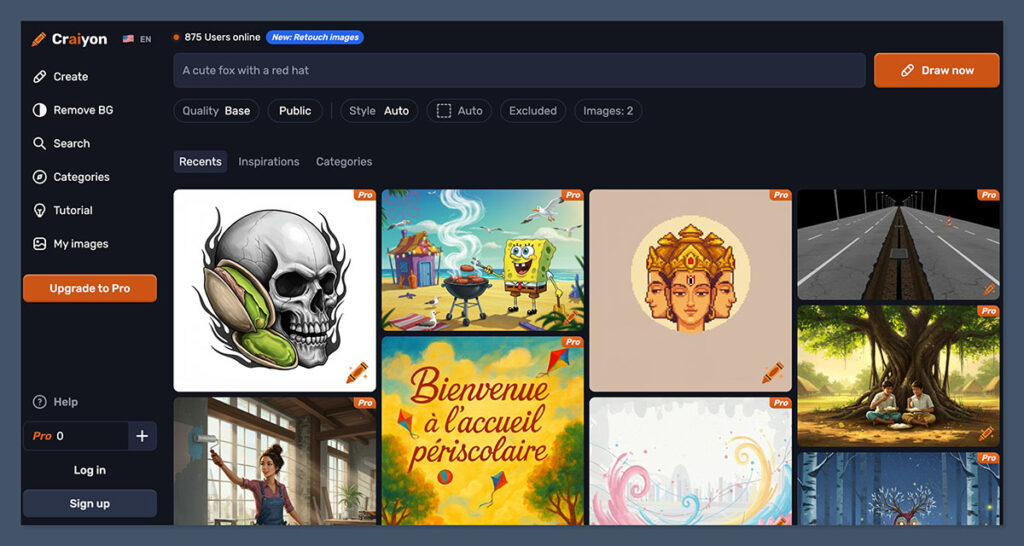
Getting started with Craiyon is about as frictionless as it gets. I didn’t need to create an account, enter an email, or hand over a credit card.
I just landed on the homepage, typed a prompt into the input field, picked a style, and hit generate. Within roughly a minute, I had nine images laid out in a grid ready to review.
The onboarding, if you can even call it that, boils down to three choices:
- Your text prompt describing what you want to see
- A style preset — options include photo, drawing, art, or none
- Optional negative prompt to tell the AI what to avoid
There’s no tutorial, no guided setup, no questions about your use case. For casual users, that’s a feature rather than a bug. For anyone hoping the tool would help them craft better prompts or understand its limits, it’s a missed opportunity.
Author’s Testing Notes
I was struck by how different Craiyon feels compared with newer tools like Midjourney or DALL·E 3. There’s no concept of a style library, no prompt history, no versioning, and no way to iterate on a specific image in a structured way.
You generate, you pick a favorite, and if you want variations, you tweak your prompt and start over. It works, but it feels like a tool built in 2022 that’s been patched rather than rebuilt.
How I Generated Images
Creating images is Craiyon’s main job, so I spent most of my testing time throwing different prompts at it to see what held up.
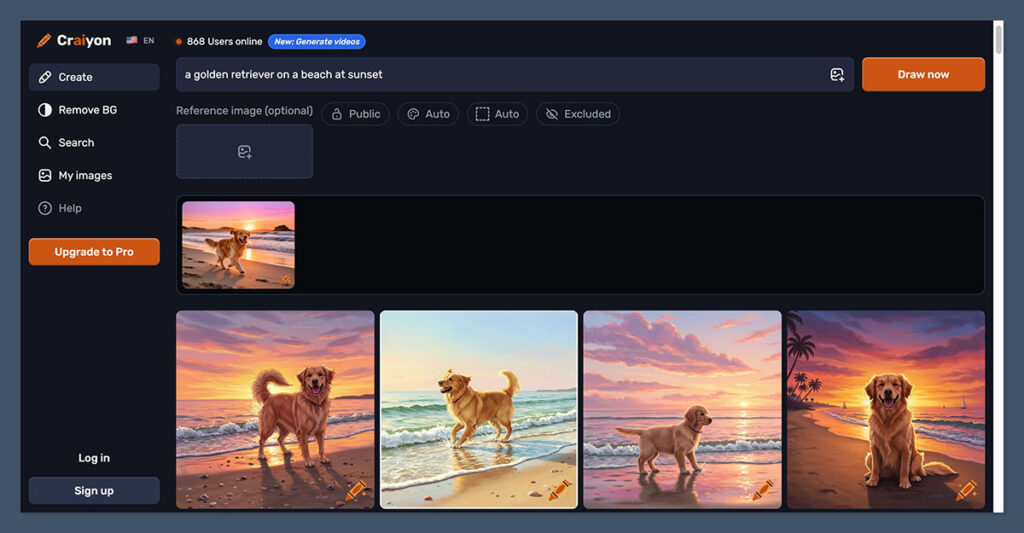
Simple subjects like “a golden retriever on a beach at sunset” produced recognizable, usable results, though none looked like photography. The style leaned painterly and slightly warped, with the kind of soft-edged oddness that’s become a Craiyon signature.
Things got rougher when I asked for anything detailed. A prompt like “a busy coffee shop interior with baristas, customers, and a chalkboard menu” returned images where the scene was roughly correct but the details dissolved up close.
Faces were smudged, the chalkboard text was gibberish, and people’s hands often merged into their coffee cups.
Using Styles and Negative Prompts
Craiyon’s style presets make a noticeable difference. Switching from “none” to “art” or “drawing” pushed results toward more stylized, illustration-friendly outputs, which actually hid some of the tool’s weak points. If you lean into the stylized look instead of fighting for photorealism, Craiyon performs a lot better.
Negative prompts also helped.
Adding “blurry, distorted, extra fingers” to the negative field cleaned up some of the worst outputs, though it didn’t transform bad generations into good ones. It’s a useful dial, not a fix.
Author’s Testing Notes
Overall, generating images with Craiyon wasn’t hard, and the speed made experimentation feel cheap and fun.
But I found myself regenerating the same prompt three or four times to get one usable image, which adds up quickly. Compared with newer generators where the first batch is usually close to publishable, Craiyon requires significantly more trial and error.
How Much Does Craiyon Cost?
Craiyon’s pricing is split across a free plan, two paid consumer tiers, and a custom enterprise option. Paid plans range from around $6 to $24 per month, and the free tier is genuinely usable rather than a three-day teaser:
- Free — Unlimited basic generations with ads, watermarks, and slower processing
- Supporter ($6 – $12 per month) — Faster processing, no ads, no watermarks, and access to higher-quality models
- Professional ($24 per month) — Private generations, priority queue, more edit credits, and early access to new features
- Enterprise (custom) — API access, custom models, and dedicated support for teams
You can use Craiyon commercially on any tier, including the free plan, as long as you follow the terms of use.
That’s unusually generous compared with other free AI image tools that lock commercial rights behind a subscription.
Is Craiyon Good Value for Money?
For a free tool, Craiyon is excellent value. The free tier has no hard cap on the number of images, which is almost unheard of in the current market. If you just want to play with AI art, brainstorm visuals for a blog post, or show your kids how text-to-image works, you cannot beat “unlimited and free.”
The paid tiers are harder to justify.
At $24 per month, the Professional plan sits in the same price range as tools with noticeably better output quality and more sophisticated workflows. If you’re paying for an AI image generator, there are stronger options for the same money.
Author’s Testing Notes
I’d recommend most users stick with the free plan. Craiyon’s strengths are accessibility and unlimited generation, and those are both free features. If you find yourself wanting faster queues or private generations badly enough to pay, that’s usually also the signal that you’ve outgrown the tool itself and should look at a more capable paid alternative instead.
Creating Images With Craiyon
Craiyon’s creative workflow is deliberately minimal. You get a prompt box, a style selector, a negative prompt field, and a button. There’s no canvas, no layer system, no node-based editor, and no multi-step refinement pipeline.
Everything happens in one generation cycle, and if you want to iterate, you rewrite your prompt.
The tool supports a handful of features that push it slightly beyond the bare minimum:
- Style presets to shift outputs between photo, drawing, art, and neutral
- Negative prompts to exclude unwanted elements from results
- Reference image uploads to guide composition or style
- Background removal on newer versions of the tool
- Edit credits on paid plans for retouching and image-to-image work
These features are useful, but they’re table stakes in 2026. Most competing tools offer the same and more, often with better execution.
Output Quality and Performance
Quality is where Craiyon struggles most. The tool was one of the first viral AI image generators back when it was still called DALL·E Mini, and while it has improved since then, the gap between Craiyon and the current generation of leading models is significant.
Here’s what I consistently ran into during testing:
- Human faces look slightly off, with asymmetric features and soft details
- Hands frequently have the wrong number of fingers or merge with other objects
- Text inside images comes out as gibberish almost every time
- Complex scenes with multiple subjects lose coherence quickly
- Photorealism is limited, with most “photo” outputs having a noticeable AI sheen
That said, Craiyon handles some categories surprisingly well. Stylized illustrations, abstract compositions, simple landscapes, and cartoon-style subjects often look decent on the first or second try. If your needs lean playful or artistic rather than polished and photoreal, the tool performs better than its reputation suggests.
Speed
Generation speed on the free tier is acceptable but not fast. Most of my batches arrived in 45 to 90 seconds, depending on server load. Paid tiers promise priority processing, which shortens the wait noticeably during peak times. If you’re generating dozens of images in a session, those saved seconds add up.
Best Use Cases for Craiyon
After testing, Craiyon falls squarely into the “great for some things, wrong tool for others” category. Here’s where it genuinely shines:
- Brainstorming and moodboards — Nine images per prompt make it ideal for quickly exploring a visual direction before committing to a more expensive tool
- Casual social content — Fun visuals for personal social posts, group chats, or low-stakes blog headers where perfection isn’t the goal
- Learning prompt engineering — Free, unlimited generations make Craiyon a zero-cost sandbox for practicing how to write better AI prompts
- Education and classroom use — Teachers can demonstrate how AI image generation works without worrying about subscription costs or student accounts
- Concept sketches — Loose, rough visual concepts that will be refined or replaced later in the creative process
And here’s where I’d skip it entirely:
- Photorealistic portraits or any image where human faces need to look right
- Brand-critical visuals that will be seen by paying customers or clients
- Detailed product mockups, UI designs, or technical illustrations
- Any image that needs legible text rendered inside it
- Professional production work where consistency between images matters
Craiyon’s Feature Set
Craiyon is a focused tool rather than a platform, and its feature set reflects that. You’re not going to find the kind of ecosystem that has grown up around tools like Midjourney or Leonardo, and there’s no app store, no community gallery with remixing, and no training on your own images.
What you do get is a clean set of core features that cover the basics of text-to-image generation:
Text-to-Image Generation
Enter a prompt, pick a style, and Craiyon returns a batch of nine images. That’s the core loop, and it’s the feature the entire tool is built around. It works well enough for basic prompts and starts to show cracks on anything complex.
Reference Images
You can upload an image to guide the generation, which helps when you want to preserve a particular composition, pose, or color palette. The implementation is basic compared with newer image-to-image tools, but it’s a useful addition that lifts Craiyon above the simplest prompt-only generators.
Negative Prompts
The negative prompt field lets you tell Craiyon what not to include. I found this useful for filtering out common AI artifacts, though it doesn’t compensate for fundamental model limitations.
Style Presets
The style dropdown is simple but effective. Switching between photo, drawing, and art meaningfully changes the character of the output, and choosing the right preset for your prompt makes a bigger difference than most users realize.
How Craiyon Compares to Competitors
Craiyon sits at the accessible, free-first end of the AI image generator market. It’s not trying to compete with Midjourney on quality or with DALL·E 3 on prompt understanding.
It’s trying to be the tool that anyone can open and use without friction, and on that front, it succeeds.
Here’s how it stacks up against the main alternatives:
| Tool | Free tier | Output quality | Best for |
|---|---|---|---|
| Craiyon | Unlimited with watermarks | Inconsistent | Brainstorming and casual use |
| Midjourney | No free tier | Excellent | Polished creative work |
| DALL·E 3 | Limited via Bing and ChatGPT | Excellent | Prompt accuracy and text in images |
| Leonardo AI | Daily free credits | Very good | Game art and stylized illustration |
| Adobe Firefly | Monthly free credits | Very good | Commercial-safe generation |
If you’re serious about AI art and willing to pay, Midjourney and DALL·E 3 are in a different league. If you want free generations without a credit cap, Craiyon is one of very few options that delivers on that promise.
Licensing and Commercial Use
One area where Craiyon is more generous than you’d expect is commercial use.
The platform allows commercial use of generated images across all tiers, including the free plan, as long as users comply with the terms of service. Free users do need to credit Craiyon, which is a reasonable trade-off for unlimited free generations.
That said, I’d still recommend reading Craiyon’s terms of use carefully before putting any output into a paid client project. AI image licensing in general is a legally murky area, and specific edge cases around trademarked or recognizable elements in outputs are worth thinking through before you commit.
Top Tip 💡
For any commercial work, treat Craiyon outputs as starting points rather than finished assets. Running them through a human editing step, whether that’s in Photoshop, Affinity, or a dedicated AI editor, catches the weird artifacts that tend to show up on closer inspection and gives you something closer to production-ready.
Customer Support
Support for a free tool is usually minimal, and Craiyon is no exception. Free users can reach out through the email address listed on the site and join the Discord community, which is active and usually helpful for basic questions. There’s no live chat, no phone support, and no dedicated help center with step-by-step guides.
Paid users get slightly more attention, and enterprise customers have a direct line to the team.
For a casual-use tool, the support level feels appropriate to the price point, though anyone expecting the kind of help center you’d find at a mature SaaS company will be disappointed.
How I Tested Craiyon
To write this review, I spent time working through Craiyon’s core features the same way a real user would.
That meant signing up (or rather, not signing up), running a variety of prompts from simple to complex, comparing outputs across style presets, testing negative prompts, and uploading reference images to see how well the tool handled guidance.
I looked at five key areas and weighted them based on what actually matters for an AI image generator:
| Criterion | Weight | What I looked at |
|---|---|---|
| Output Quality | 35% | Image fidelity, consistency, handling of faces, hands, and text |
| Features | 20% | Style controls, negative prompts, reference images, editing tools |
| Ease of Use | 15% | Onboarding, interface clarity, learning curve for beginners |
| Pricing and Value | 15% | Free tier generosity, paid plan value, commercial rights |
| Speed and Performance | 10% | Generation time, queue behavior, reliability |
| Support and Resources | 5% | Help documentation, community, response quality |
Craiyon Review: Final Verdict
Craiyon is a good free AI image generator and a mediocre paid one.
Its unlimited free tier, nine-image batches, and no-signup interface make it a genuinely useful tool for brainstorming, casual content, and anyone who wants to experiment with AI art without opening their wallet.
On that front, it’s hard to beat. But once you move past casual use, the cracks show fast.
Output quality is inconsistent, the tool struggles with anything detailed or photorealistic, and the paid plans sit in the same price range as competitors that produce noticeably better work. If your needs go beyond playful and experimental, you’ll outgrow Craiyon quickly.
My recommendation: use Craiyon for free, use it often for brainstorming and ideation, and when you need something polished, move the idea to a stronger tool for the finished version.
As a sandbox, it’s excellent. As a production tool, it’s not quite there.

Comments 0 Responses