

Jenni AI is a research-focused writing assistant built for students, academics, and knowledge workers who need help drafting and structuring source-based content, with real strengths in citations, PDF workflows, and inline editing.
I’ve spent time working through Jenni’s editor, library, and citation tools to see where it actually helps and where it falls short.
In this review, I’ll take a closer look at Jenni AI’s pricing, features, and writing quality, so you can decide whether it fits the way you actually research and write.
Why you can trust this review
This review is based on hands-on testing of Jenni AI’s editor, citation tools, and PDF library, combined with cross-referenced research from independent reviews published across 2025 and early 2026. I’ve focused on how the tool performs in real academic and research workflows, not on marketing claims.
Jenni AI Pros & Cons
| Tool | Jenni AI |
|---|---|
| Best for | Academic and research writing |
| Rating | 4 out of 5 |
| Ideal users | Students writing essays and theses, researchers managing literature reviews, and professionals drafting source-based reports |
| Free tier | Available |
| Paid plans | Roughly $12 to $20 per month depending on billing and promotions |
Pros
- Strong citation and PDF library workflow
- Context-aware autocomplete for academic prose
- Document-level review and editing tools
Cons
- Output can drift into generic or shallow text
- Citation accuracy still needs manual checking
- Pricey compared to general-purpose chatbots
Need a quick summary of Jenni AI? I’ve collected the best and worst of what this tool offers below:
What I Like
- ✔️ Smart citation tools that find and insert references directly inside your draft, with support for APA, MLA, Chicago, and more
- ✔️ A proper PDF library where you can upload papers, chat with them, and cite from them without jumping between apps
- ✔️ Context-aware autocomplete that continues your sentences in a formal, academic tone and helps you beat the blank page
- ✔️ A document-level review feature that surfaces clarity issues, repetition, and style inconsistencies across the whole draft
What I Dislike
- ❌ If you let the autocomplete run too far ahead, output becomes vague and repetitive
- ❌ Citations and PDF summaries are not always accurate, so you still need to verify every reference
- ❌ The paid plan feels expensive next to general chatbots like ChatGPT, especially for lighter users
- ❌ It won’t rescue weak arguments or shaky subject knowledge, so it’s an accelerator rather than a shortcut
My Experience With Jenni AI
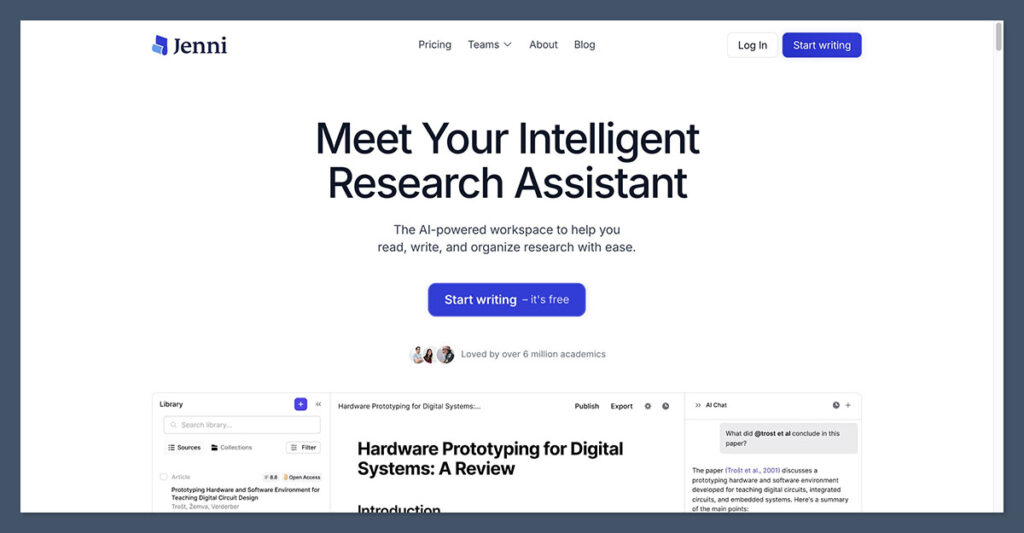
Getting started with Jenni AI is straightforward.
I could sign up with an email address and land in the editor within a minute, without needing to enter payment details for the free tier.
The onboarding asks a few light questions about what you’re writing, such as whether you’re working on an essay, thesis, or research paper, and then drops you straight into a document.
The interface feels closer to a stripped-down word processor than a chatbot, which is the right call for this kind of tool.
On the left I had my document library and uploaded PDFs, the center was the writing canvas, and the right-hand sidebar housed citations, outlines, and AI controls. Once you learn where everything lives, moving between reading sources, drafting, and editing becomes genuinely fluid.
Author’s Testing Notes
The onboarding is lighter than what you’d get with a tool like Paperpal, which pushes you toward a specific journal or discipline early on.
Jenni takes the opposite approach and assumes you’ll shape the tool to your workflow rather than the other way around. That’s fine if you already know what you’re doing, but newer students might appreciate a bit more hand-holding up front.
How I Drafted With Autocomplete
The headline feature for most people will be the AI autocomplete. You write a sentence or two, hit a shortcut, and Jenni continues the paragraph in a formal academic register.
In short bursts, this works well. It kept my tone consistent, picked up on the context of surrounding paragraphs, and filled in transitional sentences that would otherwise eat up twenty minutes of staring at the screen.
Where it struggles is when you give it too much rope. Asking it to generate three or four paragraphs in a row produced text that sounded confident but said very little.
The sentences were grammatical, the structure was fine, and the vocabulary was appropriate, but the actual substance was thin. This matches what most recent reviews report, and it’s the single biggest thing to understand before you pay for a subscription.
Working With the PDF Library
The PDF library is where Jenni earns its academic positioning. I could drag journal articles and reports into a personal library, and the tool parsed them into a searchable, chat-ready format. From there I could ask questions about individual papers, pull quotes, and insert citations into my draft without copying and pasting between tabs.
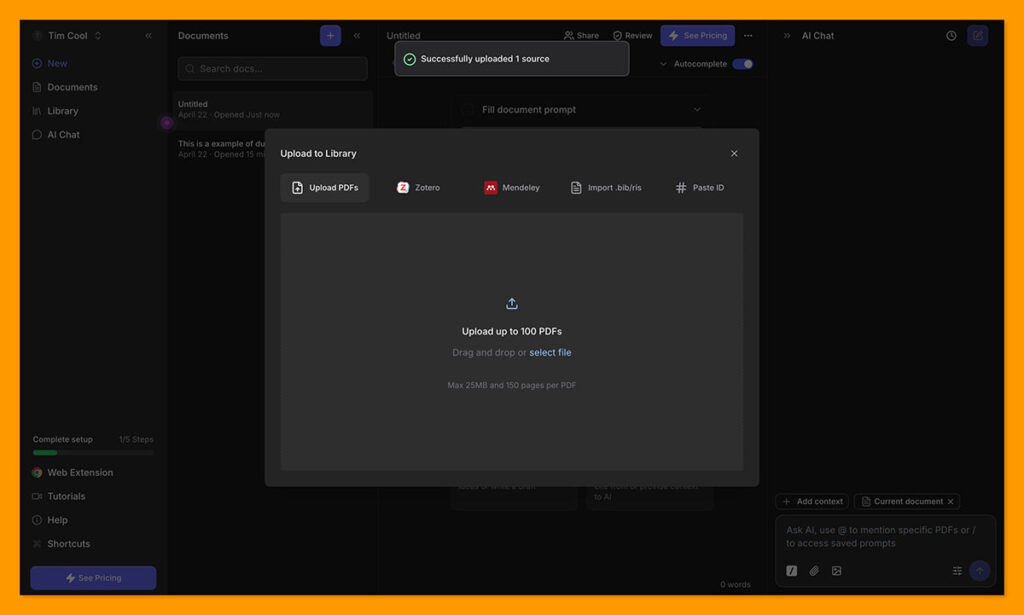
This is the workflow that generic chatbots genuinely can’t match without a lot of scaffolding. Being able to draft a paragraph, highlight a claim, and insert a citation from a PDF sitting in the same interface cuts real friction out of literature reviews.
The summaries weren’t always perfect, and I caught a few cases where the tool glossed over nuance in the source material, but as a first pass it saved meaningful time.
Author’s Testing Notes
Treat PDF summaries as a map of the paper, not a replacement for reading it. For anything you’ll actually cite in a final draft, open the source and confirm the specific claim in context. I found at least one misattribution during testing, and that’s the kind of mistake that can sink an academic submission.
How Much Does Jenni AI Cost?
Jenni AI runs on a freemium model with a single paid tier for individuals and custom pricing for teams and institutions.
The free plan is genuinely usable for light work rather than a locked demo, which is more than I can say for a lot of its competitors.
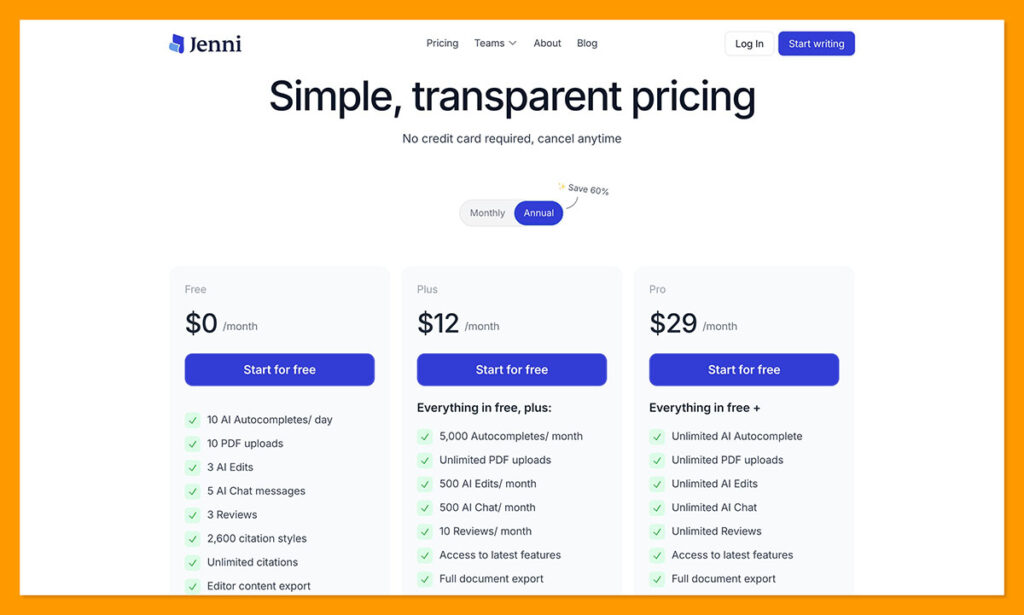
- Free – Limited daily usage, suitable for testing or occasional drafting
- Unlimited (individual) – Roughly $12 to $20 per month depending on billing cycle and promotions, with no daily caps
- Team and institutional – Custom pricing for universities, labs, and departments
Is Jenni AI Good Value for Money?
This is where opinions split. If you compare Jenni directly to ChatGPT on raw writing quality, the paid plan can feel hard to justify, because a general chatbot will often produce comparable prose for less money.
The honest answer is that you’re not really paying for the text generation. You’re paying for the academic workflow wrapped around it: the citations, the PDF library, the document review, and the editor built for longer-form writing.
If you mostly write marketing copy, blog posts, or short-form content, Jenni is the wrong tool and you’ll feel overcharged. If you’re grinding through a dissertation, a literature review, or a series of source-heavy reports, the workflow savings add up quickly and the subscription starts to look reasonable.
Author’s Testing Notes
Start on the free plan and write at least one real piece of work with it before upgrading. The feature that will or won’t sell you on Jenni is the PDF-to-citation loop, and you can test that thoroughly without paying. If that workflow clicks with how you research, the upgrade makes sense. If it doesn’t, no amount of autocomplete polish will change your mind later.
Writing and Editing With Jenni AI
Beyond autocomplete, Jenni puts real effort into editing and revision, and this is where I think the tool is genuinely underrated.
AI Editing and Rewriting
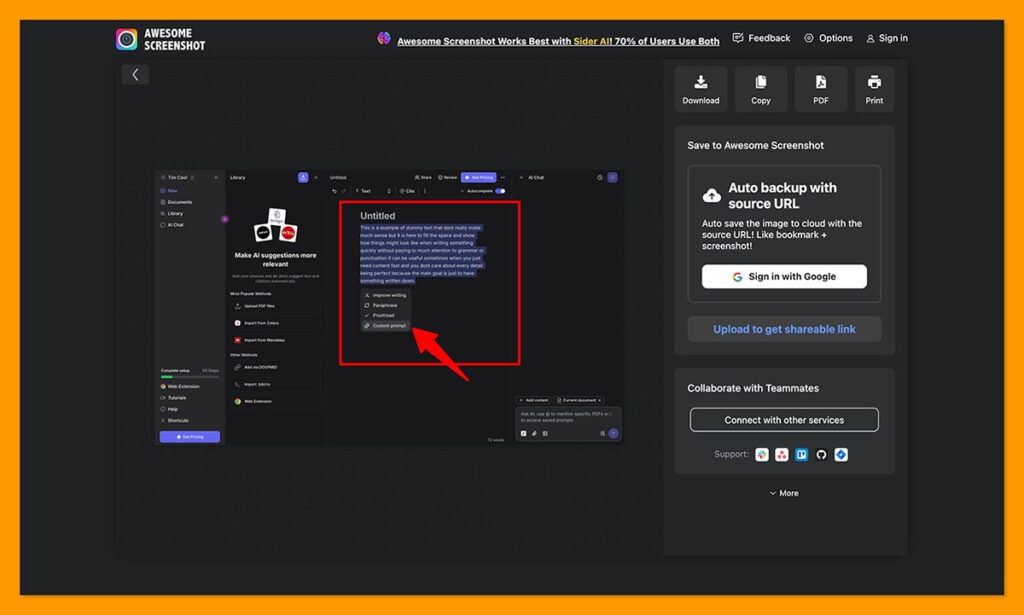
The inline editing tools let you highlight a sentence or paragraph and ask Jenni to simplify technical language, fix grammar, remove redundancy, or adjust the tone.
I found these edits more useful than the from-scratch generation, because they work with ideas you already have rather than trying to invent new ones. Hover-to-edit interactions are quick, and the suggested changes usually preserve your meaning instead of rewriting it into something blander.
Document Review
The document review feature, which rolled out in early 2026, analyzes a full draft and flags clarity issues, repetition, and inconsistent style.
It’s not a replacement for a human editor or advisor, but it does catch the kind of mid-draft drift that’s hard to see when you’ve been staring at the same document for hours. I used it on a test piece and it correctly pointed out two paragraphs that repeated the same argument in slightly different words.
Citations and Claim Checking
Citations are the feature Jenni leans on hardest in its marketing, and mostly it delivers. I could generate references in APA, MLA, and Chicago formats, and the smart citation tool would suggest sources based on what I was writing.
Some versions of the interface include a claim confidence indicator that flags statements lacking strong support, which is a nice prompt to go back and double-check weak spots.
The caveat, and it’s a real one, is that citation accuracy is good but not perfect. I ran into a handful of suggestions that pointed to papers that didn’t quite say what Jenni implied they said. For a class essay this is an annoyance.
For a journal submission it’s a serious risk, so you should verify every reference before it lands in a final draft.
Research and Source Discovery
Jenni can search for relevant sources based on your text and pull them into your library, which shortens the distance between “I need evidence for this claim” and “I have a paper open in front of me.”
It’s not as deep as a dedicated research database, and for specialized fields you’ll still want to use tools like Google Scholar or your institution’s library, but for general academic work it’s a useful starting point.
Jenni AI’s Recent Updates
Jenni has shipped steadily throughout late 2025 and early 2026. The changelog includes a document-level review feature in February 2026, image captioning and RIS import and export in January 2026, and improved mobile editing support.
The RIS support in particular matters for anyone using reference managers like Zotero or Mendeley, because it means you can move citations between Jenni and your existing workflow without manual cleanup.
The pace of updates suggests the team is genuinely focused on academic workflows rather than chasing every generic AI trend, which is encouraging if you’re weighing a long-term subscription.
How Does Jenni AI Compare to Competitors?
Jenni sits in a specific corner of the AI writing market, and whether it’s the right choice depends on what you’re trying to do. Here’s how it stacks up against the most relevant alternatives:
| Tool | Core Strengths | Where Jenni Wins | Where the Alternative Wins |
|---|---|---|---|
| Jenni AI | Academic drafting, citations, PDF library, inline editing | Integrated research-library workflow with built-in citations | — |
| SciSpace | Paper discovery, explanations, math and LaTeX support | Drafting and citations in one place | Deeper reading assistance and technical notation |
| Paperpal | Strict academic editing and journal-style feedback | More flexible drafting and idea generation | Higher rigor for journal submissions |
| ThesisAI | End-to-end thesis workflows and chapter guidance | General academic use beyond theses | Narrow, guided thesis pipelines |
| ChatGPT | Versatile multi-domain writing, often cheaper or free | Purpose-built academic UX and citation tools | Broader tasks outside academic writing |
The short version: if you want research workflow support with citations and PDFs in one place, Jenni is a strong pick.
If you need journal-grade editing rigor, Paperpal pulls ahead. If you want the cheapest flexible option and don’t mind building your own workflow, a general chatbot will do fine.
Who Jenni AI Is Best For
Based on my testing and the broader pattern of reviews from the past year, Jenni AI works best for:
- Students writing essays, term papers, and theses who already have sources and need help with drafting and citation management
- Researchers who annotate PDFs regularly and want a single environment for reading, citing, and writing
- Professionals producing reports, whitepapers, and technical documentation where clarity and references matter more than marketing flair
It’s a poor fit for:
- Anyone expecting a one-click essay generator with no oversight, because the output will disappoint on depth and accuracy
- Content marketers writing SEO blogs, ad copy, or social posts, where other tools are better suited
- High-stakes journal submissions where every reference needs to be perfect without extensive manual QA
How I Tested Jenni AI
To write this review, I worked through Jenni’s core features in realistic conditions rather than running a feature checklist.
That meant drafting actual paragraphs, uploading real PDFs into the library, generating citations and then verifying them against the source material, and running the document review tool on a longer piece to see what it caught.
My assessment weighs the areas that matter most for this category of tool: writing quality, citation accuracy, PDF and research workflow, editing features, pricing, and overall user experience.
Jenni AI Review: Final Thoughts
Jenni AI is one of the better research-focused writing assistants available right now.
It’s not magic, and it won’t turn a shaky draft into a publishable paper on its own, but it handles the workflow around academic writing better than general chatbots and better than most of its direct competitors.
I’d recommend Jenni for students and researchers who already have sources, know roughly what they want to say, and need help turning that into polished, properly cited prose.
The PDF library and citation tools are the real value here, and they’re worth the subscription if that’s how you actually work.
If you mainly write marketing content, or if you want a general-purpose assistant for mixed tasks, you’ll get more value from a cheaper chatbot. And if you’re submitting to a journal with strict standards, plan to verify every citation manually regardless of which tool you use.
Start with the free tier, run a real piece of work through it, and upgrade only if the PDF-to-citation loop genuinely fits your process.

Comments 0 Responses