

Reface is an AI-powered face-swap and avatar app that lets you insert your face into videos, GIFs, memes, and photos — and generate stylized AI portraits.
It has grown into what the company calls an “unboring content” suite, targeting everyone from casual meme-makers to influencers looking for quick, eye-catching social content.
Our team has tested a range of AI creative tools, so I can give you a clear-eyed look at what Reface actually delivers — including the parts the app store ratings don’t tell you.
In this review, I’ll cover Reface’s features, pricing, privacy concerns, and whether it’s worth your time and money.
Why You Can Trust This Review
We’ve spent time hands-on with Reface across iOS, Android, and web, and cross-referenced user feedback from the App Store, Trustpilot, and independent privacy analyses to give you a balanced picture — not just a highlight reel of the app’s best moments.
Reface: Pros & Cons at a Glance
| ✅ Pros | ❌ Cons |
|---|---|
| Realistic, entertaining face swaps and AI avatars | Aggressive monetization, especially weekly subscription pricing |
| Large, frequently updated meme and template library | Serious privacy concerns around facial data collection and retention |
| Very simple, mobile-first one-tap workflow | Multiple billing complaints around cancellation and unexpected charges |
| Available on iOS, Android, and web | Limited creative control for power users |
| Free tier with substantial functionality | Some templates and features locked behind paywalls |
My Experience With Reface
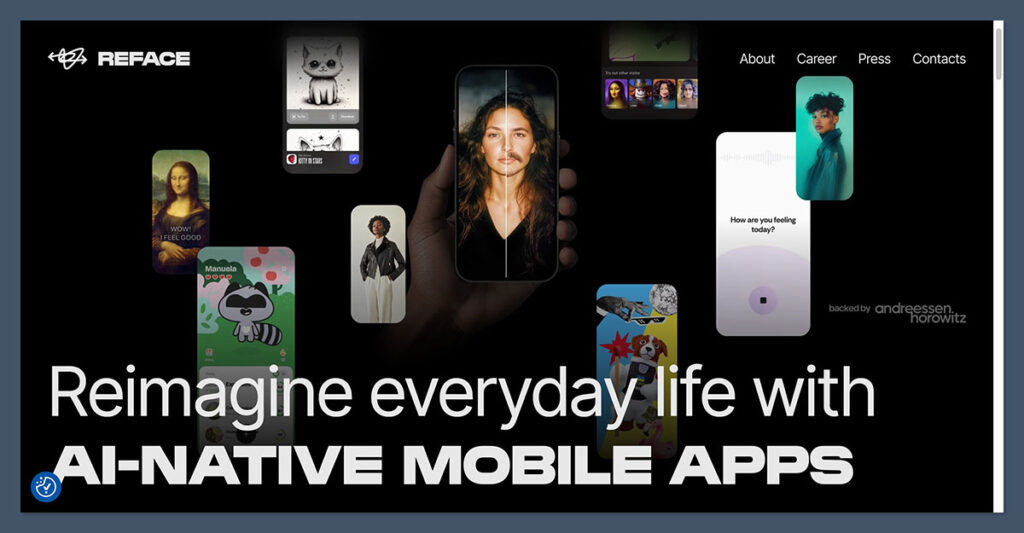
Getting started with Reface is genuinely frictionless. Downloading the app takes seconds, and you don’t need to create an account to start experimenting — you can pick a template from the library and upload a selfie almost immediately.
The app wastes no time getting you to its core experience.
The onboarding drops you straight into a browsable grid of templates: movie scenes, trending memes, music clips, and reaction GIFs.
Tap one, take or upload a selfie, and Reface handles the rest. The facial mapping runs quickly, and for most clips the result is surprisingly convincing — expressions and motion track well, and the blend is seamless enough to be share-worthy.
Where the experience starts to feel less polished is everywhere outside that core loop. The free tier is functional but constantly nudging you toward a subscription — watermarks on outputs, locked templates, and upsell prompts appear regularly.
If you want to use the app seriously, you’ll need to pay, and the pricing structure is where things get more complicated (more on that below).
Tester’s Note: The face swap quality on short clips and popular GIF templates is genuinely impressive. Where results drop off is on complex scenes with multiple faces, low-light input photos, or longer video content. Don’t judge the app solely on its best demos — your results will vary depending on the quality of your selfie and the template you choose.
Reface’s Core Features
Face Swap in Video, GIFs, and Photos
This is the headline feature. You upload a selfie, select a template from Reface’s library, and the app uses deep learning-based facial mapping to replace the subject’s face with yours. The library is large and regularly refreshed with trending content, which is one of Reface’s genuine strengths — there’s nearly always something topical to use.
AI Avatars
Upload a set of selfies and Reface generates stylized portraits in different art styles — illustrated, cinematic, fantasy, and more. It’s a fun feature for creating social profile pictures or one-off creative content, though the output style and quality can vary between styles.
Restyle and Filters
AI filters that change the style, era, or aesthetic of your images and videos. Think “turn this photo into a Renaissance painting” or apply a specific decade’s visual look to a clip.
Revive / Photo Animation
Animate still photos to move, sing, or react using lip-sync and motion effects. It’s a crowd-pleaser for old family photos or creative storytelling content.
Meme, Gender Swap, Aging, and Collage Tools
A broader set of “what if” tools — see yourself older, with a different hairstyle, or in a gender-swapped look. These sit alongside collage and meme layout features, rounding out the app as a general creative playground rather than a single-purpose tool.
Tester’s Note: Reface has quietly evolved from a simple face-swap app into a broader AI content suite. That’s useful if you want one app for multiple types of social content, but it also means the interface is more cluttered than it used to be, and some features feel less refined than others.
How Much Does Reface Cost?
Reface’s pricing is split between mobile (iOS and Android) and the web-based “Unboring by Reface” product, and the two are meaningfully different experiences with separate subscription structures.
Mobile (iOS / Android)
The app is free to download, and the free tier gives you access to a reasonable portion of templates — but with ads, watermarks on exports, and feature limits throughout. Paid plans unlock the full experience:
- Weekly: Approximately $2.49–$3.99 per week
- Monthly: Approximately $12.99 per month
- Annual: Approximately $24.99 per year
The annual plan is easily the most sensible option if you plan to use the app regularly. The weekly plan looks cheap at first glance but can effectively exceed $150–$200 per year if left running — expensive for an entertainment app.
Web (Unboring by Reface)
- Basic: ~$7.58/month billed annually ($90.99/year) — includes no ads or watermarks, unlimited photo face swaps, priority queue, and video restyle
- Premium: ~$9.99/month billed annually ($119.99/year) — similar benefits, positioned for heavier use with “unlimited activities”
One nuance worth knowing: on the web platform, the final cost depends on how many faces and frames are detected in your uploaded content. More faces or longer videos consume more processing units, so costs can creep up if you’re working with complex material.
Billing Transparency Issues
This is the part of Reface’s pricing story that most reviews gloss over, but it’s worth being direct about. There is a consistent pattern of user complaints across Trustpilot and other review platforms citing unexpected recurring weekly charges after what users believed was a one-time purchase, difficulties cancelling (especially when the app had technical issues), and frustration at not receiving refunds.
If you do subscribe, manage your subscription through the App Store or Google Play subscription management screen — not just by deleting the app — and avoid the weekly plan unless you intend to cancel within days.
Tester’s Note: I recommend the annual mobile plan or the Basic web plan if you want meaningful access without overpaying. Avoid the weekly plan entirely unless you are certain you’ll cancel before the first renewal.
Privacy and Data: What You Need to Know
This is the most important section of this review for anyone considering uploading their face to Reface — and it deserves more space than most app roundups give it.
What Reface Collects
To function at all, Reface requires access to photos and videos of your face. Beyond that, their privacy documentation indicates they can collect:
- Account data (name, email, basic profile details if you register)
- Biometric and facial data — photos, facial geometry, and potentially voice data, subject to separate opt-in consent
- Usage and device data collected automatically while you use the app
Reface frames this as necessary to provide and improve their services. Users can request correction, deletion, or restriction of their data, and may withdraw consent.
How the Policy Has Changed Over Time
Independent reviewers and privacy analysts have raised concerns about how Reface’s commitments have shifted:
- Earlier versions of their policy explicitly stated they would not use photos for face recognition. That specific language has reportedly been removed from more recent versions.
- Storage periods for facial data appear to have expanded in later policy versions — one analysis noted an extension from 30 days to up to three years for certain facial data (verify against the live policy at time of reading).
- Critics have pointed to an “embeddings loophole,” where companies argue they store face embeddings rather than biometric data itself — a distinction that blurs how long your likeness is effectively retained.
- Licensing terms appear to grant Reface a broad license to use face-swapped outputs for purposes like improving their services.
The direction of travel here is toward less restrictive policies, not more restrictive ones. That’s worth factoring into your decision.
Tester’s Note: If privacy is a priority for you, read the current policy carefully before uploading multiple high-quality selfies. Consider using photos that aren’t your most personal images. For casual, one-off use, the risk is lower — but Reface is not the right tool for anyone with serious concerns about where their facial data ends up.
User Experience and Community Sentiment
Reface’s ratings tell two very different stories depending on where you look.
Inside the app store ecosystem, ratings are generally strong. Users consistently praise the realism and entertainment value of face swaps, describe the interface as addictive and easy to pick up, and find genuine creative utility in features like the style-change and aging tools.
Outside the app store — on Trustpilot and similar platforms — the picture is more polarized.
Common complaints include subscription and billing problems (charges after cancellation, confusing terms, difficulty getting refunds), technical issues like crashes and unresponsive buttons, and a perception gap between marketing demos and real-world output quality.
This split is worth surfacing honestly: Reface is an app that many people enjoy in the moment, but a meaningful portion of paying users end up frustrated by the commercial side of the experience.
Reface at a Glance: Strengths vs. Weaknesses
| Aspect | Strengths | Weaknesses |
|---|---|---|
| Output quality | Realistic, seamless face swaps for short clips and GIFs, with convincing motion and expression tracking | Quality drops on complex scenes, multiple faces, or low-light input; some results don’t match marketing demos |
| Content library | Large, frequently updated catalog of trending memes, movie scenes, music clips, and GIFs | Some templates locked behind paywalls; advanced customization is limited compared to pro tools |
| Ease of use | Very simple one-tap workflow, mobile-first UX, minimal learning curve | Less control for power users who want fine-grained editing or export settings |
| Pricing | Free tier with solid functionality; annual plans offer reasonable value | Weekly plan is expensive over time; persistent complaints about billing transparency and cancellation |
| Platforms | iOS, Android, and web, with strong mobile support | Feature rollout uneven between platforms; longer video work is better on web but costs more |
| Privacy and data | Offers policy documentation, user rights to request deletion and withdraw consent | Collects and retains sensitive facial data; policy has become less restrictive over time; critics highlight embeddings loopholes and broad content licenses |
| Use cases | Excellent for memes, quick social posts, AI avatars, and light creative content | Not appropriate for identity-sensitive use; deepfake risks and ethical concerns if misused |
How Does Reface Compare to Alternatives?
Reface sits in a crowded space. Here’s a quick look at when you might choose something else:
- If privacy is your primary concern: Open-source face-swap tools give you local processing with no data uploaded to a third-party server — a significant difference if you’re sensitive about where your facial data goes.
- If you want professional-grade results: AI plug-ins for video editing software like Adobe Premiere or DaVinci Resolve offer far more control over output quality, lighting matching, and compositing — at the cost of a much steeper learning curve.
- If you just want AI avatars: Dedicated portrait generation apps like Lensa or similar tools focus specifically on stylized AI portraits and often offer cleaner results for that specific use case.
- If you want the easiest meme experience: Reface remains one of the most polished, accessible options for casual face-swap content, and its template library is genuinely hard to beat for social sharing.
Reface Review: Should You Use It?
Reface delivers on its core promise: quick, entertaining, share-ready face swaps with a library deep enough to keep you busy for a while.
If your goal is casual social content — memes, reaction GIFs, AI profile pictures — it’s one of the most accessible tools available, and the free tier lets you get a genuine feel for it before paying anything.
That said, there are real trade-offs to go in with eyes open about. The pricing model rewards annual subscribers and punishes anyone who accidentally stays on a weekly plan.
The privacy policy has moved in a direction that gives pause to anyone uploading multiple high-quality selfies. And the community feedback outside the app store is noticeably more critical than the star ratings suggest.
Reface is best suited to casual users who want quick, fun social content and are comfortable with the data trade-offs involved. It’s not the right choice for anyone prioritizing privacy, looking for professional creative control, or wanting a simple, transparent subscription experience.
If you do decide to try it, start with the free tier, read the privacy policy before uploading your best selfies, and if you subscribe — choose annual over weekly and manage it through your device’s native subscription manager.

Comments 0 Responses