

Here’s how AI image detection works: a tool looks for a hidden watermark or signed Content Credentials, or uses a trained model to judge whether the pixels resemble AI-generated images. Forensic and metadata checks add clues about editing and origin.
I test AI detectors for Fritz.ai, and for my latest image test I ran a real cat photo and four AI versions through Pangram Image and ZeroGPT. Whether you can trust a result depends on which detection method produced it.
This guide explains how each method decides, where it fails, and how to combine the results. It also separates evidence that AI touched an image from evidence that its accompanying story is false.
How AI Image Detection Works: Key Takeaways 🔍
- Detectors use four methods: classifiers, invisible watermarks such as SynthID, C2PA Content Credentials, and forensic or metadata checks.
- A watermark match or valid credential provides strong evidence about origin, but only when the image carries one.
- Classifier scores aren’t proof: the strongest detector in a February 2026 benchmark averaged 75% accuracy.
- Check provenance first, then compare two classifiers. Never let a single score decide whether an image is genuine.
Quick Overview of How AI Image Detection Works
AI image detectors examine different kinds of evidence, so the method matters as much as the result.
AI Image Detection Methods Overview
- Classifier detectors: Score learned pixel patterns, giving an estimate rather than proof.
- Invisible watermarks: Look for a signal embedded during creation or editing, providing strong evidence when found.
- Content Credentials: Validate a signed record of origin and recorded edits, provided that record survives.
- Forensic and metadata analysis: Inspect editing traces and file labels, which need interpretation.
Choose your check based on the image’s likely source and whether you have the original file:
Use a classifier detector if:
Your image has no readable watermark or credentials, particularly if it came from a social feed.
Check for a watermark if:
You suspect Gemini, OpenAI, or another SynthID partner created or edited the image.
Check Content Credentials if:
Your image came from a news outlet, a supported camera, or an AI tool that signs its output.
Use forensic and metadata checks if:
You suspect someone altered a real photograph rather than generating the whole picture.
I recommend checking watermarks and Content Credentials first. They look for evidence of origin, known as provenance, rather than guessing from appearance.
Classifiers are the fallback when provenance is missing. Compression and editing can change the patterns they rely on, making social-media copies harder to judge than originals.
Keep the distinction between “no evidence found” and “confirmed human-made.” Neither a missing credential nor an undetected watermark establishes camera origin.
For a side-by-side explanation, see our guide to AI detectors vs watermarking vs provenance tracking.
How Does Classifier-Based AI Image Detection Work?
- 🔍 What it looks for: Pixel patterns, noise, and textures left by AI generators
- 💻 Our recommendation: Pangram Image, among our top-rated AI image detectors
- ✅ Free to use: Yes, Pangram’s free tier includes three image scans per day
A classifier doesn’t need to spot an extra finger to flag an image. It learns statistical differences from large collections of labeled real and AI images.
A high AI score means the image strongly matches the tool’s learned AI patterns, not that its origin has been proved. The displayed percentage isn’t necessarily a calibrated probability of authorship.
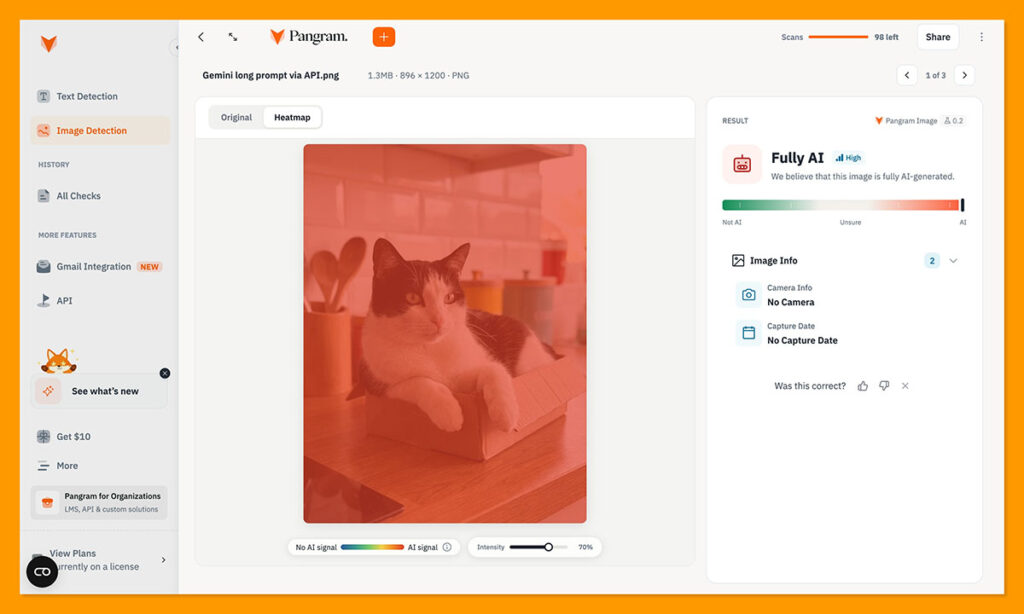
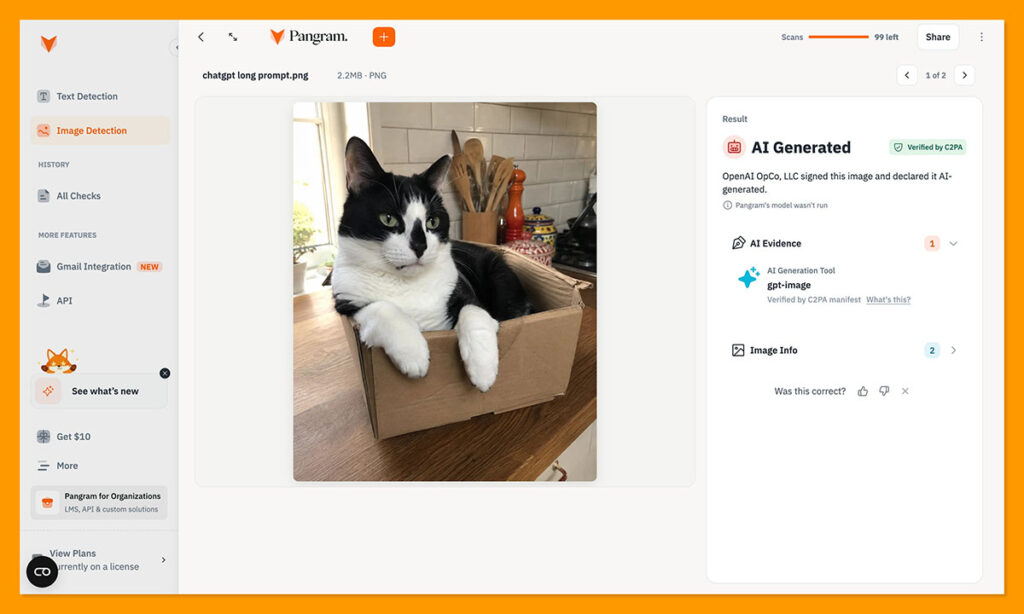
I ran a real cat photo and four AI versions from ChatGPT and Gemini through Pangram Image and ZeroGPT. Pangram identified every example correctly, although it used provider signatures for some results rather than running its classifier.
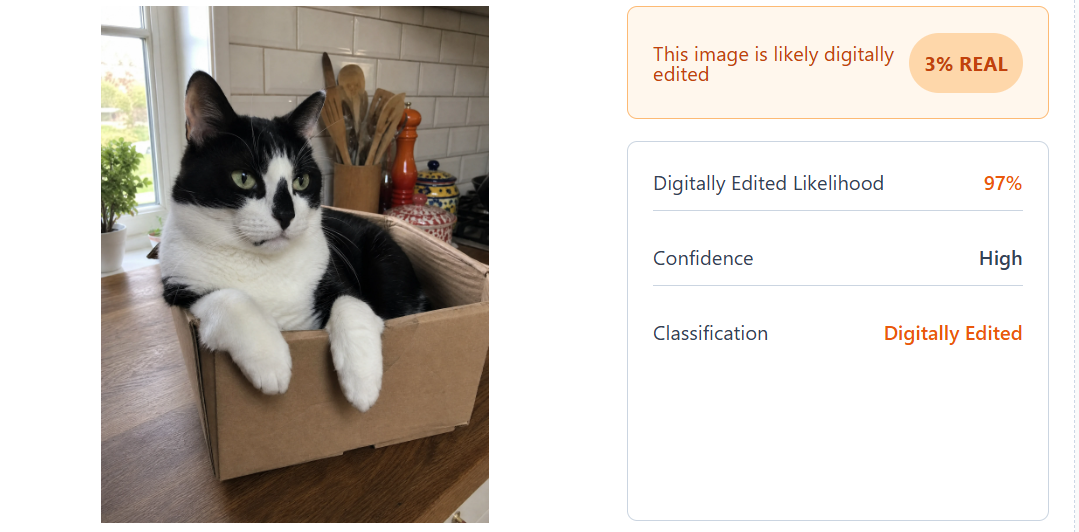
ZeroGPT labeled the original ChatGPT and Gemini API outputs as AI. It called the signature-stripped ChatGPT version “digitally edited” and assigned the real photo a small AI likelihood.
See the results in my Pangram AI image detector review.
Older classifiers looked for repeating frequency patterns left by GAN generators. These patterns can arise during upsampling, when a generator enlarges a small image to full size. Diffusion generators leave different, often fainter traces.
Another approach asks a diffusion model to reconstruct the picture. Generated images can be easier for that model to rebuild than real photographs, so the reconstruction error becomes a detection clue. This isn’t a universal test for every generator.
Newer classifiers use features from large vision models already trained to recognize visual patterns. Pangram builds on Meta’s DINOv3 and uses “synthetic mirroring”: a real photo is described, then recreated with AI, giving the detector closely matched examples to distinguish.
The weak spot is unfamiliar generators. A classifier trained mainly on one family can mistake a new kind of AI image for a real photo.
Can a detector tell an AI-edited photo from a fully AI-made one?
Usually not cleanly. AI editing tools can regenerate the whole picture, causing edited photographs to score as fully AI-generated in Pangram.
Heatmap detectors score small patches and color suspicious regions. They can help locate larger changes, but smaller touch-ups are harder to detect. My cat test didn’t assess partially edited images or heatmap accuracy.
What Does an AI Image Detector Look For?
Read the score alongside any heatmap, remembering that colored regions are predictions too. Depending on the tool, detection clues include:
- Repeating frequency patterns from upsampling
- Unusually smooth or uniform noise
- How easily a diffusion model reconstructs the image
- Deep visual features learned from large image collections
- Provider signatures checked before classification, as Pangram does
Use classifiers when origin records are absent, not as replacements for those records.
How Does Watermark Detection Work? (SynthID Explained)
- 🔍 What it looks for: An invisible signal embedded in pixels during creation or editing
- 💻 Our recommendation: SynthID Detector at synthid.com, or the “Is this made with AI?” check in Gemini in Chrome
- ✅ Free to use: Yes
Google says SynthID has marked more than 100 billion images and videos. Its watermark is a pattern of tiny pixel changes you can’t normally see.
Watermark detection looks for an intentionally embedded signal rather than estimating origin from an image’s appearance. A match therefore answers a narrower question than a classifier score, although detection can still be uncertain or wrong.
SynthID uses a neural network to embed the pattern and a matching detector to recognize it later. Google designs the mark to survive common changes, including:
- Cropping
- Filters
- Lossy compression, which reduces file size by discarding detail
That’s a design goal, not a guarantee that every edited copy remains detectable. Heavy modification can weaken the signal, so upload the highest-quality version available before interpreting a negative result.
Google’s announced SynthID partners are:
- OpenAI
- NVIDIA
- Kakao
- Soon, Apple
OpenAI-generated images carry both SynthID watermarks and C2PA credentials. You can check supported content through:
- The public SynthID Detector portal
- The Gemini app
- Google Search
- Chrome, where checks are rolling out
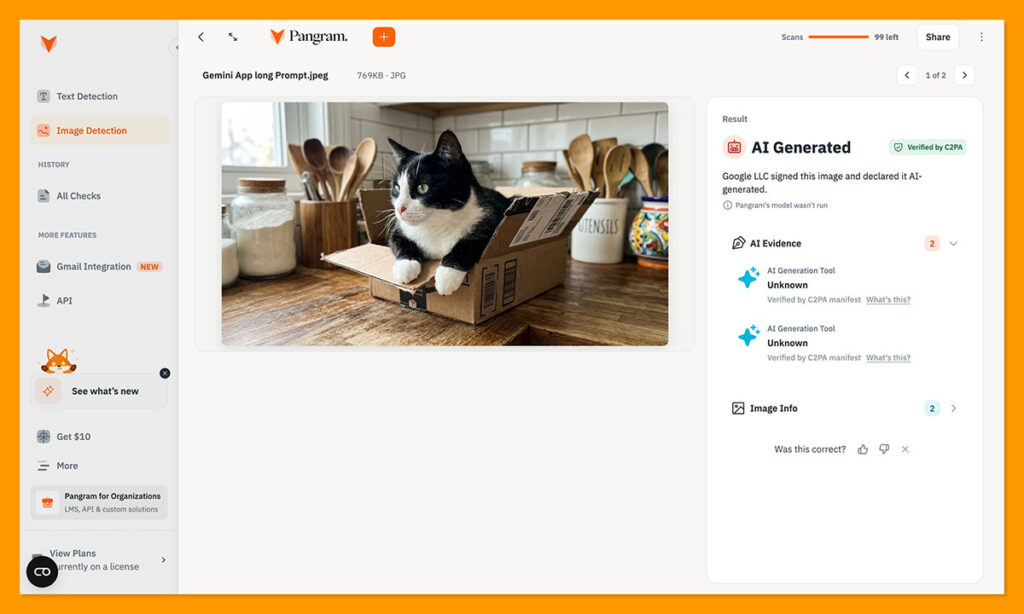
That result shows a provider signature was present, though not whether Pangram read it from the watermark or the file’s credentials.
SynthID Detector is the check I’d run first on an image that might have come from Gemini or a partner tool. A detected mark provides evidence of involvement by a compatible AI system.
The catch is that it only finds its own watermark. It isn’t a general AI detector, so “not detected” doesn’t mean a person took the photograph. Images from other generators can fall outside its coverage entirely.
Does a SynthID match mean the image is fake?
No. A “made or edited with Google AI” result means Google AI made or edited the image, not that the scene is fabricated.
In October 2026, Full Fact raised cases involving politician-shared images their posters said were genuine. Flagged results changed to “Unsure,” and Google released an update to reduce false positives and clarify confidence.
Treat “detected” as evidence of AI involvement, “unsure” as inconclusive, and “not detected” as no matching signal found. None establishes whether the accompanying story is true.
How Do Content Credentials (C2PA) Work?
- 🔍 What it looks for: A signed record of origin and recorded edits
- 💻 Our recommendation: Content Credentials Verify at contentcredentials.org/verify
- ✅ Free to use: Yes
An image with no readable credentials gives you no signed history to inspect. When present, a “manifest,” a tamper-evident record associated with the file, can identify its camera or AI tool and recorded editing history.
Valid Content Credentials provide strong evidence about a file’s recorded origin, not proof that the scene or caption is truthful. C2PA is an open specification submitted to ISO as draft 22144, not a published ISO standard.
A cryptographic hash, a fingerprint of the protected file data, ties the record to the image. Changing protected image content without updating and signing its record causes validation to fail.
Newer “durable” credentials add a soft link, such as an invisible watermark or visual fingerprint. This can help a checker retrieve a stored record after embedded metadata disappears, though retrieving a record isn’t the same as proving every pixel is unchanged.
Credential support includes:
- Google’s Pixel 10 native camera app
- Supported Leica, Sony, and Canon cameras
- OpenAI’s image tools
- Samsung’s supported AI photo-editing tools
LinkedIn and TikTok can display credentials, but uploads and web optimization can remove them. A missing credential alone tells you nothing about authorship.
If validation fails, request the original file before concluding that someone fabricated the image. Re-encoding can break its binding even when the picture still looks unchanged.
Pros
- ✔️ Origin evidence: Identifies a signer when validation succeeds.
- ✔️ Editing history: Shows changes recorded by participating tools.
- ✔️ Real-photo support: Works for camera images as well as AI output.
- ✔️ Free checking: Public verification tools are available.
- ✔️ Industry support: Supported by camera makers and AI providers.
Cons
- ❌ Limited coverage: Many images carry no credentials.
- ❌ Fragile delivery: Screenshots and uploads can remove embedded records.
- ❌ No truth guarantee: A signed image can still mislead.
- ❌ Uneven capture support: Camera signing isn’t universal.
- ❌ Inconclusive absence: Missing data proves neither AI nor human origin.
Can Content Credentials Prove a Photo Is Real?
Only in a limited sense: they can validate a trusted signing record and its relationship to the file. They can’t establish that a scene wasn’t staged or a caption wasn’t invented.
Implementations can fail too. Nikon suspended its Z6III signing feature and revoked certificates in 2025 after a flaw allowed altered images to retain valid signatures.
Alternative: Use OpenAI’s checker for ChatGPT images
OpenAI Verify offers a narrower provenance check:
- What it checks: An OpenAI SynthID watermark or OpenAI Content Credentials record.
- What it covers: OpenAI images, through a research preview.
Because OpenAI images carry both signals, a surviving watermark may help when embedded credentials have disappeared.
How Does Forensic and Metadata Analysis Work?
- 🔍 What it looks for: Editing traces and AI labels in file data
- 💻 Our recommendation: Forensically or FotoForensics for edits; an EXIF viewer for metadata
- ✅ Free to use: Yes
The file may contain an AI label before you run any classifier. Metadata is text stored alongside an image, such as its camera model or editing software, and it can include an IPTC “digital source type.”
Relevant values include:
trainedAlgorithmicMedia: created using generative AIcompositeWithTrainedAlgorithmicMedia: combines other content with generated material, including inpainting or outpainting
Inpainting replaces an area inside an image. Outpainting generates content beyond its original edges. These labels describe how content was produced, but ordinary unsigned metadata can also be changed.
Treat an AI label as a useful lead, not a tamper-proof record. An empty field is equally inconclusive because the label may never have existed or may have disappeared during sharing.
Metadata is a quick check, but screenshots omit the original file’s metadata and re-uploads can strip it.
Forensic tools examine the image itself:
- Error level analysis (ELA): Re-saves a JPEG and highlights regions that compress differently, sometimes exposing pasted-in content.
- Clone detection: Finds repeated patches that could indicate copying within the picture.
- Sensor-noise analysis (PRNU): Examines the faint pattern a camera sensor leaves, potentially linking a photograph to a camera.
These methods support photographic forensics, not universal AI-generation detection. A bright ELA patch is a clue to investigate, not an automatic finding of manipulation.
Repeated resizing and saving can obscure useful traces. Normal JPEG processing can also create differences that resemble editing.
Top Tip 💡
Before uploading an image to a detector, reverse-search it for an older or higher-quality original. An earlier copy may retain credentials or metadata that the shared version lost. Compare publication dates and captions too: a genuine photograph can still accompany a false story.
How Accurate Are AI Image Detectors?
A strong score on clean test images doesn’t establish reliability on compressed news photographs or unfamiliar generators.
No AI image classifier is reliably accurate across every generator, so treat its score as one piece of evidence. Watermarks and credentials answer a narrower question about recorded origin, but they also have coverage limits and implementation failures.
AI image detector accuracy at a glance:
| Test | What was checked | What it found |
|---|---|---|
| February 2026 academic benchmark | 16 detectors, about 2.6 million images from 291 generators | Best averaged 75% accuracy; worst 37.5% |
| Same benchmark, newer generators | Flux Dev, Adobe Firefly v4, Midjourney v7 | Most detectors averaged 18 to 30% accuracy |
| NewsGuard, May 2026 | 15 authentic war photos, 5 detectors | False positives ranged from 0 to 40% by tool |
| NewsGuard, May 2026 | 15 heavily AI-edited images | Detection ranged from 33% to 100% |
| Fritz test, 2026 | 1 real cat photo and 4 AI versions; Pangram and ZeroGPT | Pangram identified all 5 correctly; ZeroGPT labeled the stripped version “digitally edited” and gave the real photo 3% AI likelihood |
Rankings don’t transfer reliably between test sets. A detector that leads on familiar generators can fall behind on newer ones because its training examples matter as much as its architecture. The academic benchmark found no universal winner.
NewsGuard’s check is particularly relevant if you’re verifying news images. Its tools disagreed on most examples, and some flagged authentic war photographs as AI-generated.
Those errors are false positives: genuine images incorrectly labeled AI. False negatives go the other way, allowing generated images through as real. A detector can reduce one kind of error while increasing the other, depending on where it places its decision threshold.
My cat test was deliberately small, so it illustrates tool behavior rather than establishing a general accuracy rate. Pangram also used provider signatures for some examples, meaning those successes weren’t all classifier decisions.
Don’t combine these studies into a single ranking. They used different image collections and asked different questions, particularly when distinguishing fully generated pictures from edited photographs.
When comparing accuracy claims, check:
- Whether the test included generators the detector hadn’t seen during training
- Whether images were original files or compressed copies
- Whether “accuracy” covered both real and generated images
- Whether the task involved full generation or partial editing
For a consequential decision, such as challenging a photographer’s work, request the original file and supporting context. Agreement between detectors is useful, but shared training blind spots mean it still isn’t proof.
What Can Fool an AI Image Detector?
The same image can receive different results after sharing or editing. Before trusting a score, check what happened to the file between creation and upload.
- Screenshots and re-uploads: Remove original metadata and may discard Content Credentials. Added compression can also blur the patterns a classifier reads.
- Compression and resizing: Heavy JPEG saving and repeated resizing can make generated images harder to recognize, even when they look unchanged to you.
- Signature strippers: “AI image humanizer” tools can remove provider signatures. Pangram still caught my stripped ChatGPT image, while ZeroGPT changed its label to “digitally edited.”
- Brand-new generators: Detectors trained on older output can miss newer models, as the accuracy table above shows.
- Small AI edits: Replacing a face or object can be harder to detect than generating the whole image. Heatmaps become less reliable as the changed area shrinks.
- Heavily edited real photos: Skin smoothing and phone processing can trigger false positives. AI denoising also complicates the distinction between camera origin and AI involvement.
- Deliberate noise: Carefully designed, hard-to-see changes can confuse classifiers and make them confidently wrong.
Keep the original alongside any edited copy. Without it, you may be investigating traces introduced during sharing rather than the image’s creation.
How To Get More Reliable Results From an AI Image Detector
Start with evidence of origin, then use classifier scores to investigate what remains uncertain. Request the original file before interpreting a result from a screenshot.
- Check Content Credentials and SynthID first (a match is stronger than a score).
- Upload the highest-quality original available, not a screenshot.
- Read metadata for AI labels before sharing strips it.
- Reverse-search the image for an older copy.
- Compare two free detectors rather than trusting one classifier.
- Inspect the heatmap, not just the headline score.
- Treat every single result as a lead, not a verdict.
If the tools disagree, don’t average their percentages. Different classifiers use different scoring systems, and one might be reading a signature while another judges pixels. Record the labels separately and return to the source file.
In my cat test, Pangram identified the signature-stripped ChatGPT image as AI-generated, while ZeroGPT called it digitally edited. Those labels aren’t interchangeable, even though both point to processing.
For a newsroom or classroom decision, preserve the checked file and the tool results. If you still cannot establish origin, report that uncertainty instead of selecting whichever percentage looks most convincing.
Final Verdict: How Does AI Image Detection Work?
Check provenance first, compare classifiers when needed, and keep the image’s source alongside every result.
- Classifiers: score learned pixel patterns, providing an estimate rather than proof.
- Watermarks: identify an embedded signal, but can’t rule out unmarked AI content.
- Content Credentials: validate recorded origin and edits, without guaranteeing the story is true.
- Forensic and metadata checks: reveal editing clues and labels that need interpretation.
I recommend this layered approach because the methods answer different questions. A missing watermark calls for another check, not a declaration that the image is real.
Free tools make everyday checking accessible. For teams processing images in bulk, our guide to the best AI detector APIs covers integration options.
Marking should become more widespread as EU AI Act Article 50 requirements apply from late 2026, but unmarked images will remain. Start with the highest-quality original you can obtain and check its Content Credentials before uploading it to a classifier.
FAQs
Can AI image detectors be wrong?
Yes, detectors can flag real photos and miss generated ones. Compression and editing can change the patterns classifiers read, while unfamiliar generators can evade recognition.
A low AI score therefore doesn’t prove camera origin. See “How Accurate Are AI Image Detectors?” above for the benchmark results and limitations.
Is SynthID Detector a general AI image detector?
No. SynthID Detector looks for SynthID watermarks, not every possible sign of AI generation. Its coverage depends on whether a compatible tool embedded that signal.
A “not detected” result means no matching watermark was found; it doesn’t establish that a person took the photograph or that the image is unedited.
Is C2PA an ISO standard?
Not yet. C2PA is an open specification submitted to ISO as draft 22144, not a published ISO standard.
Content Credentials can still validate signed origin records. Their usefulness depends on the signer and implementation, as well as whether the record survives the image’s journey online.
Can AI image detectors spot deepfakes?
Partly, but general image classifiers aren’t substitutes for dedicated deepfake tools. Pangram Image, for example, isn’t designed for face swaps.
Video verification may require examining changes across frames rather than judging a still image. See our best AI deepfake detection tools guide for options aimed at those tasks.
Do AI-generated images have to be labeled?
In the EU, Article 50 requires providers to mark covered AI-generated outputs in machine-readable form, applying from late 2026. That isn’t necessarily a visible badge.
The EU code of practice supports complementary marking layers, such as signed metadata and watermarks. Elsewhere, requirements vary by jurisdiction, use case, and platform.

Comments 0 Responses