

Glean is an AI-powered enterprise search platform designed to connect all of your workplace tools – from Google Workspace and Slack to Jira, Salesforce, and more – into a single, unified search experience.
It’s built for large organizations where finding the right information across dozens of apps has become a daily time sink.
Our research team has spent considerable time testing Glean alongside other enterprise AI platforms, and it scored highly in our rankings for search quality, integrations, and security.
That said, it’s not without trade-offs – particularly around pricing transparency, setup complexity, and the fact that it finds information but doesn’t act on it.
In this review, I’ll break down Glean’s features, pricing, and limitations so you can decide whether it’s the right fit for your team.
Why you can trust us 🤝
We’ve conducted extensive research and hands-on testing to bring you accurate and fair reviews of enterprise AI tools. Our testing ensures our recommendations remain independent and backed by data, providing you with all of the information you need to find the right platform for your business.
Glean Pros & Cons
- Best for enterprise knowledge discovery
- Outstanding – 4.6 out of 5
- For large enterprises · For document-heavy teams · For complex tool stacks
- Free trial: Not available (paid proof of concept only)
- Pricing: ~$50+ per user/month (enterprise quote-based)
Pros 👍
- Unified AI-powered search across 100+ workplace apps
- Permission-aware results that respect existing access controls
- Personalized search powered by a knowledge graph of people, content, and interactions
- Generative AI answers with citations pulled from your internal documents
Cons 👎
- No public pricing – requires a sales call and enterprise contract
- Limited workflow automation – it finds information but doesn’t execute tasks
- Setup can be complex and time-consuming for IT teams
- Not suited for small businesses or teams with tight budgets
Glean Review
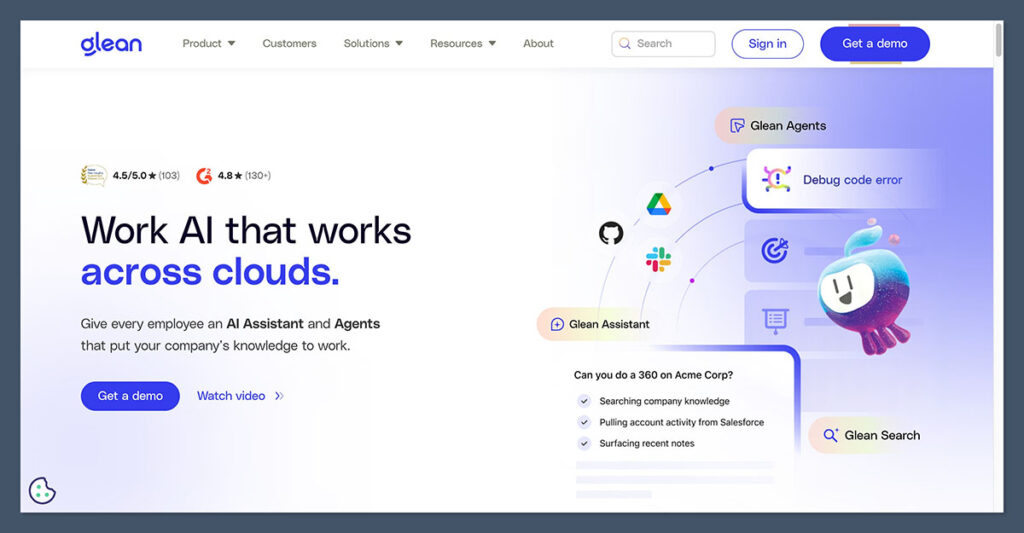
Need a quick summary of Glean? I’ve collected Glean’s best and worst features below:
What I Like
✔️ The best enterprise search on the market, connecting 100+ workplace apps – from Google Workspace and Microsoft 365 to Slack, Jira, Confluence, ServiceNow, and Salesforce – into a single, intelligent search bar
✔️ Glean’s AI doesn’t just match keywords – it understands intent and context, delivering semantic search results that actually answer your question
✔️ The platform builds a knowledge graph that personalizes results based on your role, your team, your projects, and the tools you use most
✔️ Generative answers with citations save you from reading entire documents when you only need the key takeaways
What I Dislike
❌ Glean is a search-first platform – it surfaces information but doesn’t resolve tickets, update records, or complete workflows in downstream systems
❌ Pricing is completely opaque, with no public price list and contracts that often start at $50+ per user/month with a minimum of 100 seats
❌ The initial setup requires significant IT involvement – connecting data sources, mapping permissions, and tuning relevance takes time
❌ If strict security policies prevent you from integrating certain tools (like Slack or email), Glean’s value drops significantly since it can’t index those sources
My Experience With Glean
There’s no way to sign up for Glean with just an email address – this is an enterprise product through and through, so you’ll need to go through the sales process to get access.
After that, I found the onboarding process involved but well-guided, with Glean’s team helping configure the platform for our specific tool stack and permissions.
I was immediately impressed by how Glean integrates into the browser as a new-tab experience. Unlike other enterprise tools that feel like “yet another app to open,” Glean surfaces relevant items you’re currently working on right from your homepage.
It felt like a natural extension of my workspace from day one – though I’ll note that the time spent connecting all our data sources was considerable.
How I Searched Across Our Tools
Following the setup process, I was able to start querying information across all of our connected apps from a single search bar.
This is where Glean really shines – I could type a natural language question like “What was the outcome of last week’s product review meeting?” and get a synthesized answer pulled from Slack messages, Google Docs, and meeting notes, complete with citations I could click through to verify.
I had no trouble finding specific documents, past conversations, or project details.
The personalization was noticeable too – results were clearly weighted based on my role and the teams I collaborate with most. When a colleague on a different team searched the same query, they saw results tailored to their context instead.
Glean also surfaces relevant items proactively. The browser homepage shows trending documents on your team, recently shared files, and content related to your current projects.
This “in the flow of work” design encouraged me to check Glean habitually, rather than only when I was actively searching for something.
Where Glean Stops Short
Now, Glean performs well at finding and summarizing information, but it’s important to understand what it doesn’t do.
Glean is not designed to execute tasks. If I found the answer to an IT issue through Glean, I still had to go to ServiceNow to resolve the ticket. If I discovered a relevant customer email, I still had to open Outlook to reply.
This search-first approach is intentional, but it does mean that teams looking for automated ticket resolution, approval flows, or record updates directly from an AI assistant will need to look at action-oriented platforms instead.
Author’s Testing Notes
Overall, the experience of using Glean was excellent for knowledge discovery. I saved hours each week by not having to dig through multiple apps to find what I needed.
However, Glean’s inability to take actions in downstream systems left me wishing for a more complete solution when it came to operational workflows. If your main pain point is “finding information,” Glean is outstanding. If it’s “getting things done,” you’ll need complementary tools.
How Much Does Glean Cost?
Glean follows an enterprise-first, quote-based pricing model – you won’t find a public price list anywhere on their website. To get a quote, you need to go through their sales team, which can make early-stage budgeting a challenge.
Based on industry reports and buyer feedback in early 2026, here’s what you can typically expect:
- Enterprise Search License – ~$45–50+ per user/month
- Work AI / Advanced AI Add-on – ~$15 per user/month on top of the base license
- Minimum Annual Contract – ~$50,000–$60,000 (typically requiring 100+ seats)
- Paid Proof of Concept – Up to $70,000 to test with your own data
Is Glean Good Value for Money?
Glean’s pricing is expensive, especially when you consider that the per-user cost is just the starting point.
Beyond the license fees, you’ll need to account for onboarding, configuration, permission mapping, relevance tuning, and ongoing integration maintenance as your systems evolve.
Reports also suggest a mandatory support fee of around 10% of annual recurring revenue, which you can’t opt out of.
There are also reports of renewal price increases in the range of 7–12%, which can make long-term budgeting unpredictable unless you negotiate a renewal cap into your initial contract.
Author’s Testing Notes
I recommend Glean primarily for large enterprises (1,000+ employees) with complex tool stacks and significant documentation. The platform delivers real value in those environments – Glean claims savings of up to 110 hours per user per year and 36 hours saved per new hire during onboarding.
For smaller teams or organizations looking for predictable, usage-based pricing, the setup effort and cost opacity may feel heavy compared to more transparent alternatives.
Glean’s Core Features
Glean offers the best enterprise knowledge discovery features I’ve tested, providing teams with a unified search experience that goes far beyond simple keyword matching.
The AI-powered capabilities are impressive in both scope and quality, though you’ll want to understand exactly where Glean’s strengths begin and end.
Unified Semantic Search
Glean lets you search across every connected workplace tool from a single query – Google Drive, SharePoint, Confluence, Slack, Jira, ServiceNow, Salesforce, email, and more. With 100+ connectors available, it covers the vast majority of enterprise tool stacks.
What sets Glean apart from basic search tools is its deep learning approach. Instead of matching keywords, Glean uses LLMs and semantic understanding to interpret the intent behind your query. I could ask conversational questions and get relevant results even when my exact wording didn’t match the source documents.
Knowledge Graph and Personalization
Under the hood, Glean builds a knowledge graph that maps the relationships between people, content, and interactions across your organization.
This powers highly personalized search results – the platform considers your role, your projects, your collaborators, documents shared with you, trending content on your team, and even your office location when ranking results.
In practice, this means two people searching the same query will see different results based on what’s most relevant to their context. I found this personalization genuinely useful and a significant step above generic enterprise search tools.
Generative Answers and Summaries
Glean doesn’t just return a list of links – it synthesizes content from the most relevant documents, messages, and tickets to generate concise, citation-backed answers. I could get document summaries, key takeaways from meetings, and proactive recommendations without reading entire files.
That said, as with any LLM-powered system, there are occasional inaccuracies. I encountered a few instances where Glean’s generated answers didn’t fully align with the source data. This is worth keeping in mind for high-stakes queries where accuracy is critical – always verify using the cited sources.
Permission-Aware Security
All ingested content is indexed with strict, real-time permission controls. Users only see results they’re authorized to access in the source systems – there’s no risk of accidentally surfacing confidential HR documents to someone without clearance.
Glean respects source-system ACLs, and changes in access permissions propagate to search results without lag. This permission model is central to Glean’s enterprise positioning and is particularly important for organizations with strict compliance requirements in IT, HR, and finance.
In-Workflow Surfaces
Glean integrates directly into your browser as a homepage or new-tab experience, and also connects with tools like Slack to bring enterprise context into your existing communication channels. Slack messages themselves get indexed too, becoming another searchable knowledge source.
This “in the flow of work” design is one of Glean’s smartest decisions. Rather than requiring you to remember to open a separate tool, it embeds itself into your daily habits.
Recent Updates: Agents and Workflow Features
Glean has been expanding beyond pure search. More recently, the platform has introduced agentic capabilities – AI agents that can perform tasks like summarizing backlogs, drafting Slack updates, and automating some multi-step processes. You can also build custom Q&A chatbots that work within tools like Slack.
While these additions show Glean is moving toward a more action-oriented platform, it’s still early days. The core value remains knowledge discovery, and the automation features are lighter than what dedicated workflow platforms offer.
Glean’s Integrations
Glean’s architecture is designed to plug into your existing enterprise stack rather than replace any of it.
The platform connects to over 100 workplace applications, continuously pulling in documents, tickets, conversations, and wiki pages to keep its index fresh.
Major integrations include:
- Productivity & docs: Google Drive, SharePoint, OneDrive, Confluence, Notion, Dropbox, Box
- Communication: Slack, Microsoft Teams, Gmail, Outlook, Zoom
- Project & dev tools: Jira, Asana, GitHub, GitLab, Amazon S3
- CRM & support: Salesforce, Zendesk, ServiceNow, HubSpot
However, if your organization relies on highly customized or legacy systems, Glean may struggle to integrate those sources.
The platform depends on its connector library, so if your software isn’t supported, that data won’t be included in search results.
How Does Glean Keep Your Data Secure?
Security is central to Glean’s enterprise positioning. The platform respects your existing source-system access controls, so search results are always filtered based on what each individual user is authorized to see.
Glean uses a RAG (Retrieval-Augmented Generation) approach, meaning it doesn’t store or train on your company data. Instead, it retrieves indexed data to respond to queries and removes it from memory after the task is completed.
Content is kept up to date through continuous indexing and real-time permission syncing.
That said, connecting dozens of data sources is inherently complex.
Some reviewers have noted that a misconfiguration during setup could potentially expose sensitive information, which is why the onboarding and permission mapping process deserves careful attention from your IT team.
Using Glean’s Customer Support
Glean follows a typical enterprise support model, with dedicated account management and onboarding assistance for contract customers. Here’s what’s available:
- Dedicated onboarding support – Glean’s team helps configure integrations, map permissions, and tune relevance during setup
- Account management – Enterprise customers get ongoing support through their account team
- Documentation and resources – Glean provides setup guides and best practices documentation
- Community and peer resources – G2 and Gartner communities offer peer feedback and use case discussions
Keep in mind that support fees are reportedly mandatory at around 10% of your annual contract value – this isn’t optional, so factor it into your total cost calculations.
How Does Glean Compare to Competitors?
Glean scores highly in our enterprise AI search rankings, but it’s not the only option. Here’s how it compares to the main alternatives:
| Platform | Best For | Pricing | Key Difference vs Glean |
|---|---|---|---|
| Glean | Cross-platform enterprise search | ~$50+/user/month (quote-based) | – |
| Microsoft Copilot | Teams already on Microsoft 365 | $30/user/month | Included in your existing ecosystem but limited to Microsoft apps – lacks Glean’s cross-platform depth |
| Google Workspace AI | Teams already on Google Workspace | Included with Workspace plans | Built into Google apps you already use but stays within the Google ecosystem only |
| GoSearch | Budget-conscious enterprise teams | Transparent, lower cost | Faster deployment, transparent pricing, and hybrid search – but less established than Glean |
| Guru / Slite / Notion AI | Small to mid-sized teams | From ~$10/user/month | Easier setup and more affordable, but fewer connectors and less enterprise-grade search depth |
| Workativ / Moveworks | Automated ticket resolution & workflows | Custom / quote-based | Action-oriented – they resolve tickets and execute workflows, where Glean only finds information |
If you’re not sure about committing to Glean’s enterprise pricing, the right alternative depends on your main need.
Teams that just want search within their existing Microsoft or Google stack can start with those native tools at no extra cost.
If you need cross-platform search but at a lower price point, GoSearch is worth a look. And if your real problem is workflow automation rather than knowledge discovery, platforms like Workativ or Moveworks are a better fit.
What Users Are Saying About Glean (2026)
Recent feedback from enterprise IT, HR, and operations leaders paints a consistent picture: Glean excels at knowledge discovery and everyday search productivity, but it’s not a complete solution for operational workflows.
What Users Love
✔️ Effortless knowledge discovery – Users consistently report that finding information across siloed systems is dramatically easier with Glean. Natural language questions yield clear, trustworthy summaries pulled from multiple sources.
✔️ High search accuracy – Reviewers describe Glean as intuitive and effective, particularly for large volumes of internal documentation. The ability to cross-check facts without reading multiple wiki pages saves significant time.
✔️ Smooth daily integration – The browser homepage and Slack integration make Glean feel like a natural part of the workday, not another tool to remember.
✔️ Time savings – Multiple reviewers highlight meaningful productivity gains, with some reporting they use Glean multiple times daily and get relevant answers over 90% of the time.
What Users Wish Were Better
❌ Limited customization – Some users find it difficult to tailor relevance or ranking for specific teams or business processes.
❌ Broad results need better filtering – Glean can return wide result sets, and users want more advanced filtering and refinement controls.
❌ Occasional hallucinations – As with most LLM-powered platforms, there are reports of answers that don’t fully align with source data, which can erode trust in critical workflows.
❌ Complex setup – IT teams note that connecting all data sources, configuring permissions, and tuning relevance takes significant time and effort upfront.
Glean’s Best Use Cases
Based on my testing and user feedback, here’s where Glean delivers the most value:
IT and operations knowledge search – Searching across tickets, runbooks, past incidents, and documentation in ServiceNow, Jira, and Confluence to accelerate manual resolution workflows.
Internal support (HR, finance, general ops) – Surfacing internal policies, FAQs, and prior conversations so support teams can answer employee questions faster.
Sales enablement – Helping reps quickly find pitch decks, pricing documents, CRM notes, and historical customer emails to prepare for meetings.
Onboarding and internal enablement – Giving new hires a single place to find relevant documents, org context, and project history. Glean reports an average of 36 hours saved per new hire during onboarding.
When Glean Might Not Be the Right Fit
❌ Teams that need automated ticket resolution, approval flows, or record updates directly from an AI assistant
❌ Smaller organizations without the budget or IT resources to manage enterprise-grade integrations and permission mapping
❌ Companies looking for transparent, self-serve pricing without a sales process
How We Test Enterprise AI Platforms
To bring you fair and accurate reviews, we regularly test enterprise AI platforms and put them through our rigorous research process.
Our research team has carried out extensive data collection, allowing us to create data-driven recommendations so you can find the right fit for your organization. I’ve also personally used Glean’s platform and tested its features so I can share genuine insights and tips with you.
Our testing covers several key areas of investigation:
- Search Quality & AI Features – 30% – Looking at the accuracy, relevance, and intelligence of the AI search capabilities
- Integrations & Connectors – 20% – Reviewing the breadth and quality of supported workplace applications
- Security & Permissions – 15% – Testing how well the platform respects access controls and protects sensitive data
- Ease of Use – 15% – Evaluating the user experience and how naturally it integrates into daily workflows
- Pricing & Value – 10% – Assessing whether the cost aligns with the value delivered
- Support & Onboarding – 10% – Testing what resources and assistance are available for setup and ongoing use
Glean Review: Should You Use Glean for Enterprise Search?
Glean is one of the best enterprise AI search platform I’ve tested. It helps large organizations unify their internal knowledge across 100+ workplace tools, delivering highly personalized, permission-aware search results powered by a sophisticated knowledge graph and generative AI.
Glean’s pricing can be steep and opaque, so I recommend it for growing or large enterprises (1,000+ employees) with complex tool stacks and significant documentation where the primary bottleneck is finding trusted information.
It’s ideal for teams in IT, HR, sales enablement, and operations – but only if you need the enterprise-grade search capabilities that Glean provides.
If your main need is workflow automation, ticket resolution, or you’re a smaller team looking for budget-friendly options, there are better-suited alternatives.
But for pure knowledge discovery and making your organization’s information instantly accessible, Glean is the clear leader.

Comments 0 Responses