

Generated Photos is one of the most advanced synthetic image platforms available today.
It offers AI-generated faces and full-body human images that are both realistic and ready for commercial use.
After reviewing dozens of AI content tools, I was curious to see how Generated Photos compared, especially for teams and creators who need model-like imagery without navigating complicated rights or licensing issues.
In this review, I’ll walk through my experience using Generated Photos, explore its features and pricing in depth, and explain exactly where this tool fits — and where it falls short.
Why You Can Trust This Review
I’ve personally tested over 50 AI-powered design tools, including deepfake generators, avatar creators, and AI art platforms.
This review of Generated Photos is based on hands-on use, analysis of its terms and pricing, and evaluation of how the tool fits into real-world creative workflows, not just technical specs or marketing claims.
Generated Photos: At a Glance
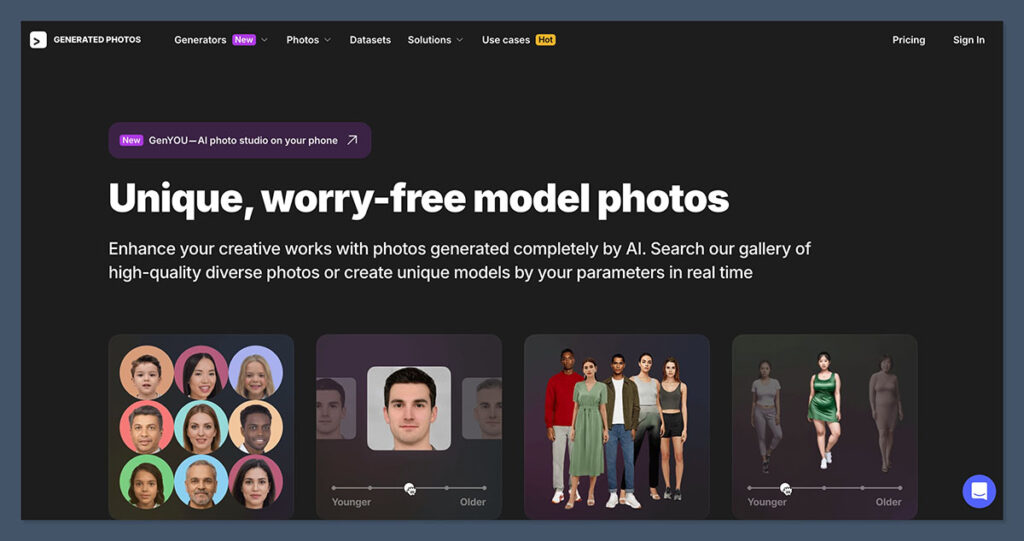
Best for:Creators, marketers, developers, and designers who need synthetic human faces or full-body shots with commercial rights.
Rating: 4.2 out of 5
Plans: Free basic access, or paid plans from $19.99 to $250 per month
Pros 👍
- Massive image library (2.6 million+ faces)
- Face and full-body generators with attribute control
- Clear licensing for commercial use
- Useful API access for automation
Cons 👎
- 15 image download limit on subscriptions
- License is limited to one project per image
- Some minor image artifacts or uncanny results
What I Like About Generated Photos
✔️ Commercial use is clearly defined
Generated Photos offers commercial licensing that is easy to understand. Each image or subscription plan comes with use rights that let you add photos to professional projects, ad campaigns, mockups, or software products. There’s no guesswork about model releases or distribution rights.
✔️ You can generate exactly what you need
Using the Face Generator, I was able to create synthetic people with a lot of control over details like age, skin tone, facial expression, gender, and more. If I needed a 40-something woman smiling with light skin and glasses, I could create it in just a few clicks. The Human Generator adds full-body poses and outfits for even more variation.
✔️ The image quality is generally excellent
Most faces look photorealistic and natural. Unless you’re working in a hyper-detailed film environment, these images are more than good enough for marketing, UI, presentations, and product design.
✔️ Privacy-conscious features like the Anonymizer
This was one of the more unique features I tested. You can upload a photo of a real person, and the Anonymizer will create a similar synthetic face that doesn’t identify the original. It’s ideal for legal, academic, or health-related projects where privacy is a concern.
What I Dislike About Generated Photos
❌ Download limits can feel restrictive
With the standard subscription, you only get 15 downloads per month. If you’re running a content-heavy business or testing visuals across multiple clients, this cap can become a bottleneck quickly.
❌ Licensing is limited to one project
Images downloaded from the library or generators can only be used in a single project unless you negotiate a broader license. That might be fine for internal work or small product mockups, but it gets messy if you’re shipping dozens of deliverables across brands or clients.
❌ The generators aren’t perfect
While most results are realistic, I did notice occasional issues such as distorted ears or unnatural smiles. These minor flaws can be edited out, but they may require a few extra steps if you’re aiming for polished assets.
❌ Confusing API terms
I had to read the API documentation and terms a few times. Different pages mention different usage limits, and the fine print includes warnings about dataset creation and stockpiling images, which could be confusing for developers looking to scale.
My Experience Using Generated Photos
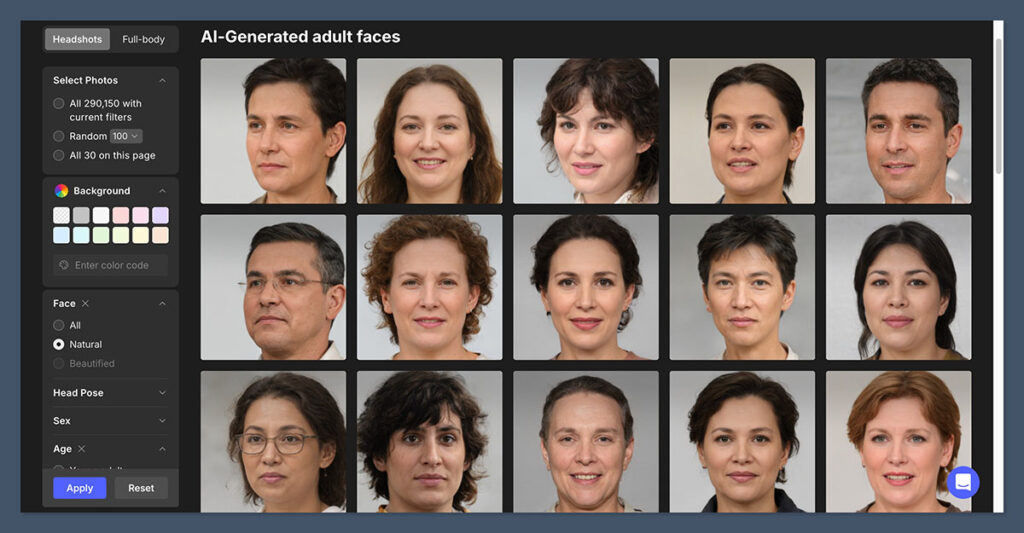
Getting started with the platform was quick. I created an account and began browsing the image library immediately. I used filters to narrow down image selections based on gender, age, ethnicity, and emotion. Results were fast and visually clear.
The Face Generator
Once I started creating my own faces, I could:
- Adjust face shape, age, skin tone, eye color, emotion, and more
- Preview results in real time
- Generate unlimited variations without additional cost (downloads still count)
- Save generated faces to collections for future use
This was especially useful when I needed avatars for a product demo that required consistent visual style. I could generate ten faces that looked like a cohesive team instead of relying on random stock photos.
The Human Generator
This tool allowed me to create full-body images with different clothing styles and poses. While it offers fewer customization options than the Face Generator, I could still choose:
- Gender and skin tone
- Clothing type (casual, formal, etc.)
- Pose variations
- Backgrounds and download formats
The Human Generator is a good fit for eLearning content, product guides, or websites where you need full-length human visuals.
The Anonymizer
Uploading a real face and receiving a synthetic replacement was seamless. The tool worked quickly and produced results that looked similar enough to serve the intended purpose while protecting identity.
Generated Photos Pricing
Here’s a breakdown of the current pricing plans:
| Plan | Features | Price |
|---|---|---|
| Face Generator + 15 Downloads | Unlimited generations, 15 monthly downloads, no watermark, commercial use | $19.99 per month or $199/year |
| Human Generator + 15 Downloads | 1,000 priority generations, no watermark, commercial use | $199 per year |
| One-Time Image Purchase | Bulk pricing by image with optional features like upscaling or transparent background | From $9 per image |
| API Access | 1,000 to 10,000 images/month, includes Anonymizer and programmatic generation | Starts at $250/month |
If you only need a handful of images each month, the $19.99 plan will likely cover your needs. But for larger production pipelines or apps that generate faces on demand, the API plan is essential — and it gets expensive fast.
Worth noting:
Credits do not roll over from month to month, and each image is tied to a single project license unless you negotiate broader usage.
Use Cases and Best Fits
Generated Photos is a versatile tool, but it’s most effective in these scenarios:
- UI and UX Design
Use synthetic avatars in dashboards, login screens, or feedback forms. - Marketing and Ads
Quickly test ad creatives with different audience personas. - Educational Materials
Insert photorealistic people into eLearning or onboarding content. - AI Training and Research
Use synthetic faces to train models without data privacy concerns. - Privacy-Safe Publishing
Replace real faces with generated twins in reports or documentation.
How Generated Photos Compares
If you’re exploring alternatives, here’s how Generated Photos stacks up:
| Tool | Main Feature | Customization | Licensing Clarity | Best For |
|---|---|---|---|---|
| Generated Photos | Photorealistic face/body images | High | Clear (per project) | Commercial visuals, avatars |
| This Person Does Not Exist | Free random face generator | None | None | Quick mockups |
| Artbreeder | Artistic face blending | High | Personal use only | Experimental or stylized work |
| Icons8 Moose | Real model photos | Low | Commercial use | Lifestyle stock photography |
| Rosebud.ai | AI-generated models for ads | Medium | Commercial use | Ad campaigns and marketing teams |
Generated Photos offers more realism and commercial flexibility than most open-source or free options but is priced accordingly.
Final Thoughts: Is Generated Photos Worth It?
I recommend Generated Photos for creators, developers, marketers, and educators who want reliable, high-quality human imagery without relying on stock photo libraries or real models.
It performs well, and its output is consistent, customizable, and commercially usable with minimal friction.
However, if your workflow demands dozens of new faces each month or if you manage multiple client accounts, the download limits and project-based licensing may be too restrictive.
You’ll either need to plan your usage carefully or invest in a higher-tier plan like API access.
Overall, it’s a great tool for those who need realistic AI-generated humans in low to medium volume with legal clarity and creative control.

Comments 0 Responses