

Quick Verdict:
Fellow AI isn’t just another meeting transcription tool—it’s a full meeting productivity system. If your calendar is crammed with client check-ins, team syncs, or product reviews, it actually helps you run smoother meetings before, during, and after the call.
The privacy controls and compliance features are a standout, especially if you’re in a regulated industry. It’s not perfect—free plan is tight and it’s not built for occasional meeting takers—but for high-volume teams, this tool doesn’t just take notes. It keeps your whole meeting workflow tight, accurate, and secure.
For me, meetings have always been a big part of the regular weekly “workload”. But I can’t be the only one who feels like they’re spending so much time in collaborative calls lately that they barely have a minute to get anything else done.
It’s not just that we’re attending more meetings in general (the average employee spends over 11 hours in calls each week), it’s that there’s so much work around the meeting to figure out too.
Once you’ve blocked aside hours for creating agendas, summarizing calls, and actually planning next steps, you basically ready to log off for the day.
I’ve seen and tried a bunch of ai meeting assistants that claim to address this problem. Honestly though, most of them are just automated transcription tools, and a lot of them play fast and loose with your meeting data by piping everything into third-party models your legal team would never sign off on. Fellow AI is a little different.
It’s one of the few tools that works with you before, after, and during the meeting to save time and energy, and it does it with the kind of admin controls and recording governance that actually hold up inside regulated teams.
Here’s what I learned when I put it to the test during a particularly busy week.
My Quick Verdict, Pros and Cons
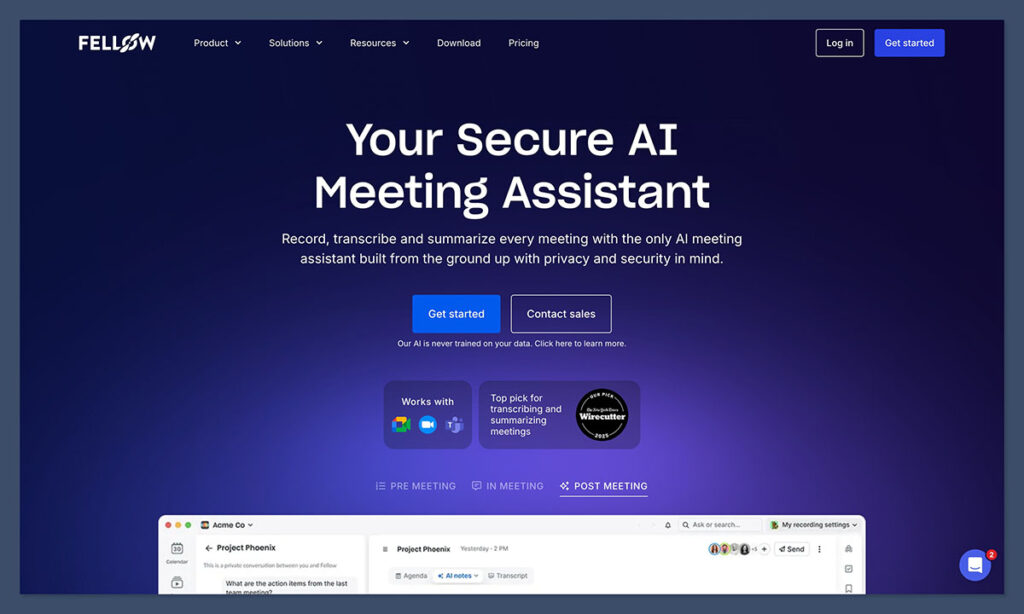
If you want a quick glimpse at who Fellow.AI seems to be built for, I’d say teams who deal with a lot of recurring calls. If most of your calendar is made up of client check-ins, weekly team syncs, sales demos, and planning for all that, Fellow AI is genuinely useful.
It does have a few downsides,, such as occasional bugs and a litmited free plan, , but I do think you get a lot of value for the price.
Pros
- End-to-end assistance with everything from meeting planning to action items
- Built-in security and compliance controls
- Surprisingly consistent accuracy, even in multi-person meetings
- Integrations with most major tools like Slack, Asana, Glean, HubSpot, Salesforce, Slack, Monday, and more
- MCP Server, API, and Zapier integrations for custom workflows
- Hundreds of templates to save you time
- Collaborative agendas for teams
Cons
- Free plan runs out fast
- No “live assistant” for real-time coaching and advice
- Occasionally misses things (like most AI notetakers, honestly)
Exploring the Key Features
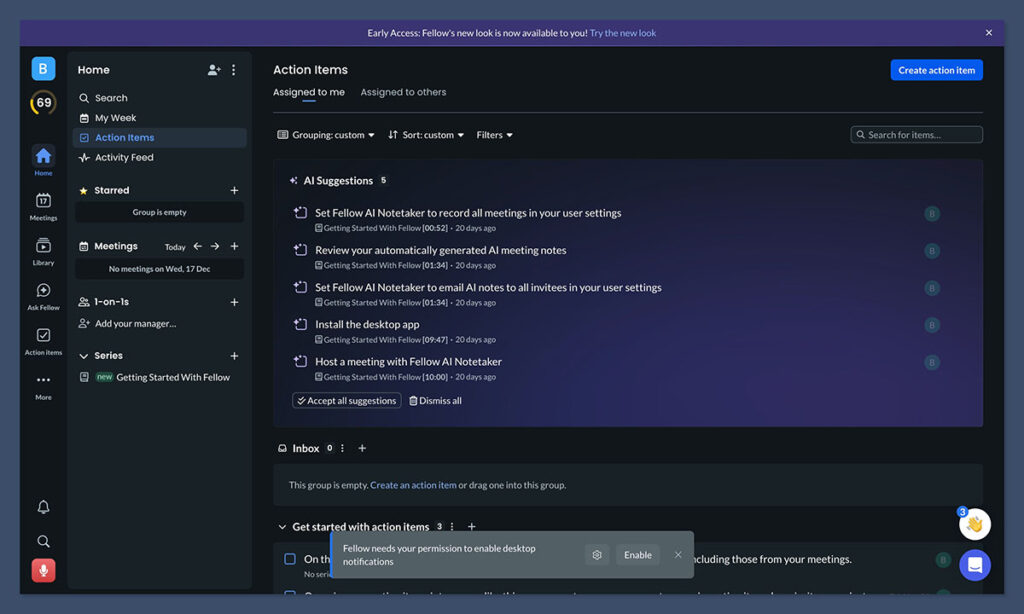
What I really like about Fellow AI, more than anything else, is it’s not just a transcription tool with good branding, like quite a few alternatives.
To its credit, this is a tool that does a pretty good job of handling the whole “meeting lifecycle”, from the prep, to the meeting itself, and keeping things organized afterwards. Here’s a closer look at what you can actually do with Fellow AI.
Preparation Support Before the Meeting
I’ll be honest, there have been quite a few times when I’ve skipped the prep work before a meeting and regretted it later. It just feels like way too much work to make sure everyone’s on the same page before you start chatting.
Then, of course, you jump in without an agenda and spend twenty minutes explaining what the meeting is about before you can actually begin.
Fellow AI helps with this in a surprisingly clever way. First, it generates a “pre-meeting brief” for everyone that’s going to be attending, which includes insights about previous conversations, what you need to follow up with, and potential action items.
Then you get a collaborative agenda that everyone on your time can add to ahead of time (uploading documents or making quick notes).
You can even use meeting automations to set up recording in advance, ask for insights from employees, or just make sure people don’t forget to attend.
On top of all that, Fellow gives you more than 500 meeting agenda templates for things like project kickoffs, sales calls, performance reviews, and interviews.
Now, a lot of platforms have templates, but Fellow’s feel written by actual operators. My favourite was a product review template that saved me an hour of rewriting the same structure every week.
Another great feature are the AI privacy controls for admins. Basically, they let you set granular meeting recording guardrails to stay in control over which meetings can and can’t be recorded.
All of these features are excellent, but Fellow’s prep features work best when everyone plays along. If even one stakeholder refuses to use agendas, you lose a lot of the value.
During the Meeting: Capturing Real Value
Fellow is one of the only AI meeting notetakers that offer a bot and botless recording option, giving users the flexibility to choose how they want to record their meetings.
When you’re actually in a meeting, Fellow acts as a note taker, but not an annoying one. It sits in the background of your Zoom, Google Meet, Teams meetings, or Slack huddles, and records, transcribes, and summarizes without headaches.
The transcription accuracy is very good, particularly in meetings where the audio was already pretty clean. Still, even when people do talk over each other, Fellow does a good job at keeping up.
It’s really good at capturing decisions, and data points side by side, so you get a great view of what people said in the meeting, and how they behaved (like when they left early).
Probably the best feature overall, though, are the “action items”. As the call unfolds, you can take notes directly inside the shared notepad. Fellow works with you too, capturing flagged decisions, tasks, and projects you need to assign to particular people.
There are some handy bonus features built in too, which I thought were brilliant at keeping everyone on track. For instance, you can see a timer in your meeting, allow participants to take private notes, and combine recordings with existing audio and video uploads.
Obviously, the more chaotic your meeting is, the more Fellow might struggle, and it’s worth remembering that there are limitations on most plans for how many conversations you can capture, and what kind of policies you can set.
But compared to the other tools I’ve tested? Fellow is one of the more reliable.
After the Meeting: Recaps, Search, and More
Most meeting tools I’ve tried are really only useful until the call ends. You get a transcript, maybe a summary, and then the whole thing vanishes into a folder you’ll never open.
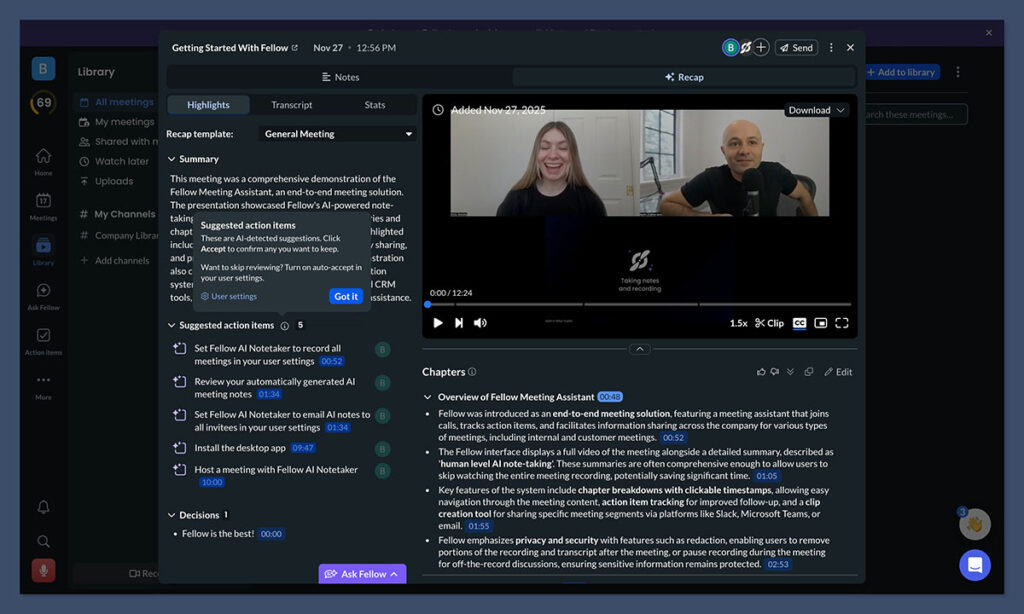
Fellow’s “after” phase is the strongest part of the product.
First, you get summaries that are actually helpful, with in-depth insights into what was actually said, and recordings you can actually choose to store in specific environments (like secure libraries).
Fellow can also upload your meeting insights to tools your teams already use, like your CRM platform (HubSpot or Salesforce), or a project management app like Linear, Monday, or Asana. On top of that, you’re not left to sort through meeting data alone.
If you have a question about your meeting, you can just turn to the built-in Ask Fellow assistant. It does all of the search work for you, to give you a quick, in-depth answer in seconds.
There’s also the option to have Fellow translate a meeting into over 90 languages, so if you need to share notes with a colleague or customer from a different country, it’s easy.
I will say, you need to orchestrate the “after meeting” features a little. If you don’t integrate it with your task tools, follow-ups won’t land as strongly. Plus, if only one or two people adopt Fellow, the meeting archive stays patchy.
But with broad team usage, it becomes one of those tools you didn’t realize you depended on until it wasn’t there.
Integrations & Language/Platform Support
Fellow has more than 50 integration options to explore. All the main stuff you’d probably want to link to your meeting assistant is there:
- Videoconferencing tools like Google Meet, Zoom, and Microsoft Teams
- Calendar apps and workflow planning tools
- CRMs like Salesforce and HubSpot
- Task tools like ClickUp and Asana
- Automation tools like Zapier
- MCP Server and API for custom workflows
If you can’t find a “pre-built” integration, there’s also an API, plus a Zapier connection system. Using those takes a little more effort, but they do help close some of the gaps.
Plus, as I said before, Fellow does support more than 90 languages, so you’re not stuck if you have a global team. One thing worth noting is that things like AI-powered CRM updates are locked into the enterprise pricing tier, and certain integrations only come with more expensive plans.
Still, I’d say Fellow does a pretty good job of keeping everything aligned.
Ease of Use, Collaboration & Security
One thing that really makes me feel more inclined to recommend Fellow AI to teams, is how easy it is to use, particularly with a group of other employees.
You don’t need a tour or training session to get started. Agendas take seconds to build, notes feel like writing in a normal doc, and the desktop app actually helps with meeting hopping. There’s even a surprisingly solid mobile app too.
Teams get access to built-in tools that support collaboration, like shared agendas, live notes, assigned tasks (with the option to add multiple assignees) and Slack nudges. Everything feels like it was built to make collaboration feel a lot less painful.
Plus, you don’t compromise on security either. Fellow behaves like a tool designed for companies with legal, compliance, or IT concerns. HIPAA, GDPR, and SOC 2 Type 2 is built in. Data isn’t fed into third party models, and you can set your own recording rules.
The only real issue here is that most controls are reserved for companies on higher-tier paying plans. For instance, you don’t get single sign-on, or delegated access unless you’re on an enterprise plan. Honestly though, that’s not unusual based on the other AI notetakers I’ve tried.
Pricing: Is Fellow AI Worth It?
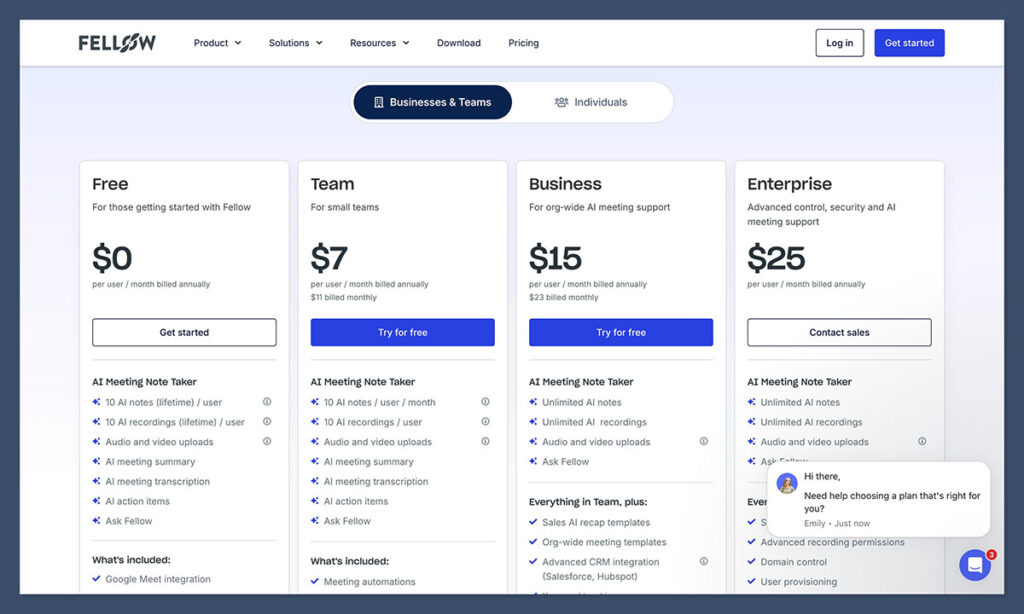
One fantastic thing about Fellow AI is there is a genuine free plan. Although it is a bit limited, you get 10 AI notes, 10 recordings, audio and video support, summaries, transcription, action items, and basic support for “Ask Fellow” (the chat-based assistant feature).
Once you’re ready to upgrade there’s:
- Team: $7 per user per month: All the free features plus API access, additional integrations, and meeting automation options
- Business: $15 per month: Unlimited notes, and recordings, Sales AI recap templates, advanced integration, and keyword tracking
- Enterprise: $25 per month: All the features of Business, plus advanced recording permissions, user provisioning, and domain controls
I honestly think most companies will skip the Team plan and move straight to Business, but at $15 per month per user, that tier isn’t exactly unaffordable.
If your meetings are sloppy, unstructured, or constantly losing action items, Fellow pays for itself quickly. One missed follow-up on a client call can cost more than a year of subscription fees.
Who Fellow AI Is Good For, and Who Should Avoid It
I won’t say Fellow AI is the best meeting tool for everyone, that’d be over-selling it, but it is a tool I’d actually feel happy recommending to:
- Companies with real security/compliance needs: If your legal team flinches at tools that casually share data with third-party models, Fellow is the safer option. The admin controls and recording rules are strict and fully configurable, letting you lock down how meetings are captured and accessed, and Fellow never trains its AI on your data.
- Teams that run recurring, structured meetings: If your schedule is full of weekly syncs, 1:1s, roadmap reviews, sales calls, and client updates Fellow strengthens the entire loop
- Sales, CS, and account teams living inside their CRM: The CRM integrations matter. After a demo or onboarding call, the summary lands where it should without rewriting
- Product and engineering teams who need clean meeting history: If your team juggles stakeholders, competing priorities, and decisions that need receipts, Fellow functions like institutional memory. When someone asks, “Why did we choose this direction?” you actually have an answer
- Hybrid and remote teams tired of playing “Who said that?”: When you have people spread across time zones, clean notes and fast recaps are really the only way to stay aligned
On the other hand, Fellow probably isn’t right for you if:
- You just want basic transcripts (for a much lower cost)
- Your teams refuse to use meeting agendas or task assignment tools
- Employees only really have meetings a few times a month
- You’re going to struggle to set up custom integrations
Fellow AI Review: My Verdict
For me, most AI note taking tools tend to be helpful, but not life-changing. There are tons of systems out there that can save you time on transcribing calls. Fellow AI is useful in a different way. It’s one of the few tools that treats meeting habits as something worth improving, not just recording.
It’s not flawless. Your team members need to actually commit to using it, and it’s not cheap if you’re only holding the occasional meeting. Plus, summaries definitely deserve a quick skim before you share them with anyone.
But ultimately, if your team spends a big chunk of the week in meetings, and you’re tired of decisions evaporating or tasks slipping through cracks, Fellow is one of the few tools that actually fixes the problem instead of just documenting it.
And unlike tools that spray your meeting data across third-party models, Fellow does it with strict privacy controls and hard security guarantees baked in.

Comments 0 Responses