

Fathom is the better starting point if you want a free, replayable meeting archive. Granola is the stronger choice if your priority is shaping useful notes, especially when you want bot-free capture across Mac and Windows.
The real question in Granola vs Fathom is what you need after the call: the original conversation to revisit, or an edited brief you can act on. Both help with meeting follow-up, but that difference should drive your choice before pricing or AI extras do.
Fathom also has the advantage for recording-led sales coaching. Granola suits consultants and small teams that want their own priorities reflected in the recap, rather than treating every conversation primarily as a recording.
Key Takeaways
- Free plan: Fathom, thanks to its ongoing recording archive.
- Customizable notes: Granola, with optional personal notes and editable templates.
- Replay and clips: Fathom, for reviewing the conversation itself.
- Flexible bot-free capture: Granola, particularly for Windows users.
- Sales workflows: Fathom, with more structured coaching and CRM follow-up.
- Privacy controls: It depends, because capture, retention, and sharing are separate decisions.
A Quick Comparison of Granola vs Fathom
Start with the record you want to keep. Granola helps you turn a conversation into useful notes; Fathom gives you recordings to revisit and share.
| Buying question | Granola | Fathom |
|---|---|---|
| Best fit | Best for notes you shape | Best for replayable records |
| Free-plan boundary | 30-day in-app history access | Limited advanced AI use |
| Paid entry for 1 user | Business: $14/user/month, billed monthly | Premium: $16/user/month, billed annually, or $20 monthly |
| Desktop availability | macOS and Windows | Mac and Windows |
| Mobile availability | iOS and Android | iPhone in-person capture |
| Capture style | Bot-free computer audio capture | Traditional meeting bot plus Mac bot-free beta |
| Replay | Notes and transcripts, without playable recordings | Recordings, with video dependent on capture mode |
| Team organization | Spaces, shared folders, folder chat | Shared meeting search and clip playlists |
| Key limitation | You cannot return to the original audio | Bot-free support varies by platform and meeting setup |
Granola’s free history limit is an access restriction, not automatic deletion. Likewise, Fathom’s Mac beta should not be read as a promise that every supported meeting app has identical bot-free capabilities.
Granola is best for you if:
- You want a client brief or decision log to be the main output.
- You prefer adding your own emphasis during a meeting.
- Your bot-free requirement includes Windows.
Fathom is best for you if:
- You need to revisit wording, tone, or context.
- You share meeting excerpts with colleagues.
- You want recordings to support sales reviews and follow-up.
Neither choice removes the need to review AI-generated commitments before sending them to a client.
1. Best Free Plan: Fathom
Fathom wins the free-plan round because its archive remains useful beyond the latest month. Granola has the lower listed paid entry price, but its free plan is less convenient when you routinely revisit older meetings.
Granola pricing: Lower paid entry, limited free access
Granola’s plans make the main upgrade decision straightforward: pay when you need ongoing access to your full meeting history or more advanced integrations.
| Plan | Price | Main buying reason |
|---|---|---|
| Basic | Free | Custom templates, shared folders, cross-meeting chat |
| Business | $14/user/month, billed monthly | Unlimited history, advanced models, integrations, API access |
| Enterprise | From $35/user/month; annual contracts available | Centralized sharing and retention policies |
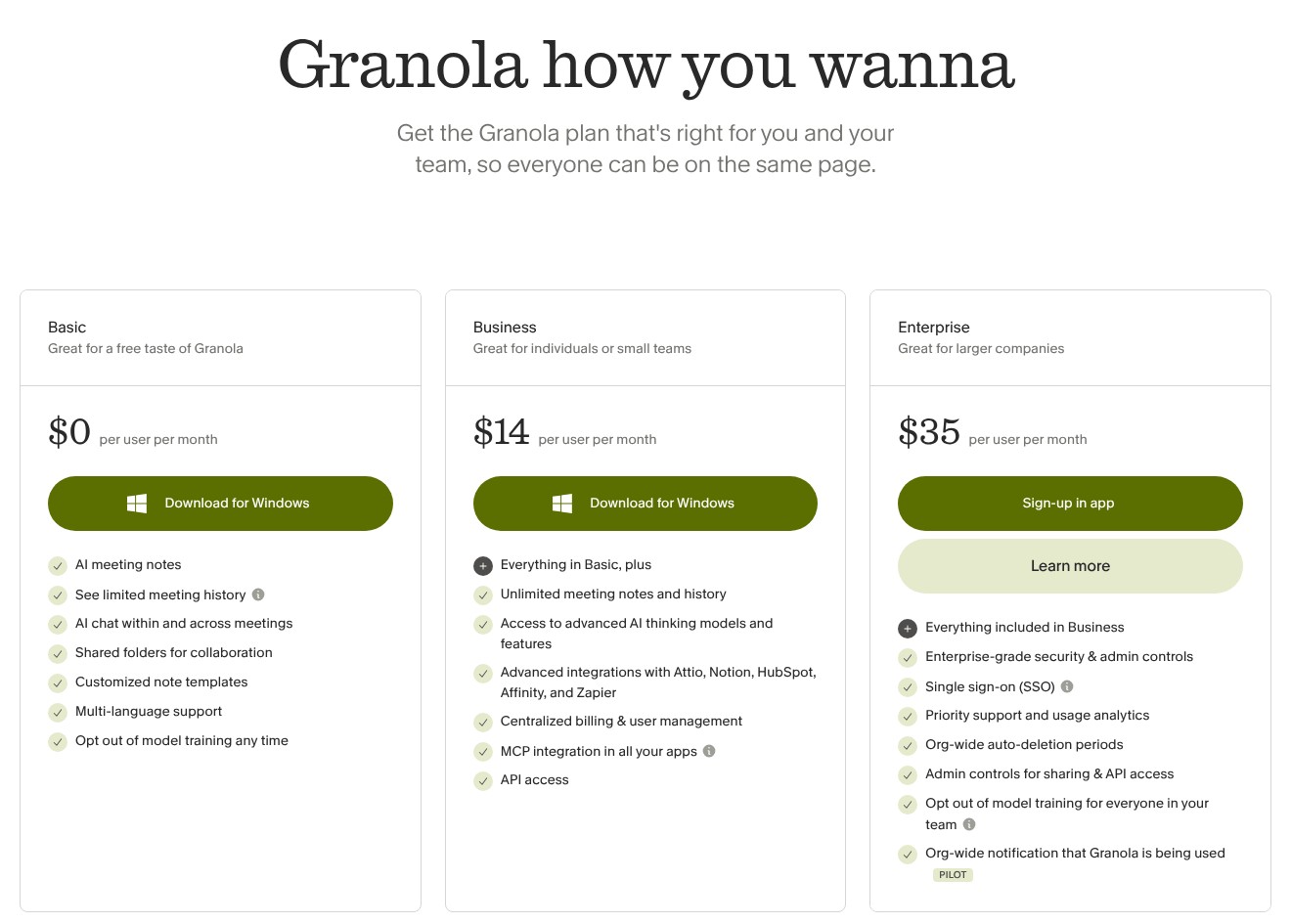
Granola’s 30-day restriction applies to in-app access. Older notes remain retained and become accessible again after upgrading; you can also export full-history titles and summaries as CSV.
That makes Basic more useful than a disappearing archive, but less useful than searchable, accessible history. An exported summary is not the same working experience as opening an older meeting inside the app.
Budget for the workspace, not just yourself. A Granola workspace uses a uniform plan, with a paid seat for each active member on a paid workspace. A separate personal workspace is possible.
Fathom pricing: Better free longevity
Fathom’s pricing separates individual upgrades from team plans. The lower Team per-user rate does not make it the cheapest purchase for a solo user.
| Plan | Annual-billing rate | Monthly-billing rate | Minimum seats |
|---|---|---|---|
| Free | $0 | $0 | Individual use |
| Premium | $16/user/month | $20/user/month | 1 |
| Team | $15/user/month | $19/user/month | 2 |
| Business | $25/user/month | $34/user/month | 2 |
| Enterprise | Contact sales | Contact sales | Confirm with sales |
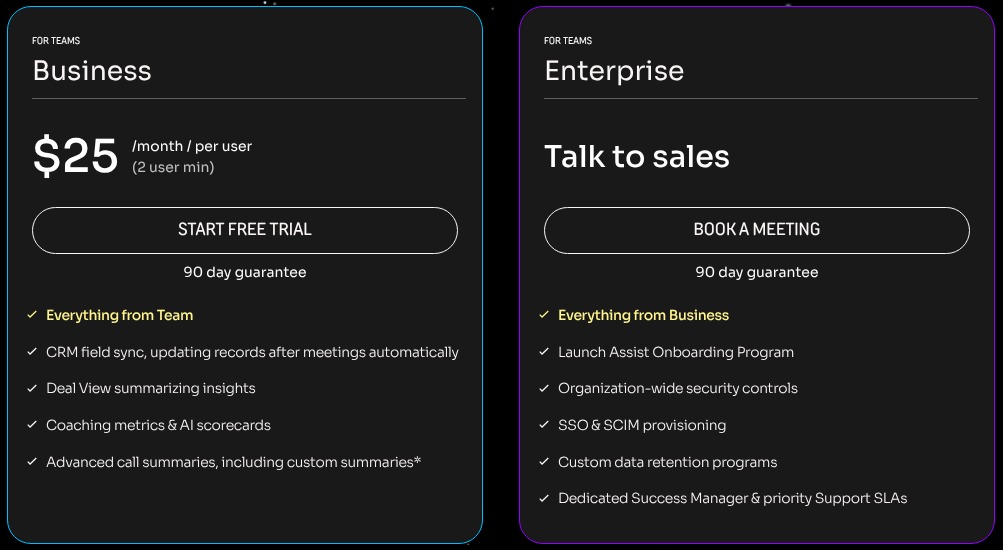
Free includes unlimited recording, transcription, and storage. Advanced AI summaries are limited to 5 per month, after which General or Enhanced summaries remain available.
For a freelancer, that distinction matters: you can preserve the meeting without paying, even if your preferred advanced summary format requires an upgrade. Unlimited storage does not mean unlimited access to every AI feature.
What would a small team actually pay?
For 2 people, Fathom Business costs $50/month equivalent with annual billing, or $68/month paid monthly. The annual commitment is $600.
2 Granola Business seats cost $28/month, billed monthly. These are not equivalent packages: Fathom’s higher-tier sales capabilities serve a different purpose from Granola’s note-led workflow.
Choose Fathom Free for a lasting recording archive. Choose Granola Business when full-history notes are enough and you would rather keep the paid commitment smaller. Granola Business uses monthly billing only.
2. Best for Notes You Can Shape: Granola
Granola wins for customizable notes because your input can guide the recap, rather than simply follow it. Fathom is a better fit if you mainly want an automated summary backed by a recording.
Granola: Give the recap your priorities
Granola combines transcript content with optional typed notes and meeting information. You can inspect supporting transcript passages, edit your original notes, and regenerate the output or switch templates.
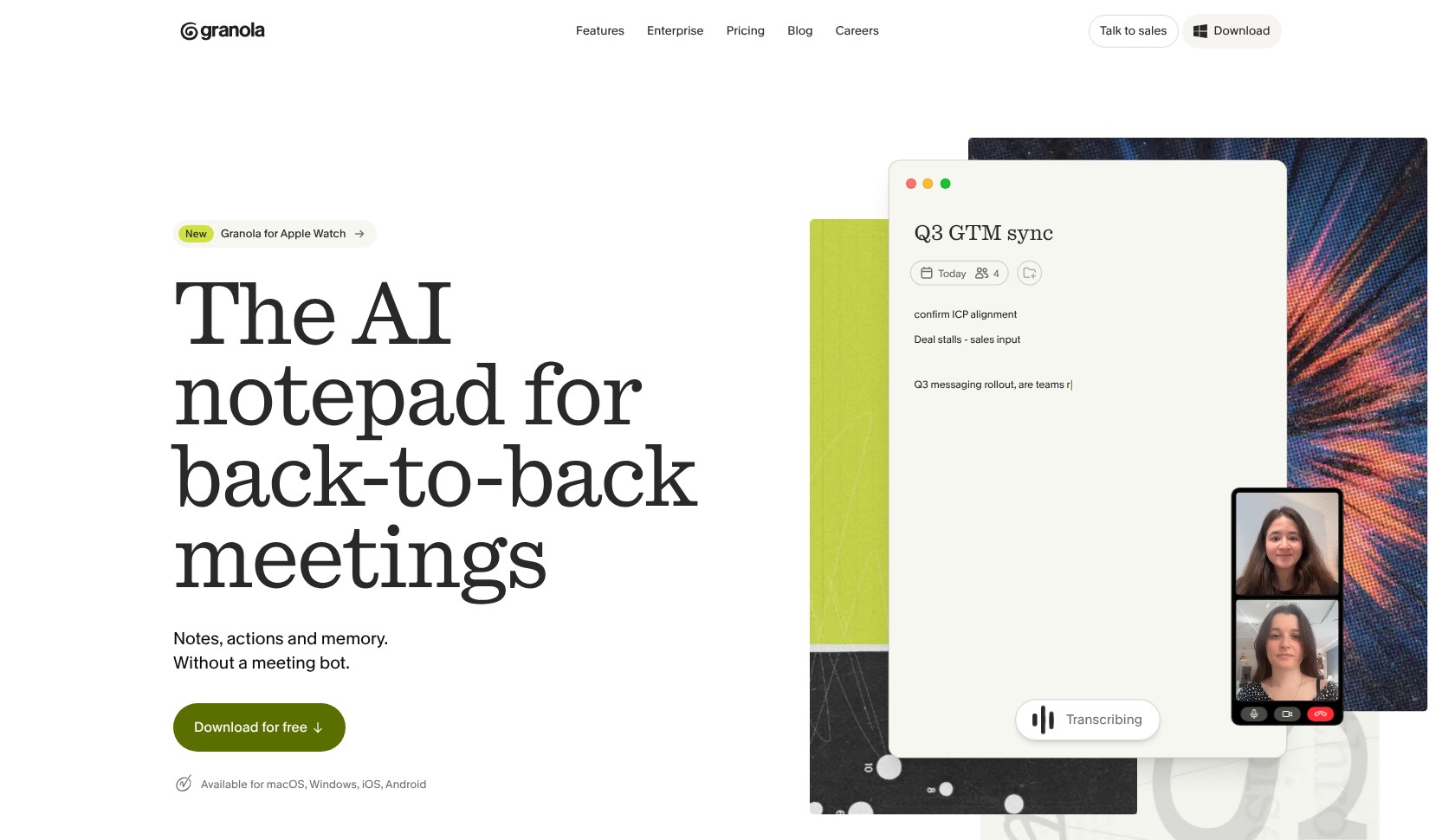
Typing is not mandatory. However, a few deliberate headings or bullets give you a way to emphasize what matters to your work without trying to transcribe the conversation yourself.
For a consultant, an illustrative workflow could look like this:
- Capture the meeting and jot down decisions that affect the project.
- Mark your priorities, such as unresolved scope or the client’s next deadline.
- Generate the enhanced note and inspect supporting passages.
- Edit before sharing, separating agreed actions from your own suggestions.
Highlighting “budget still unapproved” gives the recap a useful focus. You can then check the supporting transcript to distinguish a proposed budget from a commitment the client actually made.
Templates add structure, with a device caveat. You can define purpose, detail, length, and layout on macOS or Windows. Notes captured on iOS can use templates after syncing to desktop.
Organization-wide template sharing also requires a company email and colleagues on the same email domain. A freelancer collaborating with several unrelated client domains should not assume that template distribution works like internal team sharing.
Fathom: Let the recap lead
Fathom suits the opposite preference: capture the meeting, receive the summary, and work from its action items. Advanced summary options are useful when you want structured output without steering it through your own rough notes.
Its free allowance lets you try advanced summaries, while Premium removes that limited-use constraint. If a specialized format becomes part of every client call, budget for the paid workflow rather than assuming the free allowance will cover it.
The practical choice comes down to your role:
- You own the written deliverable: Granola gives you more ways to shape it.
- You need a reference record: Fathom lets you pair the recap with replay.
Granola wins when your judgment needs to influence the final note. Fathom remains compelling when you want the original conversation alongside the summary, particularly if you rarely add notes during calls.
3. Best for Recordings and Shareable Clips: Fathom
Fathom wins when a summary is not enough. It gives you a route back to the conversation, while Granola’s lasting meeting record is text rather than playable audio.
Fathom: Show the moment, not just the takeaway
A sales manager reviewing a customer objection may need more than “pricing concerns raised.” A relevant clip can preserve the qualification that followed, the question that prompted it, and the customer’s tone.
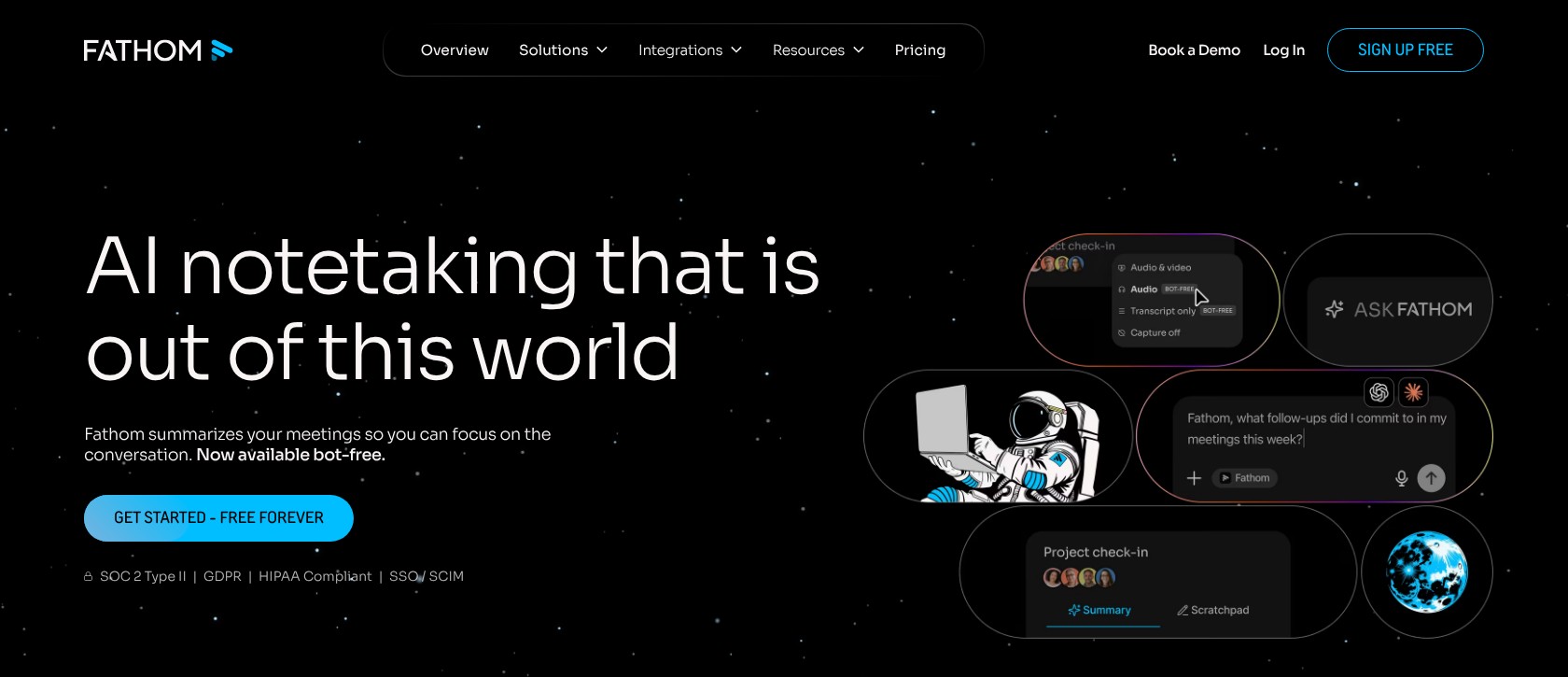
Fathom lets you share clips and organize them into playlists. That makes it useful for focused handoffs: a colleague can review the relevant excerpt instead of being asked to watch an entire call.
There are 3 distinct reasons to choose this approach:
- Verification: Revisit the exchange behind a summary.
- Handoffs: Share the passage a teammate needs.
- Coaching: Group useful examples for later discussion.
Access still matters. Team search covers meetings you own or that are appropriately shared with you; it is not an unrestricted search across every colleague’s conversations.
Video also depends on capture mode. Bot-free Zoom video requires the Zoom desktop app on Mac, so do not buy on the assumption that every Fathom recording route produces the same visual record.
Granola: Keep the useful text
Granola’s archive contains notes and transcripts, without an audio player for revisiting the call. That is a genuine limitation if the transcript leaves you uncertain about an exchange.
It can also be the more focused output. If a teammate needs the approved scope, deadline, and next action, a carefully edited brief may be more useful than another recording to review.
No replay does not mean audio is never stored. Granola processes captured audio for transcription, and mobile capture temporarily caches audio. The important buying distinction is that you do not receive a playable audio archive afterward.
Choose Fathom if replay is part of your normal work. Choose Granola if text is the intended final product, rather than a substitute you will later wish you could check against audio.
4. Best for Flexible Bot-Free Capture: Granola
Granola wins for broader bot-free flexibility, especially on Windows. However, Fathom’s Mac bot-free beta and iPhone in-person recording may already cover your meetings.
| Device or capture situation | Granola | Fathom |
|---|---|---|
| Mac desktop | Bot-free microphone/system audio capture | Traditional capture plus bot-free beta |
| Windows desktop | Bot-free capture | Traditional mode; bot-free is Mac-only |
| iPhone | iOS app | In-person capture |
| Android | Android app | Not listed in supported-device guidance |
| Bot-free Zoom video | No playable video archive | Mac beta with Zoom desktop app |
| Named desktop speakers | Supported setup for Meet, Zoom, and Teams | Attribution depends partly on capture setup |
Granola: More consistent with a no-bot requirement
Granola’s device coverage includes macOS, Windows, iOS, and Android. On computers, microphone and system audio capture removes the need to admit a separate meeting bot.
That is particularly useful when your team mixes Mac and Windows laptops. You can choose around a bot-free requirement without making Windows colleagues the exception.
Speaker identification still needs attention. Named speaker tags work on macOS and Windows for Meet, Zoom, and Teams with platform-specific setup; default labels are Me/Them.
Set this up before an important call. Names are not applied retroactively, and shared devices or overlapping voices can still complicate attribution.
Fathom: Check the exact meeting route
Fathom’s device guidance includes Mac and Windows desktop use plus iOS in-person capture. Bot-free remains Mac-only, and the broader rollout does not establish full feature parity across meeting platforms.
For Zoom bot-free video, use Zoom’s desktop app on Mac. Browser-based Zoom prevents bot-free video and can lose speaker attribution, although traditional bot capture can work with browser Zoom.
Do not assume equivalent bot-free video support for Google Meet or expanded Teams scenarios while those capabilities remain subject to rollout.
Before committing, check your actual setup:
- Is the meeting on desktop or mobile?
- Are you joining through a browser or the desktop meeting app?
- Do you need video, speaker names, or just a transcript?
Fathom also excludes phone calls, webinars, breakout rooms, and Teams group-chat instant meetings. Its iPhone support therefore should not be mistaken for general phone-call recording.
Granola takes this round, but Fathom may already cover everything you need if your normal workflow is supported Mac meetings and occasional in-person iPhone capture.
5. Best for Sales Workflows: Fathom
Fathom wins for recording-led sales follow-up because it connects review, coaching, and structured customer records. However, Granola’s shared notes and folders may be enough for teams that do not need recording reviews.
Fathom: Stronger structured sales follow-up
Fathom Business combines Deal View with CRM field sync and coaching metrics or AI scorecards. A CRM, or customer relationship management system, stores the account and deal information your sales team works from.
The distinction is between attaching meeting notes and updating structured fields. You do not need Business merely to send basic notes to a CRM, but advanced field synchronization and the broader deal workflow belong higher up the plan ladder.
Basic HubSpot, Salesforce, and Close sync is available below Business, with a limit of 3 users per email domain. That may cover a small operation without paying for the full coaching package.
Salesforce adds prerequisites worth checking before purchase:
- API access: Your Salesforce setup needs REST API access.
- Permissions: The connection needs access to the relevant objects.
- Older calls: Automatic sync follows summary generation; retroactive sync is manual per call.
Business supports a shared team Salesforce connection. Alongside this, meeting search filters and email or Slack tracker alerts can help teams find relevant discussions without manually opening every recording.
Those capabilities explain the win, but do not establish that AI coaching judgments are objectively correct. Treat scorecards as review prompts, not substitutes for a manager understanding the call.
Granola: Useful collaboration without a recording library
Granola supports private, team, and custom spaces, with shared folders and chat across folders or spaces. Folder rules can route notes to destinations including HubSpot and Slack.
That is a credible fit for account teams whose main need is a shared written understanding. Desktop collaborators can access transcripts, while recipients of web links see summary notes.
HubSpot notes can attach to contacts, companies, or deals, but the integration has practical boundaries:
- Work account required: Use Google Workspace or Microsoft 365, not a personal account.
- Existing match required: No matching record means no new record is created.
- New notes drive automation: Auto-sync applies to newly added notes; mobile notes use the desktop integration.
Salesforce sits at Granola’s Enterprise tier. If that integration is essential, compare the required plans rather than the cheapest advertised seats.
For broader collaboration choices, see our guide to AI note takers for remote teams. Here, Fathom wins for sales review; Granola is a strong alternative when the shared note is the deliverable.
6. Best for Privacy Controls: It Depends on Your Priorities
Neither product wins privacy outright. Granola avoids a playable recording archive, while Fathom retains a richer record; neither fact alone tells you who can access your data or how it may be used.
| Control | Granola | Fathom |
|---|---|---|
| Playable record | No lasting playback archive | Recording archive |
| Internal model improvement | Individual opt-out; Enterprise opted out by default | Personal opt-out and organization opt-out for team accounts |
| Third-party model training | Provider contracts prohibit training | Provider training prohibited |
| Sharing access | Link defaults and Enterprise enforcement | Appropriately shared meetings determine team search access |
| Central retention controls | Enterprise policies | Enterprise custom retention |
Separate capture from data policy
Bot-free does not mean local-only processing. Both products have cloud-data considerations, and Fathom stores data in the US.
Granola may use anonymized data for its own improvement by default, while Fathom may use de-identified customer data to improve its own models. Those practices are separate from restrictions on third-party providers training with customer data.
Review Granola’s model-training controls or Fathom’s security guidance if this affects your organization’s approval. Granola’s Android app lacks the training toggle, but changing it on desktop or iOS applies account-wide.
Check what sharing and retention actually mean
Granola’s link defaults can be anyone-with-link, company-only, or private. Changes apply to future notes; Enterprise can enforce retrospective workspace restrictions.
Remember that Basic’s 30-day window is not deletion. Older notes remain retained, and mobile audio caching is another reason not to describe Granola as storing no audio anywhere.
Before recording or transcribing meetings:
- Tell participants how the meeting will be captured.
- Confirm that your organization permits the intended processing and storage.
- Check recipient access before sending links or clips.
- Verify the administrative controls included in your chosen tier.
Granola fits a preference for text-only records. Fathom fits a deliberate need to retain and govern recordings. Participant notice alone should not be treated as proof that either setup satisfies every organizational or legal requirement.
How We Compared Granola and Fathom
This is a documentation-based comparison, not a hands-on accuracy test. Recommendations reflect the workflows and limitations that matter to professionals, freelancers, and small teams.
The criteria are free-plan usefulness, note customization, replay, device compatibility, sales follow-up, and privacy controls. Plan requirements and setup restrictions count alongside headline features.
The workflow examples show how those differences could affect your day. Category wins reflect that fit, rather than measured transcription accuracy or processing speed.
Prices current as of October 2026.
Granola vs Fathom: Our Winner
Choose Fathom if you want a free, replayable meeting record and a path toward structured sales follow-up. Its archive gives you somewhere to return when a recap leaves an important question unanswered.
That said, Granola is the better choice for note-led work, especially when you want to guide the written output or need bot-free Windows capture.
Start with the free version that matches your intended deliverable. Upgrade for a specific requirement, such as full-history note access or CRM field sync, rather than AI features you may never use.
Granola vs Fathom: FAQs
Can Granola work without typed notes?
Yes. Granola can generate notes from the transcript and meeting information alone. Your own headings or bullets are optional inputs that help steer the output.
Does Fathom always send a bot?
No. Fathom offers a Mac-only bot-free beta. Windows still uses traditional capture, and bot-free capabilities vary by meeting platform; bot-free Zoom video requires the Zoom desktop app on Mac.

Comments 0 Responses