

Best for small teams

LiveChat Essential
Visit Website →$19/user/month (annual); $25 monthly
- 1 AI Agent, 10 AI resolutions a month
- Inbox, ticketing and Shopify selling
- 60-day chat history
Most popular
LiveChat Growth
Visit Website →$79/user/month (annual); $99 monthly
- 10 AI Agents, 200 AI resolutions a month
- Supervision and shared canned responses
- Unlimited chat history
Best for large teams
LiveChat Enterprise
Visit Website →Custom pricing
- Custom AI Agents and workflows
- SSO, activity logs and white label
- Dedicated team and SLAs
Fritz.ai is reader-supported. If you buy through links on this page, we may earn a commission at no extra cost to you.
I rate LiveChat 4.0/5 in this LiveChat review. Its straightforward Shopify installation and polished agent workspace earn my recommendation, but per-seat pricing makes team size a serious buying consideration.
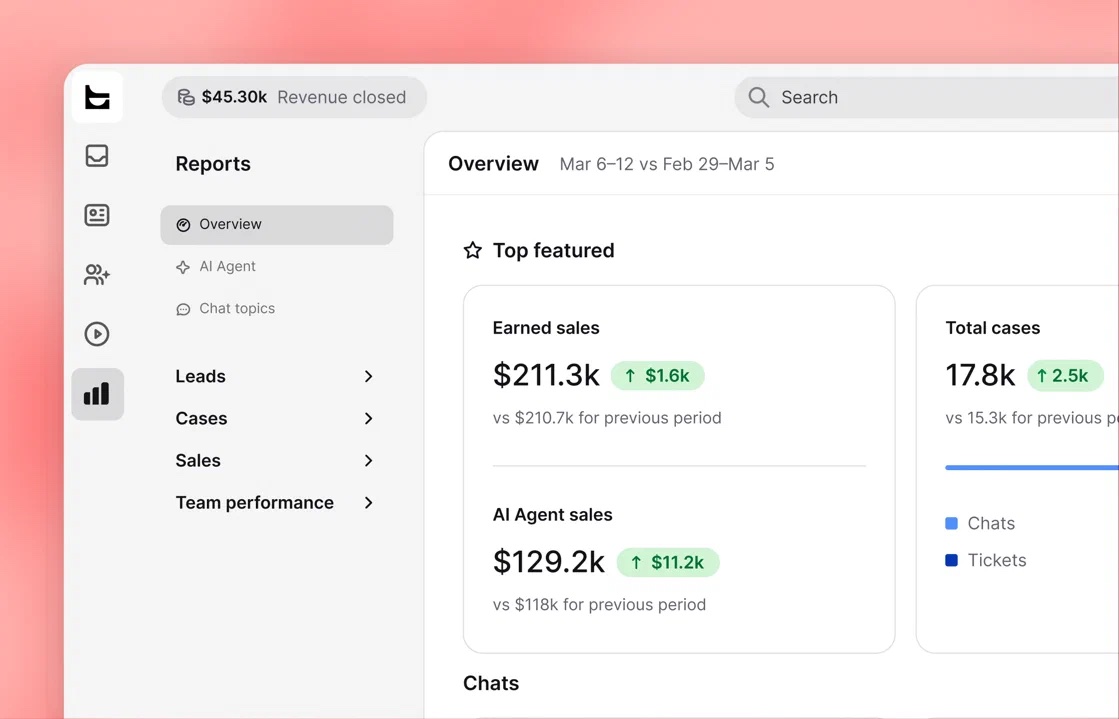
New LiveChat sign-ups now get Text plans, the LiveChat team’s newer product, with an AI Agent, shared inbox and ticketing bundled together. Existing customers can keep their legacy LiveChat subscriptions.
I’ll cover the new plans, AI features and Shopify selling tools, including when the per-seat bill outweighs the convenience of keeping customer conversations together.
Key Takeaways 🔍
- The workspace prioritizes quick replies, with sneak peek, # canned responses, transfers and AI drafts.
- Self-serve plans cost $19 or $79 per user/month annually, at the time of writing, with a 14-day no-card trial.
- Shopify shoppers can add recommended products to their cart inside chat, with sales attribution afterward.
- Essential is a taster: 10 monthly AI resolutions, 60-day history and no supervision. Growth costs roughly 4x more per seat.
- Legacy customers keep their plans, but must move to Text for the bundled AI Agent and tickets.
📢 Read about the recent changes I’ve made to this page: ⬇️
I first tested LiveChat in August 2026 and rewrote this review in November 2026. The pricing and AI allowances are new; the setup walkthrough retains the steps that still apply.
- LiveChat Pros & Cons
- How Much Does LiveChat Cost?
- My Experience With LiveChat
- Are LiveChat’s AI Features Any Good?
- Can LiveChat Help You Sell?
- Managing Conversations With LiveChat
- Does LiveChat Have Good Integrations?
- How Does LiveChat Keep Your Data Secure?
- Using LiveChat’s Customer Support
- How Does LiveChat Compare to Competitors?
- How We Test Live Chat Software
- LiveChat Review: Should You Run Your Live Chat on LiveChat?
- LiveChat FAQs
LiveChat Pros & Cons
LiveChat’s workspace impressed me, particularly its shortcuts and in-chat cooperation tools. The trade-off is paying for each teammate, with important collaboration features reserved for Growth.
What I Like
- ✔️ Quick agent tools: sneak peek displays unsent messages, # inserts canned responses, and transfers preserve conversation context.
- ✔️ AI Agent included: every Text plan bundles automation with a monthly resolution allowance.
- ✔️ No developer needed: Shopify uses an app; WordPress supports a plugin or tracking snippet.
- ✔️ Strong Shopify selling: live catalog recommendations and add-to-cart work inside chat.
- ✔️ Shared inbox: website chat and messaging channels sit alongside email and tickets.
- ✔️ No-card trial: try the selected plan without an automatic charge afterward.
What I Dislike
- ❌ Seats add up: at the time of writing, 10 Growth users cost $790 monthly with annual billing.
- ❌ Essential is restrictive: 10 AI resolutions, 5 reply suggestions per user monthly and 60-day history.
- ❌ Team tools require Growth: supervision, takeover and shared canned responses aren’t included on Essential.
- ❌ Legacy customers face a product decision: the AI Agent isn’t included, and some integrations don’t carry into Text.
- ❌ Users report billing and cancellation disputes: complaints involving older subscriptions make renewal settings worth checking before committing.
How Much Does LiveChat Cost?
At the time of writing, new customers choose between self-serve Text plans costing $19 to $79 per user/month with annual billing, or a custom Enterprise subscription.
- Essential ($19): Solo owners and small teams starting with chat.
- Growth ($79): Support and sales teams needing collaboration tools.
- Enterprise (custom): Organizations needing custom AI, SSO and SLAs.
| Feature | Essential | Growth | Enterprise |
|---|---|---|---|
| Per user/month, billed annually | $19 | $79 | Custom |
| Per user/month, billed monthly | $25 | $99 | Custom |
| AI Agents | 1 | 10 | Custom |
| Included AI resolutions/month | 10 | 200 | Custom |
| Extra 50 AI resolutions | $49.50 | $49.50 | Custom |
| AI reply suggestions/user/month | 5 | 50 | Custom |
| Live visitors tracked | 50 | 400 | Custom |
| Proactive campaigns | 3 | 30 | Custom |
| Conversation and file history | 60 days | Unlimited | Unlimited |
| Chat teams | 1 | 10 | Custom |
| Workflow rules/monthly executions | 3 / 300 | 10 / 1,000 | Custom |
| Supervision, takeover, shared canned responses | No | Yes | Yes |
| Multilingual support, 48 languages | No | Yes | Yes |
| SSO, activity logs, white-label widget | No | No | Yes |
| Recommended for | Solo owners, small teams | Support and sales teams | Custom AI, enterprise controls |
Prices are USD and exclude sales tax or VAT. Annual billing means paying for the year upfront, not paying the displayed monthly equivalent each month.
- Channels: website, in-app, Messenger and SMS through Twilio come with every plan.
- Tools: AI Copilot, the live Shopify catalog and workflows are included.
- Access: every plan includes round-the-clock support and web and desktop apps.
Try LiveChat free for 14 days, no card needed: See plans and start a trial.
What’s New With LiveChat? 💻
- 11 May 2026: Text announced its rebrand, new website, AI selling agents and custom skills.
- By November 2026: new LiveChat trials receive Text plans, bundling the AI Agent, inbox and ticketing.
- Existing customers: keep their LiveChat account, plan, price and login; both products can run side by side.
- Moving to Text: LiveChat says pricing stays the same without downtime, with most accounts receiving 200 monthly AI resolutions. Check integration compatibility first.
- Shopify installations: the app listing still shows older prices at the time of writing. Confirm your trial’s plan in billing settings.
Legacy LiveChat plans remain for existing customers, without the Text AI Agent or tickets. These are monthly prices per person, shown with annual billing first and monthly billing second:
- Starter ($19 / $25): 1 user, 100 tracked visitors, 1 recurring campaign and 60-day history.
- Team ($49 / $59): 400 visitors, unlimited campaigns and history, no fixed user cap, basic reporting.
- Business ($79 / $89): 1,000 visitors, scheduling, staffing prediction, advanced reports, SMS and Apple Messages for Business.
AI resolutions are shared across the account, not multiplied by seats. Around the included Growth allowance, adding resolution packs to Essential can cost less than upgrading every teammate.
| Team size | Essential seats only | Essential + 4 packs, 210 resolutions | Growth, 200 resolutions | Cheaper around 200 resolutions |
|---|---|---|---|---|
| 1 user | $19 | $217 | $79 | Growth |
| 3 users | $57 | $255 | $237 | Growth |
| 5 users | $95 | $293 | $395 | Essential + packs |
| 10 users | $190 | $388 | $790 | Essential + packs |
These are monthly equivalents with annually billed seats, before tax. Resolution packs are added from billing settings whenever you need them; included resolutions don’t roll over into the next month.
Growth wins this AI-volume comparison for teams of 1 to 3. Larger teams should choose it for collaboration and unlimited history, not merely the larger resolution allowance.
Is LiveChat Good Value for Money?
- Essential is inexpensive but thin: its AI allowance suits testing or very light automation, not a busy store.
- Growth buys team features: supervision, unlimited history, multilingual groups and agent reporting explain the upgrade better than AI alone.
- Per-seat billing penalizes larger teams: compare Tidio’s conversation-based model and Crisp’s workspace pricing before adding occasional users.
- The trial is risk-free; annual billing isn’t flexible: monthly plans cancel anytime; annual plans run 12 months and change at renewal. Schools and nonprofits can request discounts.
My Testing Notes 📝
I recommend Essential with monthly billing at $25 per user for solo owners or small teams starting cautiously. Plan changes take effect from the next billing cycle.
Choose Growth when supervision becomes necessary, or when a solo account regularly needs more than 60 monthly AI resolutions. For larger teams, collaboration must justify upgrading every seat.
My Experience With LiveChat
Getting LiveChat onto my site didn’t require writing code, but installing the storefront widget wasn’t the entire Shopify setup. Checkout and thank-you pages needed their own attention.
My August walkthrough covered installation and the agent workspace. The Text-specific settings below follow the current setup; they aren’t additional interactions from that earlier test.
How I Signed Up
I signed up with a business email and password, verified my email and followed the built-in onboarding steps. There was no card requirement, so signup didn’t commit me to a subscription.
At the time of writing, the trial gives you 14 days on Essential or Growth without an automatic charge. Your workspace carries over if you subscribe afterward.
Installing the Widget on Shopify and WordPress
Shopify’s app installation kept me out of the theme code. I connected my store, then enabled the widget through the theme editor using these steps:
- Open “Add apps” in Shopify admin, choose “Shopify App Store” and search for LiveChat.
- Select “Install” twice to add the app and confirm installation.
- Create an account or choose “Log in” to connect your LiveChat account.
- Pick your store, then select “Add chat widget.”
- Select “Save” in the theme panel, then use “LiveChat Customization” to restyle the widget.
Checkout and thank-you pages were a separate job. The storefront save didn’t replace checkout customization, so I followed this additional sequence to add the widget there:
- Open Settings > Checkout > Customize, then “Apps.”
- Select “+” to add LiveChat, optionally enabling it for Shop Pay.
- Save the checkout changes, then repeat for the thank-you page.
On WordPress, I pasted the tracking snippet into footer.php before the closing body tag. A theme’s code-snippet field is another route; LiveChat also offers a WordPress plugin.
For Text installations, the embed settings sit under Website widgets. Follow this sequence to connect the website and confirm that the installed widget is live:
- Open Settings > Website widgets, enter your website address and continue.
- Choose Embed code, open the HTML tab and copy the code.
- Paste before
</body>, save, reload and interact with the widget. - Confirm “Connected” status before moving on to team setup.
My Testing Notes 📝
Budget for the checkout-page step. A widget visible on product pages doesn’t guarantee shoppers can reach you at checkout, where delivery or payment questions can interrupt a purchase.
Setting Up My Team
I invited agents through the Team section using “+ Invite agents.” I entered their email addresses, chose each person’s role and selected “Invite”; they received setup instructions by email.
The agent’s “Edit profile” control lets you set concurrent chat limits and working arrangements. Group assignments determine where agents work, while working hours can change their availability.
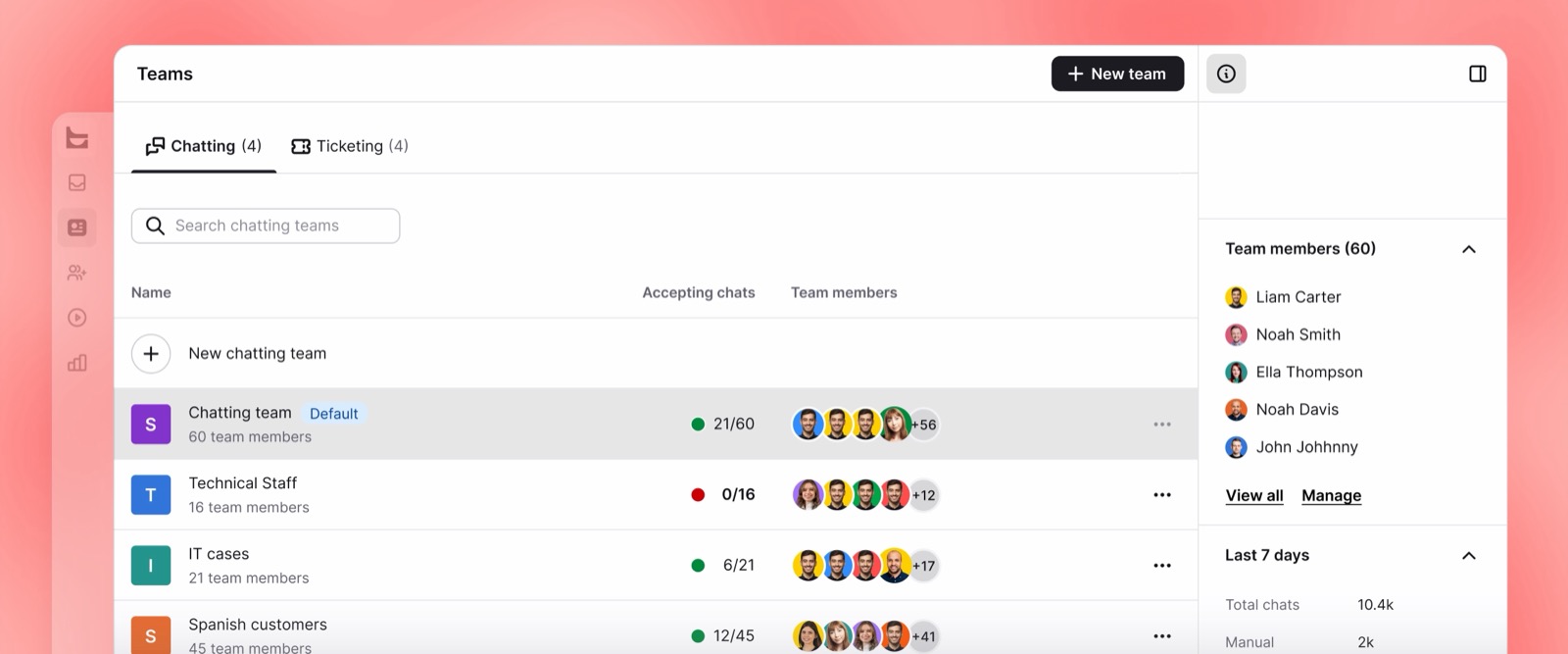
- Essential supports 1 chat team, suitable for a shared queue.
- Growth supports 10 chat teams, letting sales and support work separately.
- Routing rules require Growth, including rules based on page, topic or channel.
Handling My First Chats
The agent workspace is my strongest reason to recommend LiveChat. Its shortcuts reduce the work between reading a customer’s question and delivering an answer:
- Sneak peek shows the visitor’s message while they’re typing, before they send it.
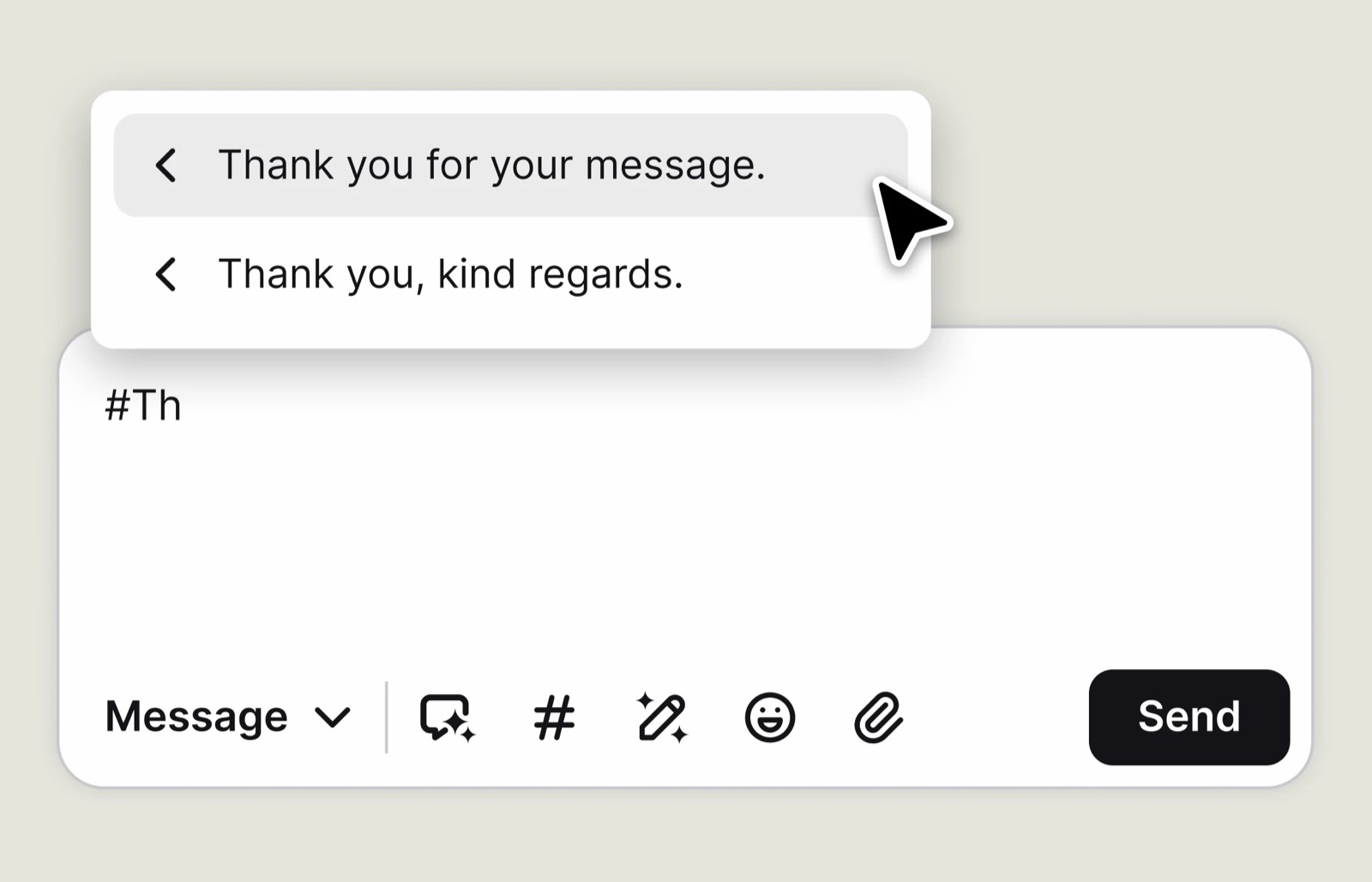
- Canned responses insert with # followed by a shortcut; a shared team library requires Growth.
- Chat transfer moves the conversation to another agent or team with its context.
- Supervision allows private coaching during a conversation; supervision and takeover require Growth on Text plans.
I opened Copilot from the top-right control or with Cmd+G on Mac and Ctrl+G on Windows. On mobile, it sits in the bottom navigation; each agent’s Copilot conversations are private.
In the Text inbox, Space drafts a reply and Refine rewrites it. The details panel adds shopper context, but Essential’s limited history means older exchanges won’t always remain available.
My Testing Notes 📝
Sneak peek and canned responses helped most with response time. Supervision also makes LiveChat attractive for training junior agents, but its Growth requirement changes the budget for a team rollout.
Training the AI Agent
Text walks you through knowledge, instructions and skills, with a preview widget for testing answers before launch. Connecting sources isn’t the same as confirming that replies are customer-ready.
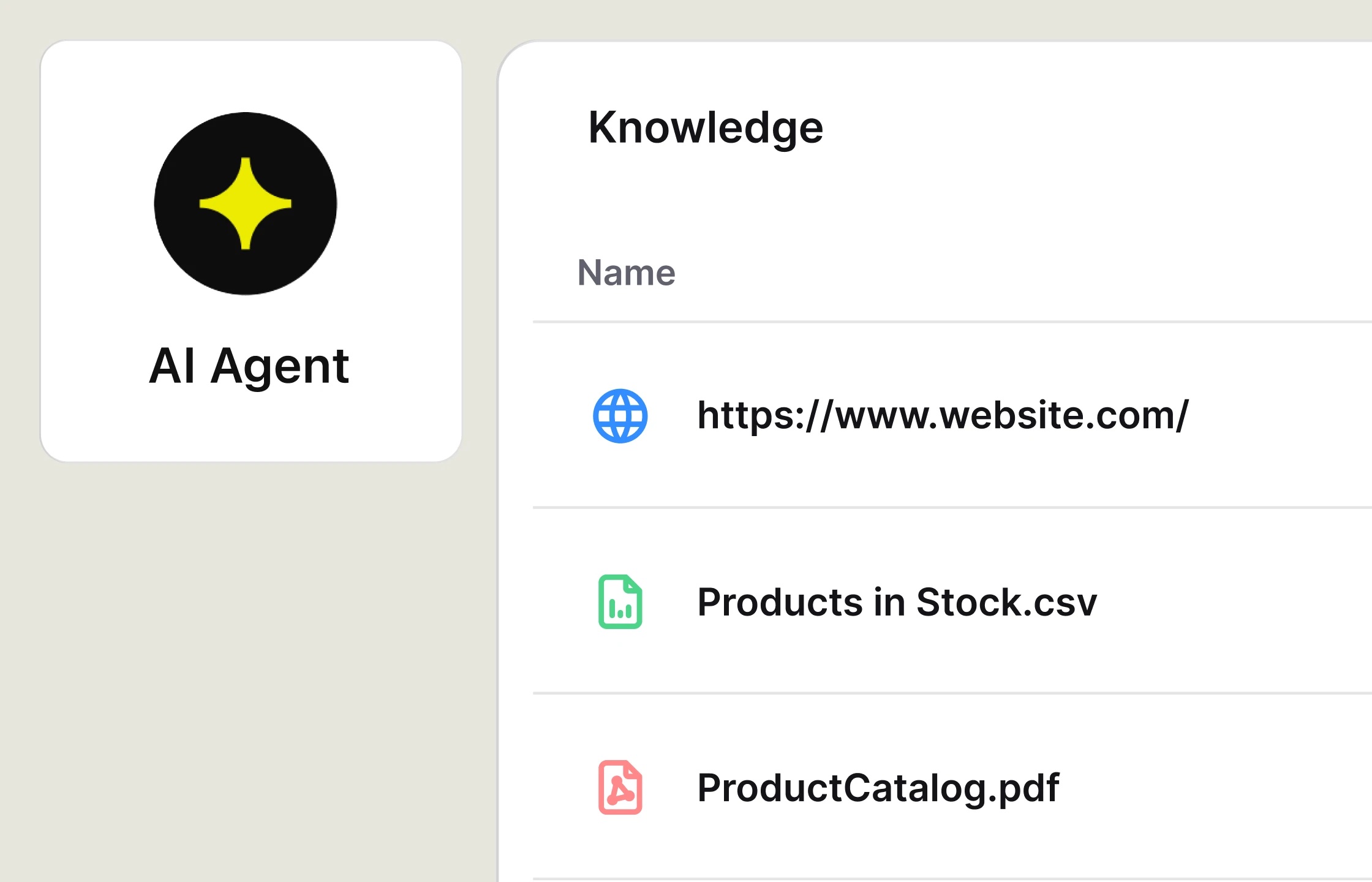
- Add knowledge: websites support up to 5,000 pages each with scheduled rescans; you can also write articles in Text.
- Upload supporting files: PDF, DOCX, PPTX, TXT, CSV and MD files can be up to 50 MB each.
- Set instructions: control the name, tone, reply length, languages and excluded topics within 10,000 characters.
- Enable skills: choose customer-detail collection, discounts, ticket creation or transfers.
- Review knowledge gaps: unanswered questions are ranked by frequency to help prioritize missing information.
Top Tip 💡
Keep internal-only documents out of the AI Agent’s sources. Information you supply can appear in customer replies; exclude unsuitable topics, such as legal or investment advice, through instructions.
LiveChat Testing Summary
Installation and team invitations were straightforward. Shopify’s separate checkout setup needed extra attention because the storefront installation didn’t complete the job for those pages.
Plan selection matters once agents collaborate. Supervision and unlimited history are compelling reasons to choose Growth, even when the AI allowance alone doesn’t justify it.
Are LiveChat’s AI Features Any Good?
LiveChat’s AI goes beyond reply drafting: it answers from your content and transfers conversations with context. I recommend testing it for routine first-line support, not assuming it can replace your team.
At the time of writing, Essential’s allowance mainly supports evaluation. Creating tickets and calling webhooks show how agentic AI works in practice, but those capabilities don’t establish answer accuracy.
🤖 The AI Agent
- Answer routine questions about delivery, returns, prices and opening hours.
- Recommend products when a shopper expresses buying intent.
- Collect contact details and share discounts through enabled skills.
- Create or update tickets for issues needing follow-up.
- Transfer to your team, with ticket creation available when nobody can take over.
Website chat and messaging channels share the AI Agent’s knowledge, including WhatsApp after hours. Essential includes 1 AI Agent, while Growth supports 10 for differentiated setups.
🧠 Custom Skills
Custom skills translate intent into actions, such as tagging a conversation or sending data through a webhook. Both self-serve plans include 10, configured with plain-language instructions.
The order-status example asks for an order number or email, then retrieves the answer from your system. The instruction is code-free; the webhook isn’t, so someone must maintain that endpoint.
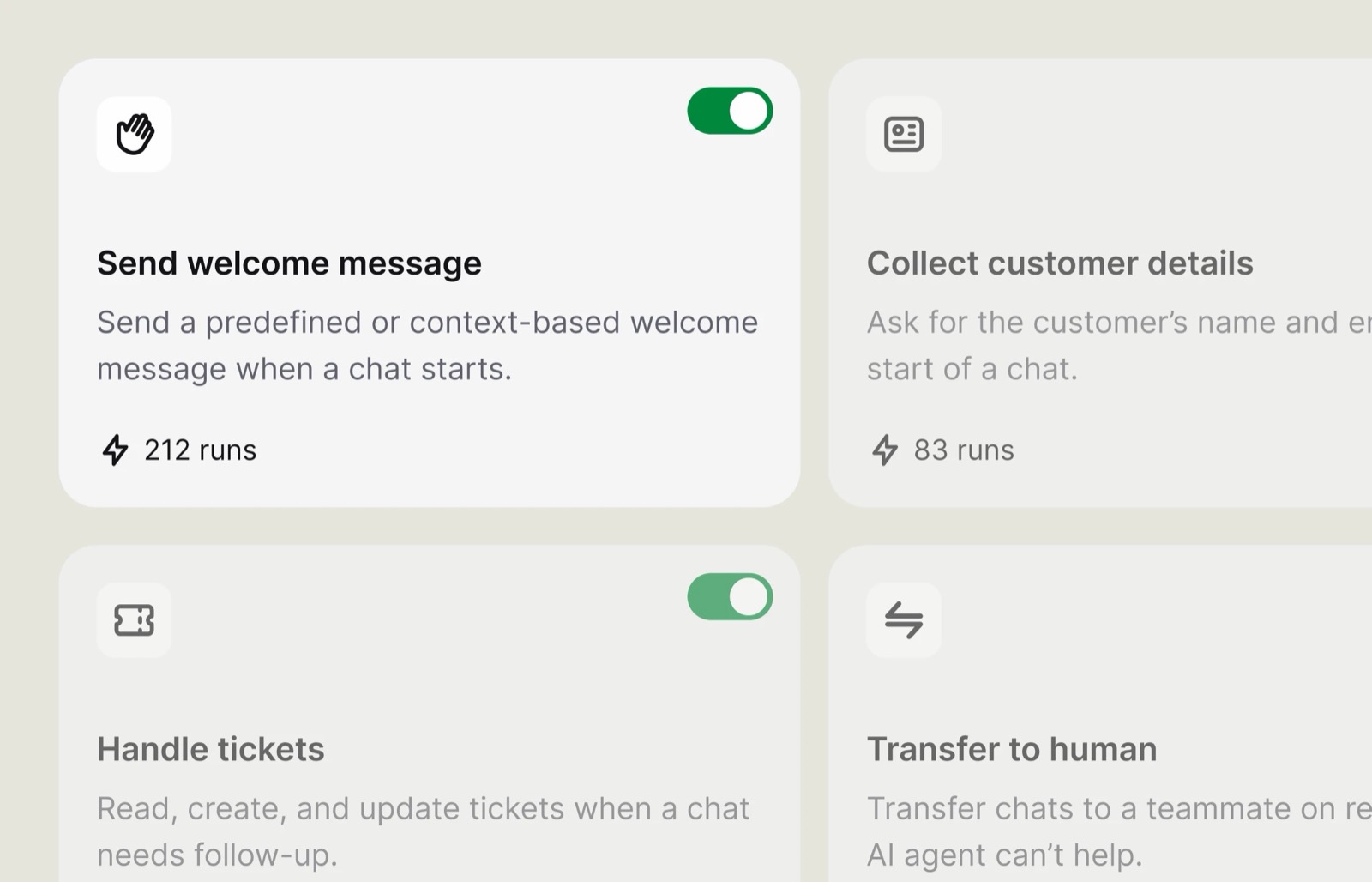
For automation spanning several business systems, compare dedicated AI agent builders. LiveChat is easier to justify when work starts in a customer conversation, rather than a broader operational workflow.
💬 AI Copilot for Your Team
- Space drafts replies from connected knowledge.
- Refine adjusts wording, including tone, grammar and length.
- Tag suggestions help classify conversations.
- Shared knowledge supports both agent assistance and customer-facing answers.
- Chat summaries appear on Growth and Enterprise.
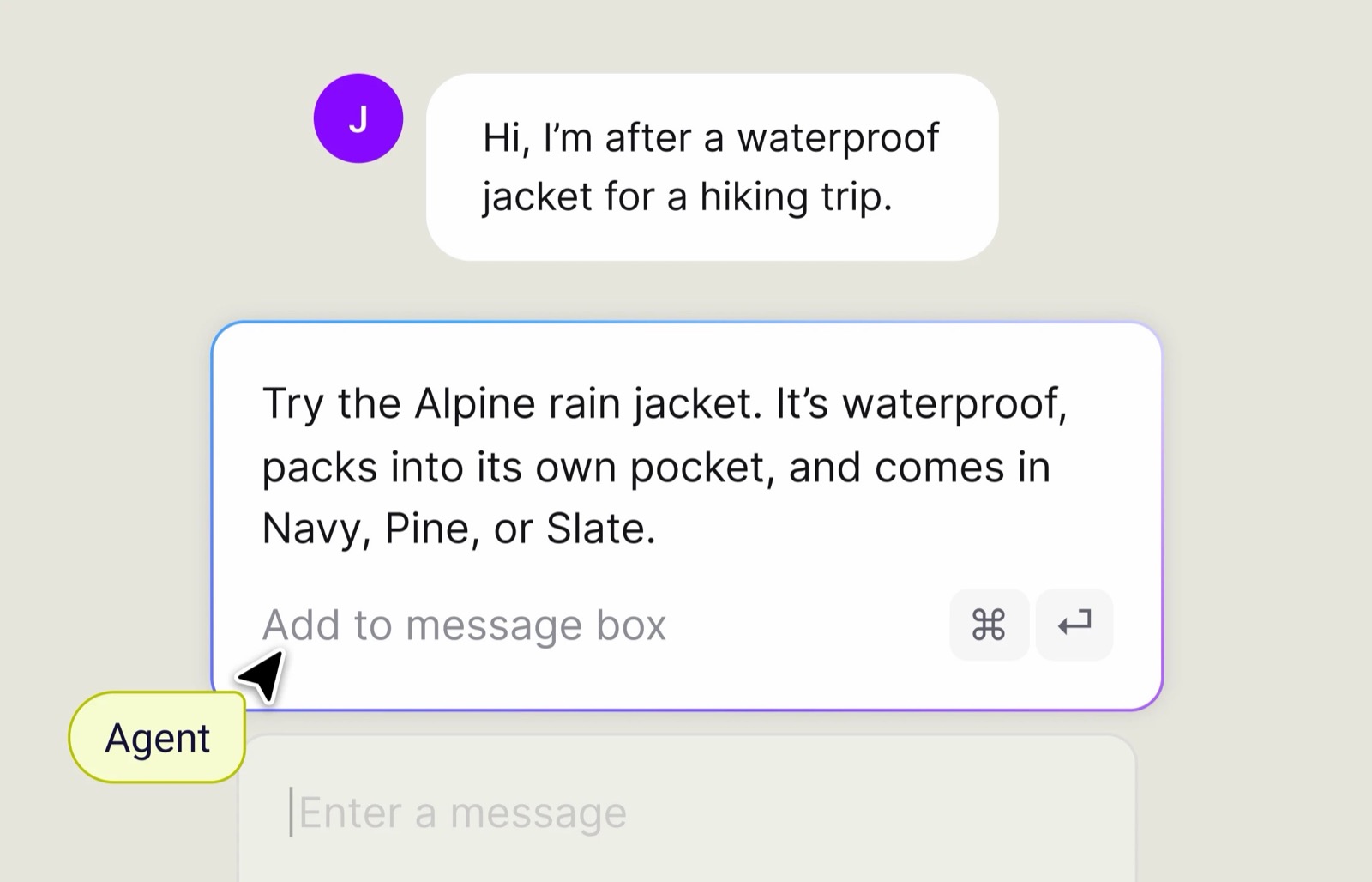
Unfortunately, reply suggestions are capped at 5 per user monthly on Essential and 50 on Growth. Shared knowledge helps keep answers consistent, but Essential offers little drafting capacity.
💵 How AI Resolutions Are Billed
- 1 resolution per conversation: the AI must independently solve at least 1 question. Unanswered transfers, spam, greetings and test chats don’t count.
- Allowances reset monthly: a warning arrives at 90% usage, with no rollover.
- Running out pauses new AI chats: LiveChat says service resumes when you add a 50-pack for $49.50. Check your billing settings for account-specific top-up behavior.
📊 LiveChat’s Own AI Numbers
These are vendor claims, not results from my test. Don’t treat the headline figures as a forecast of how accurately the AI will handle your store’s questions.
| Claim | Where it appears | What it tells you |
|---|---|---|
| LiveChat says 98% resolution | AI page | Headline without a published sample or method |
| Text claims 74% of routine inquiries resolved | May 2026 announcement | Early March and April deployments |
| Text claims 266% conversion lift | Same announcement | No baseline supplied |
| LiveChat says 70% of chat sales involve AI | Nuvoo customer story | Result from 1 retailer |
| LiveChat says 96% resolved and 215% more AI-assisted orders | Selsey customer story | Result from 1 retailer over 3 months |
A billed resolution doesn’t mean every question was answered. Use the AI Agents report and knowledge gaps view to assess your own results rather than buying around a headline percentage.
If you only need a website-trained bot, a standalone builder like Chatbase may be simpler. LiveChat’s stronger argument is combining automation with an active human support team.
Can LiveChat Help You Sell?
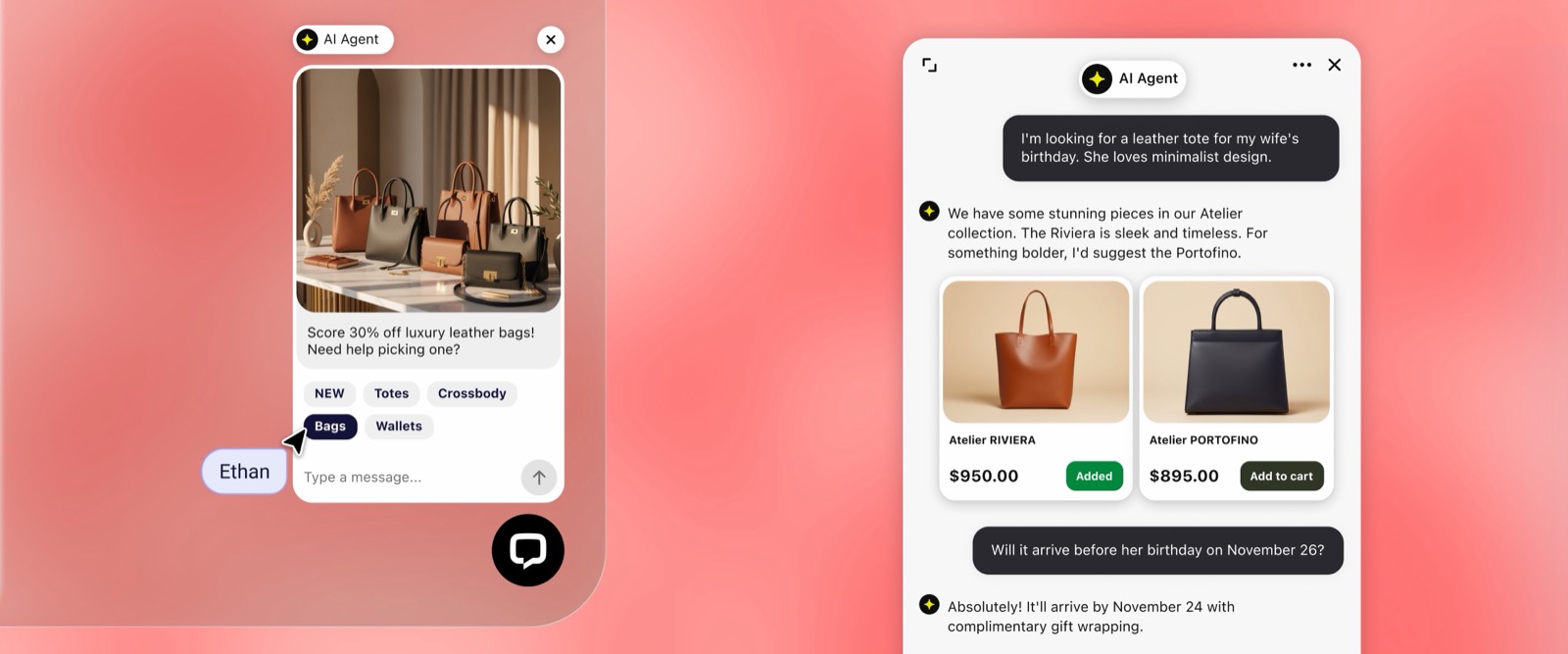
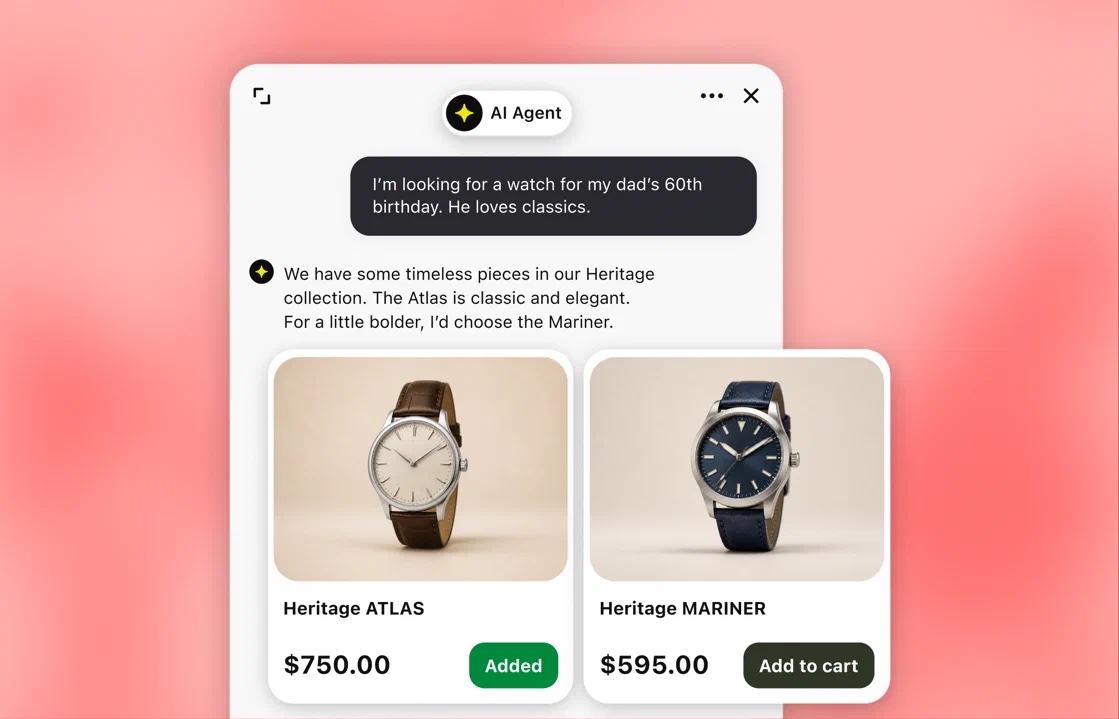
LiveChat makes its strongest case on Shopify. The AI Agent recommends products and lets shoppers add them to their cart inside chat, rather than directing them elsewhere.
At the time of writing, Essential limits proactive selling to 3 campaigns and 50 tracked visitors. Compare it with other AI tools for ecommerce on attributable revenue, not feature counts.
🛍️ Shopify and WooCommerce
Every plan includes the live Shopify catalog, giving the AI Agent real products to recommend. Your team can also see the shopper’s cart beside the conversation.
WooCommerce adds cart and product context too, with order details available to agents. That helps distinguish a pre-purchase question from a customer asking about an existing delivery.
- Cart contents show what the shopper is considering.
- Order value and purchase date provide context for existing customers.
- Fulfillment status helps agents address delivery questions.
For a wider store stack, compare other AI tools for Shopify stores. Avoid paying twice for overlapping customer assistance if an existing app already covers your main use case.
Still, some Shopify users report slow results or additional app fees. Installing a chat widget doesn’t establish that the subscription will produce profitable orders.
📣 Campaigns and Visitor Tracking
The Traffic view shows who is browsing and which pages they’ve visited, including time spent. Start a conversation yourself or use a targeted campaign to reach them.
- Visitor targeting reaches selected shoppers, such as returning visitors on product pages.
- Timed prompts appear after a delay you choose.
- Cart reminders invite shoppers to ask questions before leaving.
- Goals connect orders or page visits to the conversation that influenced them.
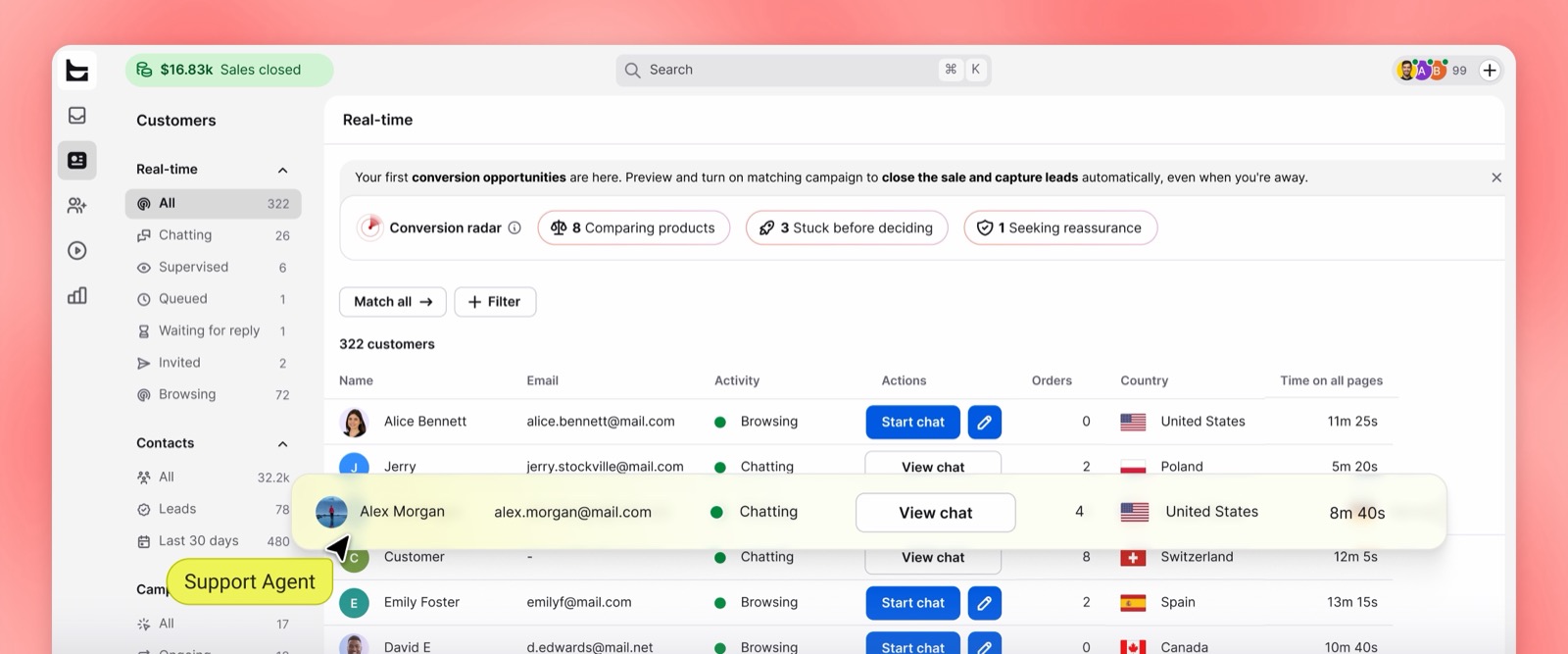
Choose Essential’s campaigns carefully rather than targeting every page. Growth expands campaign capacity and simultaneous visitor tracking, making it more suitable for several targeted messages.
💵 Sales Reports
Reports separate earned sales from AI Agent sales, counting orders placed within 30 days after a chat. Visitor funnel and AI Agent sales reports come with every plan.
The attribution reporting is more useful than the sales pitch, because you can compare it with your store’s performance. That window shows influence, not proof that chat caused a purchase.
Managing Conversations With LiveChat
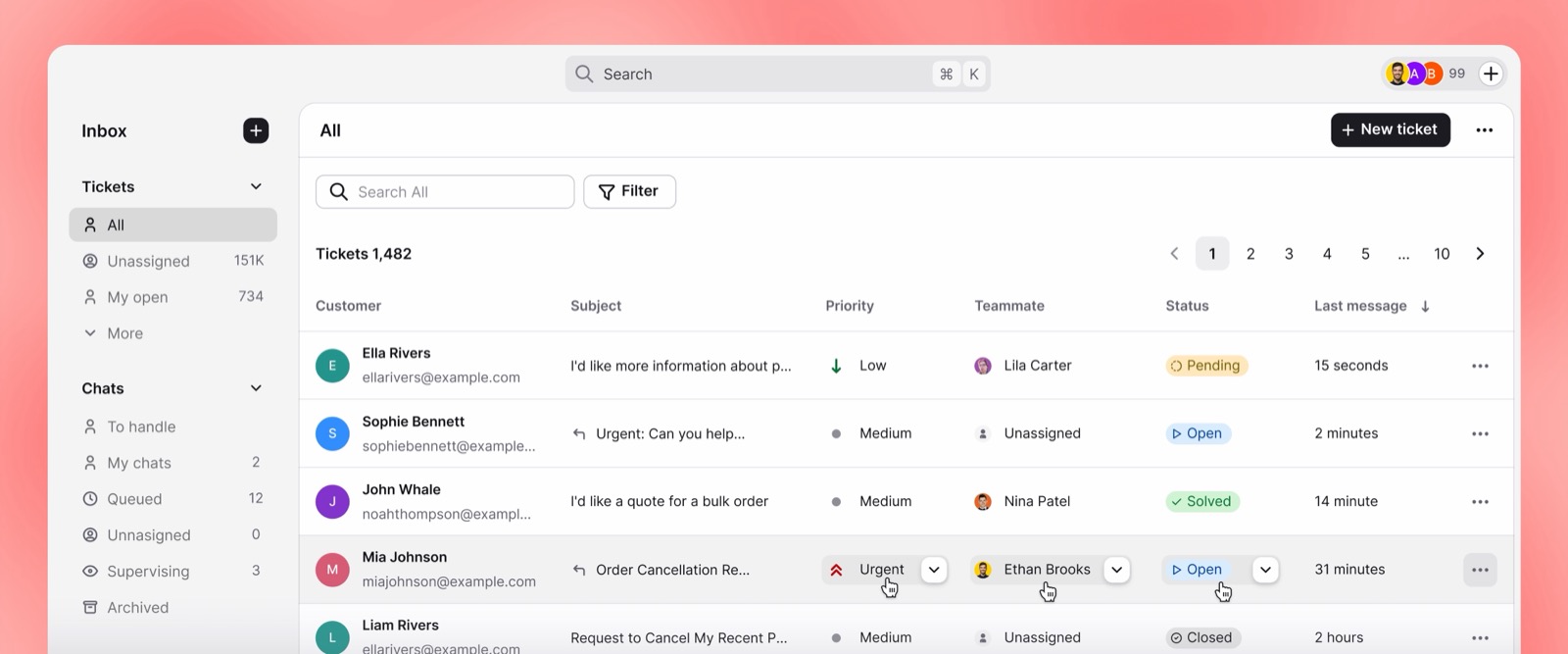
LiveChat brings customer text conversations into a shared inbox, with tickets alongside live chats. A product-page conversation can become follow-up work after the visitor leaves.
However, there is no native voice or phone channel on any plan. Don’t choose it as a complete contact-center replacement if your support operation depends on calls.
📥 Channels in One Inbox
| Channel | Connection | Who answers |
|---|---|---|
| Website chat | Snippet or platform plugin | AI Agent or team |
| WhatsApp Business number | AI Agent or team | |
| Messenger | Facebook page | AI Agent or team |
| SMS | Twilio account | AI Agent or team |
| Connected inbox | Team | |
| Voice and phone | Not available | Not supported |
In-app chat and multiple websites are supported across plans. Inbox views distinguish assigned conversations from queued and archived ones; supervision remains a Growth feature.
At the time of writing, multilingual agent groups require Growth, with support for 48 languages. Running the widget on several websites doesn’t unlock language-based team management.
🎫 Tickets and Workflows
- Tickets share the workspace: chats can become follow-up work, with customizable automated ticket replies.
- Ticket rules automate handling: assign, prioritize or follow up when conditions match.
- Playbooks connect events to actions: add conditions or delays instead of managing every follow-up manually.
| Capacity | Essential | Growth |
|---|---|---|
| Workflow rules / monthly executions | 3 / 300 | 10 / 1,000 |
| Ticket custom fields | 5 | 20 |
| File and data storage | 2 GB + 50 MB/user | 15 GB + 100 MB/user |
I recommend a dedicated help desk for ticket-heavy operations, rather than choosing LiveChat simply because tickets are bundled. Freshdesk’s Freddy AI is an alternative when structured case handling takes priority.
📈 Reports and Chat History
| Report | What it shows | Plans |
|---|---|---|
| Chat and ticket metrics | Volume, missed chats, active hours, satisfaction | All |
| Visitor funnel and AI Agent sales | Goals and attributed sales | All |
| AI Agents report | Resolutions and transfers | All Text plans |
| Agent activity and performance | Response times and team performance | Growth, Enterprise |
| On-demand reporting | Analysis beyond standard reports | Enterprise |
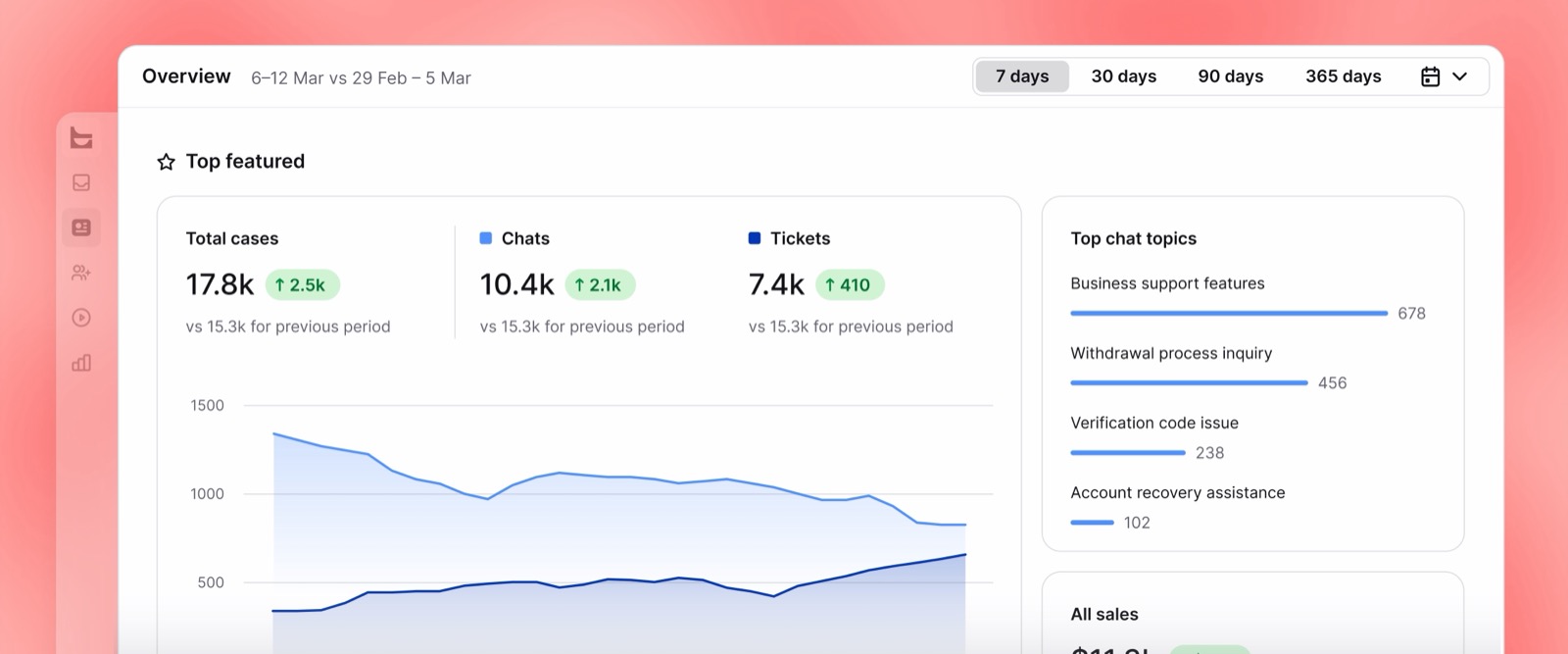
Archived conversations retain transcripts you can email or download, with visitor banning available after a chat. Some users nevertheless report awkward exports for offline analysis.
Top Tip 💡
Price Growth from day 1 if customers revisit old issues. Essential’s 60-day conversation and file history can be too short for returns, billing disputes or lengthy purchase decisions, regardless of chat volume.
Does LiveChat Have Good Integrations?
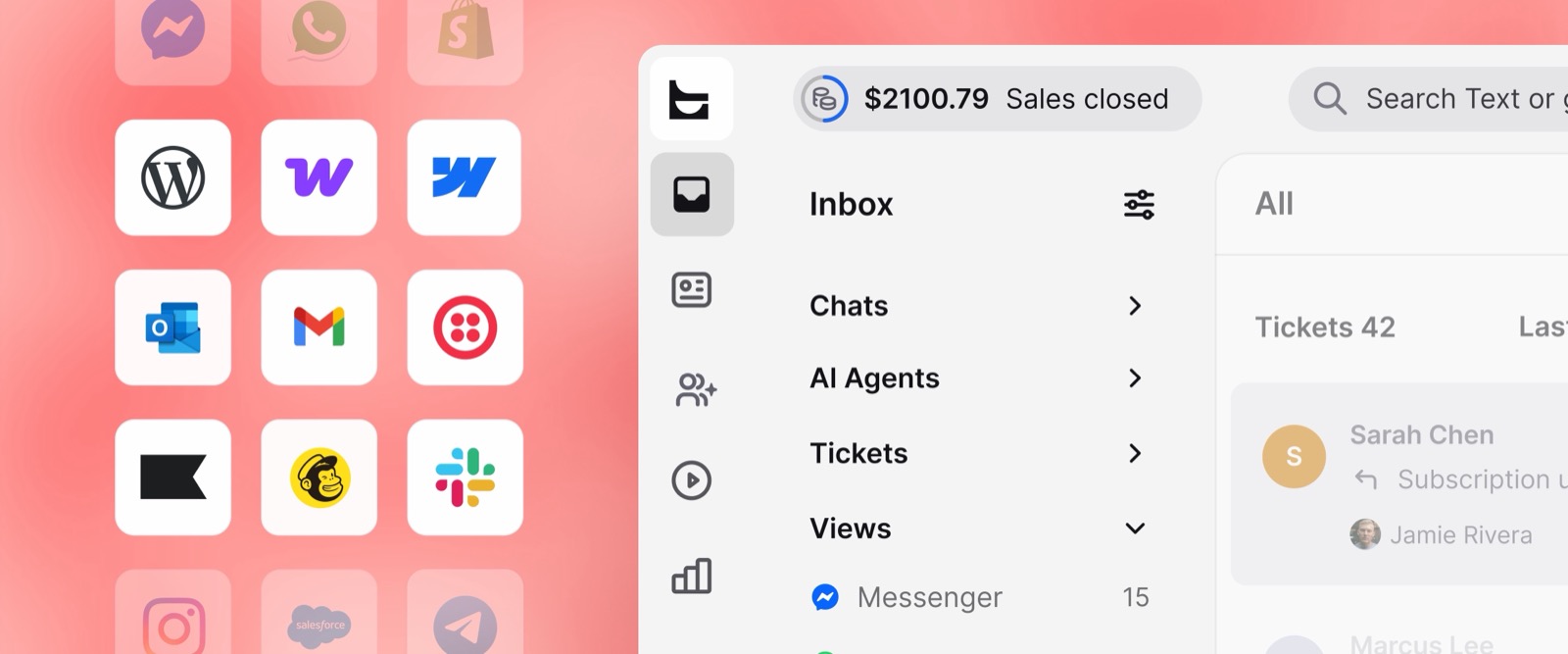
LiveChat’s marketplace connects your store and customer-management tools, so you don’t have to replace the systems around your inbox. Migration compatibility needs a separate check.
- Store and website connections: Shopify, WooCommerce, WordPress and Webflow cover common installation routes.
- CRM integrations: create leads from conversations and display customer records in the agent app.
- Chat API: at the time of writing, Essential includes 10,000 monthly calls; Growth includes 20,000. An additional 100,000-call pack costs $29.50.
- MCP server: available on every plan so compatible AI assistants can connect to Text data.
- Desktop and mobile apps: macOS and Windows applications accompany iOS and Android apps.
If conversations feed your sales pipeline, connect the CRM rather than manually copying leads. These AI CRM tools offer options for managing the work after the chat.
Unfortunately, some marketplace apps charge separately, and not every LiveChat integration works in Text. Confirm your essential connections before migrating rather than assuming the marketplace covers both products.
Users also report mobile slowness and notification problems. Test notifications on the devices your agents actually use before making the mobile app your main support channel.
How Does LiveChat Keep Your Data Secure?
LiveChat’s Text plans are SOC 2 Type 2 compliant, with GDPR and CCPA controls. Current compliance reports are available through trust.text.com for reviewing customer-data handling.
- PCI DSS SAQ A: listed within the platform’s compliance credentials.
- WCAG 2.2 AA: the chat widget supports this accessibility standard.
- EU-US Data Privacy Framework: included among its data-protection credentials.
- Customer-detail collection: the skill requests fields you select, and customers can decline to share them.
At the time of writing, SSO, activity logs and white-label controls require Enterprise. An ordinary Google or Microsoft login isn’t a substitute for enterprise single sign-on.
HIPAA support is still listed as coming soon for Enterprise, not available today. I don’t recommend adopting it for protected patient information based on a future compliance promise.
Using LiveChat’s Customer Support
Round-the-clock support comes with every plan, so Essential customers aren’t restricted to self-service documentation. Help is available during installation as well as after launch.
- Live chat: 24/7/365 access to the support team.
- Help Center: platform-specific installation and setup guides.
- Product news and system status: updates and service availability.
- Plan and migration calls: sales guidance, plus pricing-page AI assistance with human handover.
- Enterprise assistance: Product Expert support, personalized onboarding, team training and direct engineering access.
Users regularly praise easy setup and responsive support. That feedback supports LiveChat’s appeal for small teams, but doesn’t establish how quickly a complex integration issue will be resolved.
Unfortunately, personalized onboarding and engineering help require Enterprise. Self-serve teams rely on chat and documentation; some users also report needing support to cancel, so arrange cancellation before renewal.
How Does LiveChat Compare to Competitors?
LiveChat is my pick for a polished agent workspace with Shopify selling, not the lowest chat bill. The team’s products serve more than 30,000 companies, with customer stories including Wembley Stadium.
If per-seat pricing gives you pause, compare alternatives before subscribing. My roundup of AI chatbots covers more options beyond the live-chat shortlist below, including tools aimed primarily at automation.
- ➡️ Tidio is my budget pick for small stores: a free plan and conversation-based billing reduce dependence on team size. LiveChat remains my choice for workspace polish; see how Tidio’s Lyro pricing works before adding automation.
- ➡️ Intercom is stronger for SaaS support: Intercom’s Fin AI agent charges by outcome alongside help-desk seats. Compare the complete bill, because agent assistance and other add-ons can raise the entry price.
- ➡️ Zendesk suits ticket-heavy teams: choose it when structured case management matters more than Shopify conversations. Automated resolutions beyond the included allowance carry additional usage charges, so budget for both agents and automation.
- ➡️ Crisp suits teams wanting workspace pricing: included seats make costs easier to predict, although ticketing requires Plus. My Crisp AI review explains the credit-based automation trade-off.
- ➡️ tawk.to is the zero-budget choice: core live chat is free, while branding removal and AI Assist cost extra. LiveChat’s advantage is its workspace and integrated selling tools, not a lower starting bill.
At the time of writing, these are the entry paid prices and AI models, with tawk.to’s free core included. The free-plan column identifies alternatives that don’t require a subscription.
| Tool | Starting price | Billing model | AI pricing | Free plan | Best for |
|---|---|---|---|---|---|
| LiveChat | $19/user/month, annual | Per user | 10 or 200 resolutions included; $49.50/50 extra | No; trial | Workspace and Shopify selling |
| Tidio | $24.17/month | Conversations | Lyro from $32.50/month for 50 conversations | Yes | Budget stores |
| Intercom | $19/seat/month | Seats + usage | Fin $0.99/outcome | No; trial | SaaS support |
| Zendesk Suite | $55/agent/month, annual | Agents + usage | Extra resolutions $1.50 to $2.00 each | Trial only | Ticket-heavy teams |
| Crisp | $45/month, 4 seats | Workspace | Included AI credits | Yes; 2 seats | Predictable team pricing |
| tawk.to | Free | Paid add-ons | AI Assist from $29/month | Yes | Zero-budget sites |
How We Test Live Chat Software
I score live chat against practical customer-service jobs, not feature counts alone. Setup and agent usability matter alongside automation, selling tools and the cost of adding teammates.
I signed up and installed LiveChat on Shopify and WordPress in August 2026, including Shopify’s checkout setup. I also invited agents and worked through the workspace and Copilot.
The November Text features are separate from that hands-on experience. My recommendation rests most strongly on the agent workspace; vendor AI performance figures aren’t results from my test.
A closer look at how we score live chat software ⬇️
The Fritz house score weights 7 categories, giving equal priority to automation, the agent experience and pricing. LiveChat’s collaboration restrictions and seat costs pull down an otherwise strong recommendation.
| Category | Weight | Score | Main consideration |
|---|---|---|---|
| AI Agent and automation | 20% | 4.0/5 | Capabilities, allowances, handovers |
| Agent workspace and ease of use | 20% | 4.5/5 | Installation, shortcuts, collaboration |
| Pricing and value | 20% | 3.3/5 | Seats, limits, commitment |
| Selling and ecommerce tools | 15% | 4.3/5 | Catalog, campaigns, attribution |
| Channels, inbox and integrations | 10% | 4.0/5 | Coverage, tickets, connectivity |
| Security and compliance | 5% | 4.3/5 | Credentials and administrative controls |
| Help, support and reputation | 10% | 3.9/5 | Support access and user feedback |
Overall Fritz score: 4.0/5
The weighted result is 4.01, rounded to 1 decimal place. A polished workspace and useful bundled tools outweigh, but don’t erase, the per-seat cost and Growth-only collaboration features.
LiveChat Review: Should You Run Your Live Chat on LiveChat?
I rate LiveChat 4.0/5 for its straightforward installation, efficient agent workspace and Shopify selling capabilities. Bundled AI and ticketing make Text plans more complete, although Essential’s allowances remain restrictive.
I recommend LiveChat for Shopify stores and small to mid-size support teams that want chat to support sales. Budget for Growth when supervision matters; choose tawk.to or Tidio for a free start, and Zendesk for ticket-heavy operations.
Start with the 14-day trial and test the AI Agent against your store’s questions before subscribing. No card is required and nothing charges automatically afterward, so you can assess setup and answer quality without committing to annual seats.
LiveChat FAQs
Is LiveChat now called Text?
New LiveChat sign-ups receive Text, but existing LiveChat accounts still operate. Text is the newer product from the same team, combining live chat with an AI Agent and ticketing.
Compare features rather than matching plan names. Essential, Growth and Enterprise have a different feature mix from legacy subscriptions, so existing customers should compare the capabilities they use.
Is the AI Agent included in LiveChat’s price?
Yes, on Text plans; no, on legacy LiveChat subscriptions. New subscriptions include an AI Agent allowance, but that doesn’t mean unlimited automated conversations or unlimited agent assistance.
At the time of writing, Essential includes 10 monthly resolutions and Growth includes 200. Additional packs cost extra; see “How Much Does LiveChat Cost?” for the full comparison.
What counts as an AI resolution on LiveChat?
A resolution is a conversation where AI independently answers at least 1 question. Multiple answered questions don’t create additional resolution charges; unanswered transfers, spam, greetings and test chats are excluded.
Unused allowances don’t roll over. LiveChat says the AI Agent stops accepting new chats when the allowance runs out until you add a pack; check your billing settings.
Does LiveChat have a free plan?
No, but its 14-day trial needs no credit card. It provides the selected plan’s features without an automatic payment afterward, and your workspace carries over if you subscribe.
Schools and nonprofits can request additional discounts. For permanently free software rather than a trial, compare Tidio or tawk.to in the alternatives section above.
I’m already a LiveChat customer. Do I have to switch to Text?
No, migration is optional, and your existing plan, price and login remain available. You can run both products while deciding, but Text’s AI Agent and tickets aren’t added to legacy subscriptions.
Check integration compatibility before moving. LiveChat says migration keeps the subscription price and gives most accounts an expanded AI allowance, but some older integrations don’t transfer.
Is LiveChat good for small businesses?
Yes, particularly for Shopify stores where chat supports purchases. There’s no minimum team size, so a solo owner can start on Essential without buying unused seats.
Choose Growth when collaboration or longer history becomes necessary, not simply because you hired another person. Essential can suit a shared queue without supervision or advanced routing.
Is LiveChat better than Tidio?
I prefer LiveChat for its agent workspace and Shopify cart context. Tidio is the stronger budget starting point when you want a free plan and conversation-based pricing.
Compare AI usage separately: Tidio’s Lyro AI agent is an add-on, while Text plans include a limited allowance. Neither billing model wins for every team size or conversation volume.

Comments 0 Responses