

Question AI is a browser-based research assistant that combines web search, long-context reasoning, and document workflows to help you answer complex questions faster than a standard chatbot or a stack of browser tabs ever could.
I’ve spent hours hands-on with Question AI and tested it against the other heavyweights in the deep research category, including Perplexity, Gemini Deep Research, and OpenAI’s research tools.
In this review, I’ll walk through Question AI’s features, real-world performance, pricing positioning, and the trade-offs you need to know about before making it part of your workflow.
Why you can trust this review
I’ve put Question AI through a structured evaluation covering citation accuracy, source diversity, depth of synthesis, and workflow fit.
I compared its behavior directly against competing deep research agents on identical prompts, so the observations below come from hands-on testing rather than marketing claims. Every limitation I mention is one I ran into myself.
Question AI Pros & Cons
Best for: Solo researchers, students, and content teams who want fast, cited answers without fully committing to a Google or OpenAI ecosystem.
Pros
- Web-first research UX
- Inline citations on every answer
- Handles long, multi-turn research threads
Cons
- Opaque model stack and ranking logic
- Limited public benchmarking
- Privacy policies less detailed than big vendors
What I Like
✔️ Strong citation discipline compared to vanilla chatbots, with inline references I could click through to verify
✔️ The agentic behavior decomposes broad questions into sub-queries automatically, which saves real legwork on complex topics
✔️ Long-context handling means I could keep refining the same research thread without losing earlier findings
✔️ Document uploads work alongside live web search, so I could blend my own PDFs with current sources in a single answer
What I Dislike
❌ The system doesn’t publish benchmark scores, so I had to infer quality from direct comparisons against competitors
❌ Coverage bias is real: paywalled academic material and non-indexed sources are underrepresented in answers
❌ Data governance information is thinner than what Google, OpenAI, or Perplexity publish, which matters for sensitive work
❌ Vague prompts produce vague syntheses, so there’s a learning curve to getting the best results out of it
My Experience With Question AI
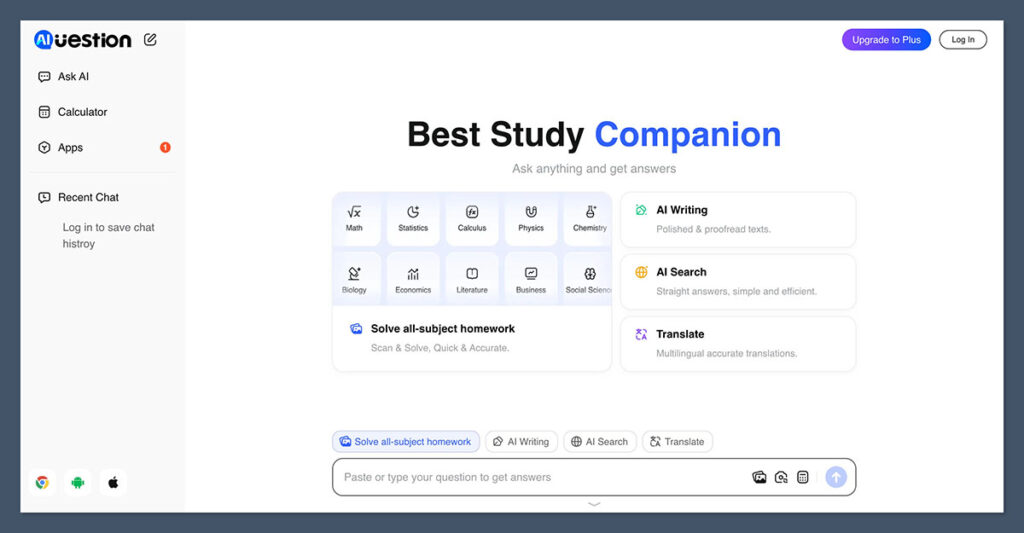
Getting started with Question AI was straightforward. I didn’t need to configure model settings, pick a reasoning mode, or set up integrations before running my first query.
I typed a research question, the tool interpreted it, kicked off multiple background searches, and returned a structured answer with citations within a few minutes.
For my first real test, I asked it to summarize the current state of AI regulation in the EU, including timelines and enforcement bodies. Question AI pulled from a mix of official sources and recent news coverage, structured the response by phase, and attached inline links so I could verify each claim.
That’s the workflow the whole category is optimized for, and Question AI executes it cleanly.
Author’s Testing Notes
What stood out early was how much the answer quality depended on how I framed the question. A vague prompt like “tell me about AI in marketing” got me a generic overview I could have written from memory.
A scoped prompt like “compare the three most-cited challenges of implementing generative AI in B2B content workflows in 2025, with sources” got me something I’d actually use. This isn’t unique to Question AI, but it’s worth internalizing before you judge the tool.
How It Handles Research Tasks
Question AI behaves like most current deep research agents. When I submit a complex query, it decomposes it into sub-questions, searches the web, reads dozens of pages in parallel, and then synthesizes a unified answer.
Sessions on harder prompts took anywhere from one to several minutes, which is normal for tools in this class.
The answers came back with inline citations rather than a citation dump at the bottom, which I prefer because it lets me verify specific claims without hunting. On factual questions with clear ground truth, the accuracy was solid.
On more interpretive questions, the tool sometimes leaned on popular English-language sources and skipped dissenting perspectives I knew existed from prior research.
Working With Documents
I uploaded a long PDF and asked Question AI to extract specific claims and cross-reference them against live web sources.
This is where deep research tools earn their keep, and Question AI handled it well. I could ask follow-up questions across both the document and the web in the same thread, and the tool kept earlier context intact.
It’s not a replacement for a proper data analysis notebook, and I wouldn’t feed it a large spreadsheet expecting robust computation. But for reading, summarizing, comparing, and pulling quotes from long documents alongside live research, it worked well enough that I stopped switching back to my usual manual process.
Author’s Testing Notes
The multi-turn refinement is where I got the most value. My first-pass answer on a complex topic was usually okay but incomplete.
When I pushed back with “you missed X, and I want you to weight peer-reviewed sources more heavily,” the second and third passes got noticeably better. Treat it as a conversation, not a vending machine.
How Much Does Question AI Cost?
Question AI follows the familiar freemium pattern common across the AI research category. There’s a free tier that lets you run a limited number of queries to evaluate the tool, with paid tiers unlocking longer sessions, deeper research runs, priority processing, and expanded document handling.
Because Question AI’s pricing and tier structure can shift as the product evolves, I recommend checking the current plan page directly before committing.
The broader point is that it sits in the same rough pricing territory as Perplexity Pro and similar deep research tools rather than undercutting them dramatically.
- Free tier – For casual testing and light research use
- Paid plan – For regular users who need longer sessions, more queries, and priority processing
- Higher tiers – For power users, teams, or anyone running high-volume research workflows
Is Question AI Good Value for Money?
Value depends entirely on how often you run research tasks that would otherwise cost you hours of manual work. If you’re doing desk research weekly, even a modest subscription pays for itself in saved time. If you only need occasional answers, the free tier or a general-purpose chatbot will probably serve you just as well.
Compared to Perplexity Pro and Gemini Deep Research, Question AI’s advantage isn’t raw price, it’s the lighter, web-first UX that doesn’t lock you into a bigger ecosystem.
That matters if you want a focused research tool without adopting Google Workspace deeper or committing to OpenAI’s broader suite.
Author’s Testing Notes
If I were advising a solo content strategist or a small marketing team, I’d say: start on the free tier, run your real workflows through it for a week, and only upgrade once you’ve hit the limits. The value case is obvious once you see it save you three hours on a topic you’d normally spend a full morning researching.
Core Features of Question AI
Question AI’s capabilities map to what defines the deep research category in 2025 and 2026. Here’s what actually matters in day-to-day use.
Multi-Source Web Research
Question AI runs multiple web searches per query, reads across dozens of pages, and fuses the findings into a single synthesized answer. Every claim I could verify came with an inline citation linking back to the original source, which is the standard I hold these tools to.
The tool tends to favor high-authority and well-indexed sources, which is both a strength and a limitation. You’ll get clean answers grounded in mainstream coverage, but niche industry blogs, paywalled academic papers, and non-English sources show up less often than they probably should.
Agentic Deep Research Behavior
For complex prompts, Question AI takes a genuinely agentic approach. It breaks the question into sub-questions, searches each one, reads the results, and synthesizes an answer that accounts for the full scope of what it found. This is the same pattern used by Perplexity Deep Research, Gemini Deep Research, and OpenAI’s research tools.
In practice, this means you can throw it a broad question like “what are the key trade-offs of implementing AI in supply chain management” and get back a structured breakdown rather than a shallow paragraph.
The trade-off is that longer runs take longer, and occasionally the tool goes down a sub-topic rabbit hole that wasn’t actually relevant to my question.
Long-Context Reasoning and Documents
Question AI handles long research threads well. I could keep adding context, uploading additional documents, and refining the question without losing earlier findings. This is critical for any serious research workflow because real research is iterative, not one-shot.
Document support works alongside web search rather than as a separate mode, which I appreciated. I could ask a question that pulled from both my uploaded PDF and live web sources in the same answer, with citations distinguishing between the two.
Multimodal and Code Awareness
Like most current deep research tools, Question AI handles images, charts, and code snippets at a functional level. I could paste code and get explanations, share a chart image and get a description, and work through light data analysis in the chat.
What it isn’t is a replacement for a proper notebook environment or a specialist coding assistant.
Content and Research Workflows
Where Question AI actually shines for my use case is content and marketing research. Outlining articles, building competitor matrices, extracting claims from sources, and fact-checking drafts all worked well. The citation discipline makes it much easier to trust the output than a generic chatbot, and the multi-turn refinement means I can iterate until the output is genuinely useful.
Strengths in Real-World Use
After putting Question AI through its paces, here’s where it genuinely delivered.
Time savings on complex queries
The deep research pattern compresses hours of manual search and reading into a few minutes. On topics where I’d normally open twenty tabs, Question AI handed me a structured synthesis with citations I could verify. That’s the core value proposition, and it holds up.
Better citation hygiene than vanilla chatbots
Research-targeted systems are specifically optimized to cite their sources and reduce hallucinations relative to general-purpose chat models. Question AI follows this pattern, and it made the outputs trustworthy enough that I’d actually use them as a starting point rather than something I had to fully re-verify.
Good fit for content and marketing teams
Outlines, research briefs, competitor overviews, and fact-checking all worked well. If you’re running content production and you’ve been using a generic chatbot for research, Question AI is a meaningful upgrade.
Democratizes desk research
Non-experts can get a reasonably structured report on complex topics without specialist training. That matters for small teams where everyone wears multiple hats and no one has time to become a specialist in every topic they write about.
Limitations and Risks You Should Know
No honest review of a deep research tool is complete without a serious look at the limitations. Here’s what I ran into.
Hallucinations Still Happen
Even the latest deep research systems can fabricate details, misattribute quotes, or overstate certainty. Strong benchmark scores do not equal zero hallucinations. I caught Question AI confidently stating things that turned out to be wrong when I clicked through to the cited sources, which is exactly the “illusion of completeness” problem that plagues the whole category.
The fix is simple but non-negotiable: verify anything that matters. Treat the tool as a research accelerator, not a research replacement.
Coverage Bias
Like all tools in this category, Question AI is constrained by what its crawling layer sees. SEO, paywalls, and index coverage shape the answers you get. Academic material behind paywalls, niche industry publications, and non-English sources are underrepresented. If your research depends on those, you’ll still need to supplement manually.
Opaque Synthesis and Ranking
The tool decides which sources to emphasize and which to ignore, and that logic isn’t transparent. This can embed algorithmic bias or tilt results toward popular and English-language perspectives. For most content and marketing work this isn’t catastrophic, but for anything where source balance matters, you need to actively counteract it in your prompts.
Privacy and Data Governance
Deep research agents typically send queries, context, and uploaded files to third-party LLM APIs or internal model clusters. For confidential decks, internal strategy documents, or proprietary datasets, you need to check the provider’s terms on storage, retention, and training use. Question AI’s public documentation on this is thinner than what Google or OpenAI publish, so if you’re handling sensitive material, verify before you upload.
Prompt Quality Matters A Lot
Question AI rewards specific, scoped research questions with clear constraints and required outputs. Vague prompts get vague syntheses. There’s a real learning curve to writing prompts that produce genuinely useful answers, and it’s worth investing time in that skill if you plan to use the tool seriously.
How Does Question AI Compare to Competitors?
Question AI sits in a crowded category alongside some of the biggest names in AI. Here’s how it stacks up against the main alternatives.
| Tool | Key Strengths | Weak Spots |
|---|---|---|
| Question AI | Focused, web-first research UX with inline citations and long-context reasoning. Lighter footprint than ecosystem-heavy alternatives. | Less public benchmarking, unclear model stack, thinner privacy documentation than big vendors. |
| Perplexity Deep Research | Strong autonomous research with high benchmark scores. Very citation-focused and solid for both technical and business topics. | Limited workflow customization. Interface optimized for reports rather than project management. |
| Gemini Deep Research | Huge 1M-token context window with native Google Workspace integration. Strong choice if you already live in Google tools. | Google account required, privacy concerns for sensitive corporate data, and UI still evolving. |
| OpenAI Deep Research | Long autonomous runs with strong emphasis on veracity and citations. Well-integrated into OpenAI’s broader tooling. | Access and pricing can be limiting. Less natively web-facing than pure answer engines. |
If you’re already committed to Google’s ecosystem, Gemini Deep Research is the natural choice. If you want the most rigorously benchmarked option with the strongest citation discipline, Perplexity is hard to beat.
If you’re an OpenAI power user, their research tools integrate cleanly into the rest of their suite.
Question AI’s pitch is different. It’s for people who want a focused, web-first research copilot without adopting a bigger ecosystem. That’s a legitimate niche, and the tool serves it well.
Practical Tips for Getting the Most Out of Question AI
Tip: Start every research session with a scoped, specific question. “What are the three most cited challenges of generative AI in B2B content workflows, with peer-reviewed sources where possible” will always outperform “tell me about AI in marketing.”
A few other things I learned during testing that will save you time:
Treat it as a conversation, not a search box. The biggest quality gains came from multi-turn refinement. Push back on the first answer, ask for missing perspectives, and request source reweighting. The tool responds well to direction.
Verify the citations that matter. Click through on any claim you plan to use in your own work. Hallucinations still happen, and a confident answer with citations is not the same as a correct answer with citations.
Combine it with your own sources. Upload your documents alongside live web search. The tool’s best output comes when it can blend your context with current information.
Don’t use it for sensitive material without checking policies. If you’re handling confidential information, verify the provider’s data governance before uploading anything.
How I Tested Question AI
To bring you a fair and honest review, I ran Question AI through a structured evaluation that covered the areas that matter most for content, marketing, and research workflows. My testing focused on five core dimensions:
Information accuracy and citation quality. I ran research tasks where I already knew the ground truth or had strong prior research, then checked correctness, source breadth, citation density, and whether the tool surfaced primary sources versus secondary blogs.
Depth versus breadth. I compared single-pass answers against multi-turn refinement on the same questions to see how much quality improved with active guidance.
SEO and content research fit. I asked for SERP-like topic overviews on niche subjects and checked how well the topical maps aligned with what I see in actual search results.
Workflow integration. I evaluated export options, copy-paste fidelity, and how easy it was to hand off drafts to human writers or teammates.
Safety and compliance. I reviewed the public documentation for data retention, content filters, and handling of sensitive query types.
Final Verdict: Should You Use Question AI?
Question AI is a capable, focused deep research tool that delivers on the core promise of the category: turning complex research questions into synthesized, cited answers without hours of manual work.
Its inline citations, long-context reasoning, and document support make it a meaningful upgrade over generic chatbots for anyone doing serious content or research work.
It’s not the right choice if you need the rigorously benchmarked answers of Perplexity, the deep Google integration of Gemini, or the broader tooling of OpenAI’s suite.
But if you want a lighter, web-first research copilot that doesn’t lock you into a bigger ecosystem, Question AI occupies that niche well.
The honest recommendation: start on the free tier, run your real workflows through it for a week, verify the citations on anything that matters, and upgrade only once you’ve proven the value for your own use case.
Done that way, it’s one of the more useful additions you can make to a modern research workflow.
Comments 0 Responses