

Otter.ai is one of the most popular tools on the market for meeting transcription and productivity, offering features like automatic meeting capture, live transcription, summaries, and post-meeting insights.
After testing it myself and comparing it to similar tools, I can say that Otter stands out for its deep feature set and flexible use across Zoom, Google Meet, and Microsoft Teams.
In this review, I’ll walk you through everything you need to know about Otter — from pricing and features to who it’s best suited for and where it might fall short.
Why You Can Trust This Review
I based this review on the latest updates to Otter’s platform and real testing data, along with extensive documentation and third-party insights.
I also fact-checked the platform’s current legal status, HIPAA policies, and integration options to give you a clear, no-nonsense overview of where it performs best.
Otter AI Pros and Cons
| Tool | Best For | Rating | Use Cases |
|---|---|---|---|
| Otter.ai | Automated meeting transcription | 4.5 out of 5 | – Teams using Zoom, Google Meet, or Microsoft Teams – Founders and solo operators – Enterprise clients needing compliance support |
Pros:
- Works across all major video platforms
- Automatic calendar-based meeting joining
- Accurate live transcription and AI-generated summaries
- Chrome extension allows transcription with no visible meeting bot
- HIPAA compliance available on Enterprise tier
Cons:
- Limited transcription minutes on free plan
- Some privacy features only available on Enterprise tier
- Legal concerns around recording consent still ongoing
What I Like About Otter
- Automatic meeting joins make it easy to track meetings without remembering to invite a bot every time
- Live transcription is fast and accurate, even in group settings with multiple speakers
- Chrome extension allows browser-based transcription without a visible participant, which is ideal for privacy-conscious teams
- The platform integrates directly with tools like Google Docs, Notion, Salesforce, and Jira, which improves post-meeting workflows
- Enterprise-grade features like SSO and HIPAA compliance help Otter work in regulated industries
What I Don’t Like
- The free plan is useful for testing but too limited for regular use, with just 300 minutes per month and 3 file uploads
- Most advanced privacy features are only available to Enterprise customers
- Otter has been named in recent lawsuits related to consent and recording, which could raise red flags for certain companies
My Experience With Otter
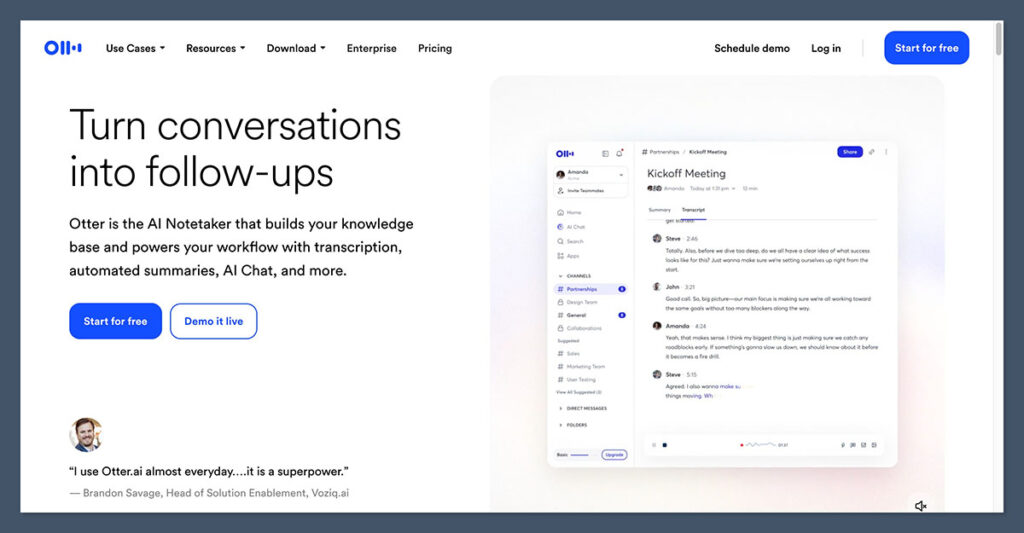
Signing up for Otter was quick and easy. I created an account using my email, synced my Google Calendar, and was able to set it to join upcoming meetings automatically. Within minutes, I was seeing live transcriptions of my scheduled calls.
What stood out was how well Otter handled overlapping voices. Even with two people talking at once, the transcription remained readable.
After each meeting, Otter generated a summary of the conversation, suggested action items, and even identified recurring themes across multiple meetings.
I used the Chrome extension during a Google Meet call, and it worked exactly as promised. No additional meeting participant was added, and Otter transcribed the call locally from my browser tab.
This no-bot option is especially helpful in environments where visible AI bots may cause friction or require approval.
Otter AI Pricing and Plans
Otter offers four pricing tiers to support a range of users from casual individuals to enterprise teams.
Otter AI Pricing Table (Monthly Billing)
| Plan | Monthly Cost | Annual Cost | Features |
|---|---|---|---|
| Basic | Free | Free | 300 monthly minutes, 3 file imports |
| Pro | $16.99 | $8.33 | 10 file imports, longer meetings (90 mins), advanced transcription tools |
| Business | $30 | $19.99 | 4-hour meetings, unlimited imports, admin tools |
| Enterprise | Custom | Custom | HIPAA compliance, SSO, custom integrations, audit logs |
Each plan includes AI-powered transcription, speaker identification, and access to mobile and desktop apps.
Key Features of Otter AI
Otter is more than just a note-taker. Below are the core features that set it apart and how each one performs in real use.
1. Automatic Meeting Capture
Otter connects to your Google or Microsoft calendar to automatically join scheduled meetings. It supports Zoom, Microsoft Teams, and Google Meet.
This saves time and reduces the risk of forgetting to hit “record.” It also allows you to create a consistent transcription workflow across different video platforms.
There is also a manual upload option if you want to transcribe pre-recorded audio or video files.
2. Real-Time Transcription and Post-Meeting Summaries
During the meeting, Otter captures everything as it’s said. Speakers are labeled and timestamps are added automatically. After the meeting, Otter generates:
- A detailed transcript
- A short summary of key discussion points
- Suggested action items
- Keyword tagging and search functionality
This is helpful for reviewing long calls or sending a recap to someone who couldn’t attend.
3. Chrome Extension With No-Bot Mode
The Chrome extension allows you to transcribe audio from any browser tab, not just meetings. You can use it for:
- Internal meetings without bots
- Webinars
- Sales calls
- Podcasts or interviews
This mode is especially useful when you need to avoid the appearance of a bot joining your meeting, such as in interviews or external client discussions.
4. Integrations and Output Options
Otter integrates with several popular tools, allowing you to send meeting notes directly to:
- Google Docs
- Notion
- Dropbox
- Salesforce
- HubSpot
- Jira
You can also export transcripts as text, PDF, or audio. This improves collaboration by keeping everything centralized.
Security and Privacy With Otter
Security is a major focus for Otter, especially given its role in recording and storing sensitive information.
Key Security Features
- SOC 2 Type 2 compliance
- Data encryption during transfer and storage
- GDPR and CCPA compliant privacy practices
- Deletion tools and automated trash emptying after 30 days
- No customer-uploaded data is used to train Otter’s models
HIPAA Support
HIPAA compliance is available on the Enterprise plan, but it requires a Business Associate Agreement. This is essential for healthcare or insurance companies that handle protected health information.
Consent and Notifications
Otter recommends obtaining consent before recording any meeting. On the Enterprise tier, administrators can enforce automatic pre-meeting notification emails. These are sent to all participants and provide transparency around data recording.
Legal Concerns and Ongoing Lawsuits
Otter has been named in class-action litigation, including a case that alleges it recorded meetings without participant consent.
While no judgment has been issued, the lawsuit highlights growing concerns about AI note-taking and compliance.
To protect your organization, you should:
- Always obtain clear consent from participants
- Use Otter’s built-in notification features
- Avoid sharing transcripts or audio files without permission
- Review data retention policies before rollout
This is especially important if your organization operates in a two-party consent state or country.
Who Is Otter AI Best For?
Based on testing and research, here is a quick guide to who will benefit the most from Otter.
| User Type | Recommended Plan | Why It Fits |
|---|---|---|
| Individuals | Pro | More minutes, file uploads, and long meeting transcriptions |
| Small Teams | Business | Admin features, 4-hour limit, unlimited imports |
| Large Enterprises | Enterprise | HIPAA, SSO, compliance, and custom integrations |
| Remote Teams | Business | Works across Zoom, Meet, and Teams with one central system |
| Freelancers/Consultants | Pro | Chrome extension, easy search, client-friendly summaries |
Final Verdict: Is Otter AI Worth It?
Otter is a strong choice for anyone looking to simplify the way they handle meetings. It combines the convenience of live transcription with post-meeting insights and integrates into popular tools your team is likely already using.
If you’re working across platforms like Zoom, Google Meet, and Teams, it helps centralize your meeting data. The AI-generated summaries and search functionality save real time.
While the free plan is limited, the Pro and Business tiers offer strong value depending on your use case.
However, if you’re in a sensitive industry or need deep privacy controls, you’ll want to opt for the Enterprise plan. Otherwise, you may run into limitations with consent policies and feature access.

Comments 0 Responses