

I’m happy to say I’m (almost) over my vendetta against AI tools. I’ve been forced to admit that they’re genuinely useful, which is good since I don’t think any business I work with would let me just “opt out” of using a subscription.
Still, there’s one lingering problem that makes my days harder: too much choice. Use AI for a while and eventually you’re going to find one model that’s better for researching or planning, another that’s great for working on spreadsheets, then another that’s ideal for images.
So you’re left with a dilemma, do you try to force the same quality of work out of one system and accept the limitations, or pay for fifteen subscriptions at once? Nexos.ai seems to think the answer is “neither”, and frankly, I respect that.
Quick Verdict
nexos.ai is the platform that makes welcoming AI into your business or workday a bit less painful. The workspace gives you a single chat interface for over 200 models, and you can even compare outputs side-by-side. There are no-code AI agents, features that cover everything from content creation to project management, or deep research.
Plus, you get integrations with the tools you already use. nexos.ai also has a side for developers, the AI gateway, which makes managing your AI tools a lot easier. The whole system is definitely excessive for someone who just occasionally logs into ChatGPT. It’s perfect if you’re tired of navigating a jumbled mess of subscriptions and shadow apps.
Pros 👍
- Complete AI workspace and development tools in one account
- No-code agent building
- Integrations with common business and messaging apps
- Content creation for all kinds of media
- More than 200 models in one chat interface, with useful output comparisons
- Genuine security-first approach for enterprises
Cons 👎
- No free trial
- Some features are still in production
- Unnecessary for occasional AI use
What Is Nexos.ai, And Who Is It For?
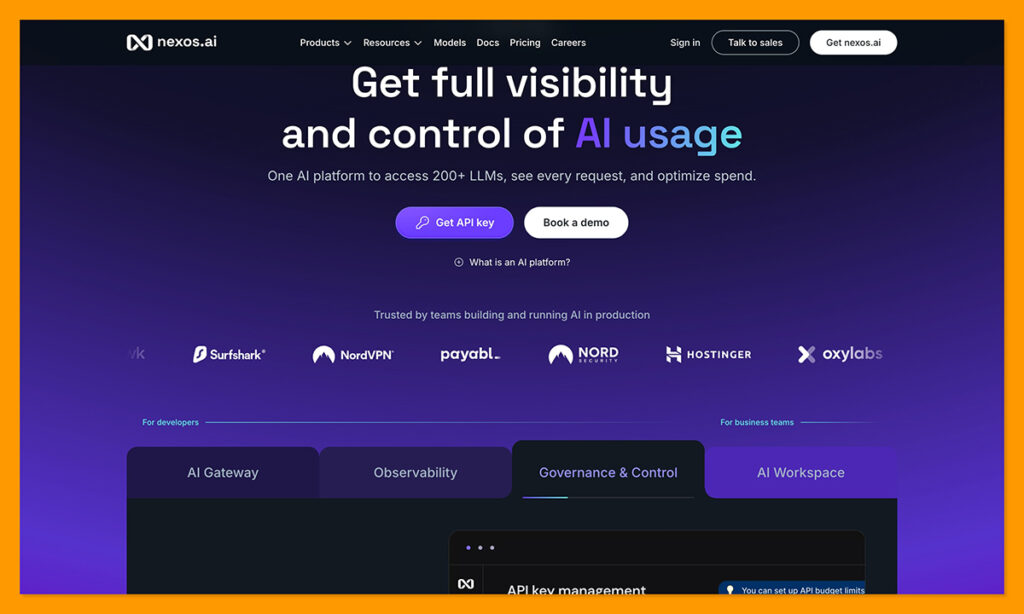
nexos.ai is a Lithuanian-built AI platform split into two main products. The first one is the AI workspace, the complete tool anyone can use to interact with over 200 different AI models whether they’re running research or creating content. The second product is the AI gateway, which connects applications to those 200+ AI models through a single API, and helps you out with routing, cost management, access, plus monitoring.
It’s still a relatively new member of the AI market, but I think it’s starting from a good place. It doesn’t lock you into one or two models. It’s security-focused with ISO 27001 & 42001, GDPR, and SOC 2 Type 2 certifications (which helps keep leaders calm). It’s also solving a problem we’re all getting pretty sick of right now: AI tool sprawl.
The customer results I’ve seen are pretty impressive already. Nord Security, for instance, reduced its coding agent LLM costs by 46% with the toolkit. Payhawk reduced security investigation times by 80%. I’d quickly recommend this tool to anyone paying for several AI accounts, teams building agents without developers, or businesses running multiple models at once. I wouldn’t bring it up to someone who’s happy using a single assistant for everything.
nexos.ai Workspace Review
I started with a closer look at Workspace, because this is the “useful for everyone” part of what nexos.ai has to offer. The Workspace is where users can access 200+ models for AI tasks, compare outputs, design their own no-code AI agents, plus create any kind of content they can think of.
The first thing I like about it is it’s simpler to use than I would have guessed. Initially, I saw “200+ models” and thought I’d be plagued with decision paralysis, but even if you don’t have a preferred model in mind, nexos.ai can help you. There’s an Auto Select feature that can read your prompt and pick a model based on specialization and expected quality. You can still switch the model out if you don’t like the suggestion, though.
The Interactive Chat functionality is helpful too. If your prompt is missing context, nexos.ai can stop and ask follow-up questions before it spits out an answer. You’ll also have access to memory features that can store your role or preferences across conversations.
Model Comparison and Content Creation
nexos.ai gives you all the variety you could want from a model perspective, with 200 options including the most popular LLMs from ChatGPT, Claude, Google (Gemini), Mistral, and so on.
With the “Compare Models” feature, you can run some tests before you commit to an option. The tool lets you send a prompt to a few models at the same time, then review the responses side by side, checking for things like accuracy, tone or speed.
The full collection of models also gives you plenty of help with different kinds of tasks. There are models that can browse the web, or Deep Research models that help with planning out and conducting longer investigations. You’ve also got models that excel in different kinds of content creation, whether you’re producing slides, spreadsheets, reports, or images.
Usefully, everything you create can stay inside of the platform (and be shared with your team), so you’re not trying to track everything across different accounts.
The Agent Builder and Agents
The Agent Builder from nexos.ai is how everyday people (without developer skills) can create assistants to help them with certain tasks. You just describe the job you want to do and answer a few follow-up questions, then the system gets to work. It writes instructions, maps work, then lets you connect everything to apps and data you already use.
You can choose a model (or use Auto Select), start with a template, share your agent with your colleagues, plus schedule it to run at specific times.
The template library is pretty comprehensive, with options for marketing, sales, customer support, recruitment, legal, finance, or productivity tools. What I like most, though, is you still get control over the final output. You can ask the agent to pause before it completes a task, updates a record, or sends a message for you, which saves you from a lot of compliance headaches.
Projects, Company Knowledge, and Integrations
Projects on the nexos.ai Workspace are where the system keeps all your uploaded files, conversations, web research, plus custom instructions you might have given in previous discussions. You can add to your resource base whenever you like by uploading PDFs, CSV files, or images.
There are even tools that let multiple team members chat and share content together. That’s really helpful when you’re working on a big project together, like a new product launch, and you need everyone to be “generating” from the same baseline.
The integrations are fantastic too. You’ve got Google Workspace Connections for things like Drive, Docs, Calendar, Sheets, or BigQuery. Microsoft connections cover tools like SharePoint, OneDrive, Teams, or Outlook. Then there are the extra integrations for Slack, Jira, GitHub, Compass, Confluence, plus several others.
There are also integrations available for messaging apps such as Slack, Telegram, or WhatsApp Live, plus a browser extension, alongside mobile apps for both iOS and Android. The MCP connections all retain the permissions from your original system, too.
nexos.ai AI Gateway Review
Before I get into the features, it’s worth asking why this side of the platform exists at all: most organizations can’t scale AI responsibly, or efficiently, because they have no real idea how it’s being used. AI spend is growing much faster than visibility into it, so the invoices keep climbing while nobody can say exactly which team, tool, or agent is driving the increase.
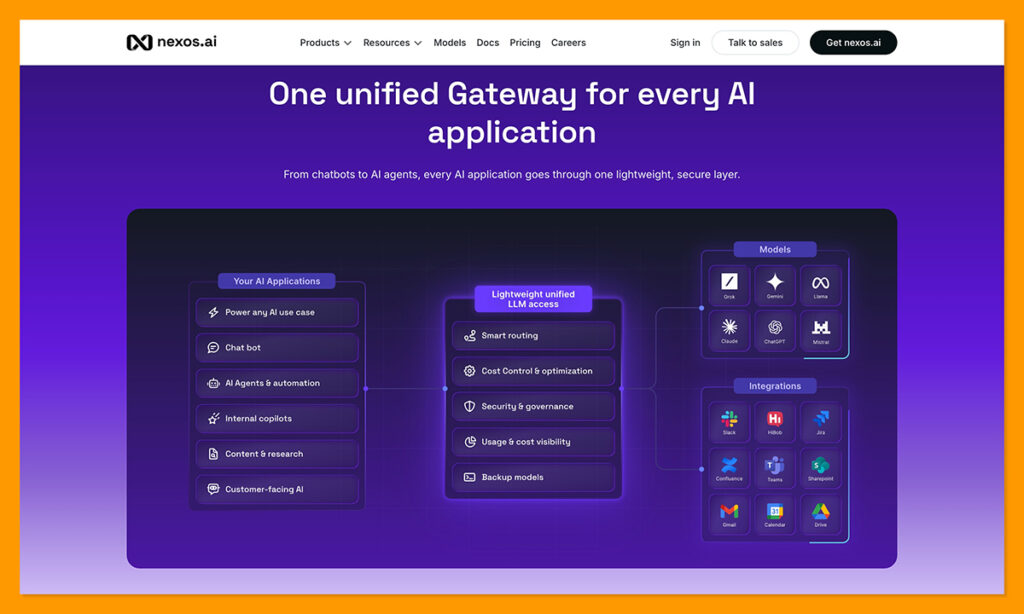
Usage is fragmented on top of that, scattered across departments, apps, plus a growing pile of agents quietly making calls in the background. Logs don’t really solve the problem either, since they’ll show you that something happened without telling you whether it was operationally useful, or whether you got anything back for the money.
The Gateway is built to fix that, and it gives you controlled access to LLMs plus complete observability into your AI traffic, then uses that picture to optimize spend. The promise is that you’ll know exactly how many euros you’re spending on LLMs, where AI is being used, what it costs, who owns it, how efficiently it runs, plus what value you’re getting back.
The AI Gateway is the more technical side of nexos.ai, giving developers a single OpenAI-compatible endpoint for access to over 200 models. If you have an existing OpenAI SDK build, you’ll usually need just a new base URL and API key, rather than starting from scratch.
Once you’ve got your API account set up it covers everything from generating images and content, to speech analysis, transcription, file processing, RAG workloads, embeddings, and of course, chat. Users can use the request parameters to change the model being used too, so you’re not stuck with the option you picked when you first started.
I also like that the Gateway supports bringing existing provider contracts into your toolkit, though the team is still working on a full BYOK rollout.
Routing, Fallback, and Cost Control
Smart routing is basically the “developer-focused” version of the tool nexos.ai uses to help you choose the right model for a task. You send a request, then the system suggests the ideal model based on cost, latency, or expected quality. What’s even more impressive is the fallback that’s built-in.
If the tool stops working perfectly for any reason, the fallback rules choose and transfer the task to the next best model. The system also includes load balancing for better spreading of traffic across providers. There’s also context compression plus intelligent caching to keep workloads from overflowing.
For cost-conscious users, there’s the option to apply budgets or hard caps to every workflow. Rate limits protect you from sudden request spikes, plus you can break down usage by team, project, model, or individual key.
All of that adds up to the thing most finance teams actually care about, which is cutting AI spend without cutting the quality of the work. Routing sends cheap requests to cheaper models while the harder jobs still get the ones that can handle them, caching stops you paying twice for the same answer, plus context compression trims the token counts you were never really using. The savings come from removing waste rather than downgrading your output, which is why a company like Nord Security can drop its coding agent costs by 46% and still ship the same work.
Governance and Observability
As I mentioned before, nexos.ai does take security seriously. The system never trains models on your data, it’s European-hosted, plus it has a fantastic selection of compliance certifications. For tracking purposes, the Gateway logs your prompts, responses, model choices, token use, errors, latency, plus other essential details. There are traces and spans too, to let developers follow a full request through chained workflows.
The reporting side is where this gets genuinely useful, though, because you can see AI usage across every provider in one place rather than logging into five dashboards to piece it together. You get analytics per model, usage and spend analytics sitting alongside them, plus insights broken down by user, team, or individual API key so you always know who is responsible for what. Per-model performance is tracked too, covering latency, errors, and response times, and budget tracking runs across all of it so nothing creeps up on you at the end of the month.
The enterprise plans for both the Gateway and the Workspace give you more security options too. For instance, on the Gateway you’ll have SSO and SAML, full audit logs, RBAC, policy rules and environments, SLAs, as well as dedicated limits. You can also apply input and output guardrails to block sensitive information across models.
Another thing worth noting from an overall security perspective is that the whole system was founded by the Tesonet team, which has some excellent backing as one of the top providers for cybersecurity brands like Nord, Oxylabs, and Surfshark.
Pricing and Value for Money
There are two plan options for both the Workspace and the Gateway sides of the platform. The AI Workspace starts at $39 per month, with 1,000 monthly credits, access to the 200+ models, unlimited AI agents, integrations, plus all the content creation options you might need. You can also buy extra credits as “top ups” whenever you need them.
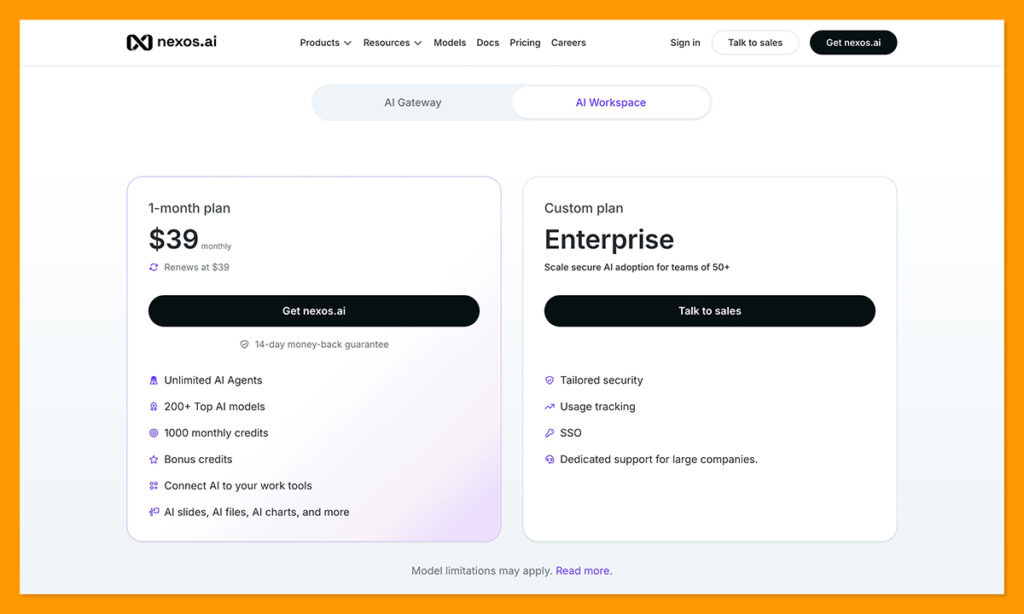
The Enterprise plan is custom priced, and it’s intended for bigger teams who need more usage (plus usage tracking), SSO support, tailored security features, and extra customer support.
Even the standard $39 per month option sounds well-worth it for me when you consider how much people usually spend buying things like ChatGPT or Claude separately.
The AI Gateway plans are a little different. With the pay-as-you-go plan, you pay the cost of the LLM, plus a 5% platform fee. Whenever you need to top-up, minimum amounts start at $5. That option gives you access to all the major LLM models, intelligent routing and caching, unified API management, cost and usage observability, and AI cost control.
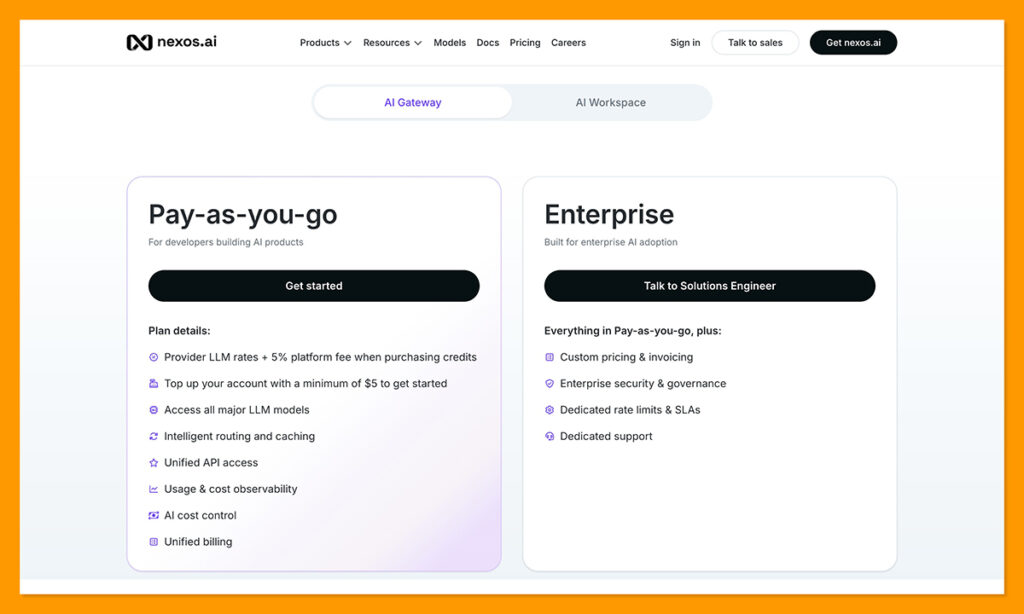
The Enterprise plan is once again custom, based on what you actually need, and it bundles in enterprise security, governance, dedicated rate limits, SLAs, plus advanced support.
Is nexos.ai Worth It?
For me, nexos.ai isn’t going to be an exciting option if you only use a single AI assistant most days, and don’t really want to build anything new.
Still, it’s well worth consideration if your team is using a bunch of different AI tools across departments, and absolutely nobody is having an easy time keeping track of costs and subscriptions. Workspace can replace several account purchases in one go, while Gateway gives your technical teams a single place for routing requests and reviewing workflows.
Obviously, most teams probably won’t be using all of the 200+ models available here, but at least you don’t have to pay more in terms of cost and complexity for the handful of options you are using. If what you really need is a way to cut down AI spending and complexity, plus keep teams aligned at the same time, this is a platform I’d definitely check out.
nexos.ai FAQ
What is nexos.ai?
nexos.ai is a Lithuanian-built AI platform that gives you access to 200+ AI models in one place. It’s split into two products: the AI Workspace, a chat and agent-building environment anyone can use, and the AI Gateway, a single API that lets developers connect their applications to those same models with routing, cost controls, and monitoring built in.
What’s the difference between the AI Workspace and the AI Gateway?
The Workspace is for everyday users: you chat with models, compare outputs side by side, build no-code agents, and create content such as slides, spreadsheets, reports, or images. The Gateway is for developers and technical teams: it’s one OpenAI-compatible endpoint that handles smart routing, fallbacks, caching, budgets, and observability across all your AI traffic. You can buy either one on its own, or use both.
How much does nexos.ai cost?
The AI Workspace starts at $39 per month, which includes 1,000 monthly credits, the 200+ models, unlimited AI agents, integrations, and the content creation tools. You can buy credit top-ups if you run out. The AI Gateway is pay-as-you-go: you pay the provider’s LLM rate plus a 5% platform fee, with a minimum top-up of $5 and no monthly commitment. Both products also have a custom-priced Enterprise plan.
How does the 5% Gateway platform fee work?
The fee is added on top of whatever the model provider charges. So if a model costs $10 per 1M tokens, you’d pay $10.50 per 1M tokens through nexos.ai. That 5% covers the Gateway features themselves: smart routing, caching, spend controls, observability, and API key management.
Which AI models can you use with nexos.ai?
You get 200+ models from the major providers, including OpenAI (ChatGPT), Anthropic (Claude), Google (Gemini), and Mistral. If you don’t know which one to pick, the Auto Select feature reads your prompt and chooses a model based on specialization and expected quality. You can also use Compare Models to send one prompt to several models at once and review the answers side by side.
Do I need coding skills to build AI agents in nexos.ai?
No. The Agent Builder is no-code: you describe the job, answer a few follow-up questions, and the system writes the instructions and maps the work for you. You can start from a template (marketing, sales, customer support, recruitment, legal, finance, or productivity), connect your apps, share the agent with colleagues, and schedule it to run at set times. You can also make the agent pause for approval before it sends a message or updates a record.
What tools does nexos.ai integrate with?
The main ones are Google Workspace (Drive, Docs, Calendar, Sheets, BigQuery), Microsoft (SharePoint, OneDrive, Teams, Outlook), plus Slack, Jira, GitHub, Compass, and Confluence. There are also messaging app connections for Slack, Telegram, and WhatsApp, a browser extension, and mobile apps for iOS and Android. The MCP connections keep the permissions from your original system, so people only see what they’re already allowed to see.
Is nexos.ai secure, and does it train AI models on my data?
Your data is never used to train models, and the platform is hosted in Europe with GDPR compliance alongside ISO 27001, ISO 42001, and SOC 2 certifications. Enterprise plans add SSO and SAML, RBAC, full audit logs, policy rules, and input and output guardrails that block sensitive information from reaching models. The company was founded by the Tesonet team, which is behind cybersecurity brands such as Nord, Oxylabs, and Surfshark.
Can nexos.ai actually reduce AI costs?
Yes, and that’s the main pitch of the Gateway. Smart routing sends simple requests to cheaper models while harder jobs still go to the ones that can handle them, caching stops you paying twice for the same answer, and context compression trims unnecessary tokens. You can also set budgets and hard caps by team, project, model, or API key. As a real-world reference, Nord Security cut its coding agent LLM costs by 46% using the platform.
Can I bring my own API keys to nexos.ai?
Partly. The Gateway supports bringing existing provider contracts into the platform, but full BYOK (bring your own keys) is still listed as “coming soon” on the plan comparison. If BYOK is a hard requirement for you, confirm the current status with the nexos.ai team before committing.
Is it hard to switch an existing app over to the AI Gateway?
Usually not. The Gateway uses an OpenAI-compatible endpoint, so if your app is already built on the OpenAI SDK, you’ll typically only need a new base URL and a new API key. From there you can change models through the request parameters, without rebuilding anything.
Does nexos.ai offer a refund?
Yes. Workspace plans come with a 14-day money-back guarantee, so you can cancel from the Billing section within 14 days of purchase. The Gateway has no subscription to cancel: there’s no monthly minimum and no long-term commitment, you only spend the credits you top up.
Who is nexos.ai best for?
It’s best for people and teams paying for several AI subscriptions at once, teams that want to build agents without developers, and businesses running multiple models that need visibility into who’s spending what. It’s overkill if you’re happy using a single assistant such as ChatGPT for everything and don’t plan to build anything new.

Comments 0 Responses