

HeadshotPro is one of the most popular AI headshot generators for professionals, offering an affordable way to create business ready portraits without booking a photographer or studio session.
In this review, I’ll take a closer look at HeadshotPro’s pricing, features, image quality, and limitations, so you can decide whether it’s the right AI headshot tool for your professional needs.
Key Takeaways
- HeadshotPro generates professional AI headshots designed for LinkedIn, resumes, websites, and business profiles
- Pricing ranges from $29 to $59 as a one time payment, making it far cheaper than traditional photography
- The tool produces a large volume of images, increasing the chances of finding strong usable headshots
- There are no manual editing tools, so results vary and some images will need to be discarded
HeadshotPro Pros and Cons
| HeadshotPro | |
|---|---|
| Best for | Professional and corporate headshots |
| Overall Rating | 4.5 out of 5 |
| Also Recommended For | Individuals, remote teams, business profiles |
| Pricing | One-time purchase, $29 to $59 |
| Pros | Cons |
| Excellent value compared to traditional photography | No ability to edit or adjust individual images |
| Clean and professional styles | Image quality varies across the generated set |
| Large number of generated images per order | Slower turnaround time than some competitors |
| Simple setup with no technical skills required | Not ideal for users who want full creative control |
| Full ownership rights to all images |
What I Like
✔️ HeadshotPro offers excellent value with pricing that starts at just $29 for a full set of AI-generated headshots
✔️ The platform is simple to use, requiring only a few selfies and no design or technical skills
✔️ It generates a wide variety of images with different outfits, backgrounds, and lighting, improving your chances of finding high-quality results
✔️ You retain full ownership of your headshots and can use them freely for personal or commercial purposes
✔️ Ideal for professionals who need a fast and affordable solution for updating LinkedIn profiles, websites, and resumes
What I Dislike
❌ There are no built-in tools to edit or retouch individual images after they’ve been generated
❌ Image quality can vary significantly across the set, and some results may appear overly airbrushed or unnatural
❌ Turnaround time ranges from one to three hours, which is slower than some AI headshot tools available today
❌ Users looking for fine-grained control or advanced customization will find the platform limiting
What Is HeadshotPro?
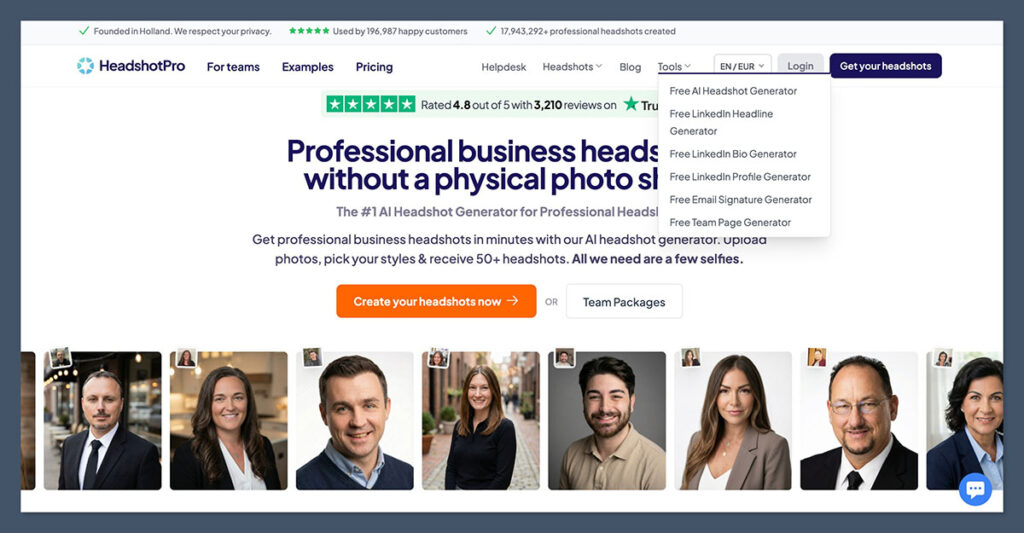
HeadshotPro is an AI headshot generator that creates professional-style portraits from a batch of selfies.
You upload between 6 and 12 personal photos, and the tool trains an AI model to create 40 to 150 new headshots in various poses, outfits, and backgrounds.
The platform is aimed at business professionals looking to replace traditional photography sessions with a fast, lower-cost alternative. All the headshots are generated digitally, using your face and likeness to build new compositions.
Key Features
- Generates brand-new headshots based on your facial features
- Offers multiple backgrounds and clothing styles to match different branding needs
- Includes business-friendly styles optimized for resumes, LinkedIn, company bios, and more
- Full ownership rights to your AI-generated images
- Optional team plans for companies or groups needing consistent staff photos
I found the overall experience smooth and beginner-friendly. The interface is clean, and the step-by-step upload process makes it easy to get started, even if you’re not tech-savvy.
HeadshotPro Pricing
HeadshotPro uses a one-time purchase model rather than a subscription, making it easy to budget for. There are three plans available, each with different image counts and delivery speeds.
| Plan | Price | Images Generated | Delivery Time | Key Features |
|---|---|---|---|---|
| Basic | $29 | Around 40 | Up to 3 hours | Entry-level access with standard options |
| Professional | $39 | Around 100 | 2 hours or less | Includes more style options and faster speed |
| Executive | $59 | 150+ | 1 hour | Fastest turnaround with highest resolution |
Each plan includes access to all core features, including style selection and background variety.
The main difference is in the number of headshots you receive and how quickly they’re delivered.
For team use, HeadshotPro offers discounted bulk pricing that allows businesses to generate headshots for multiple employees with a shared brand style.
This makes it an attractive option for remote teams, startups, or agencies that want consistent staff images without booking in-person sessions.
What I Liked About HeadshotPro
After testing HeadshotPro, I was impressed with several aspects of the platform. Here are the top reasons I think it works well for professionals and teams.
It Offers Great Value
Compared to a traditional photographer, HeadshotPro is significantly cheaper. A studio headshot can easily cost between $200 and $500 per person, depending on your location and the photographer’s experience. HeadshotPro starts at just $29.
Even the Executive plan, which provides the highest number of images, still costs less than a typical one-hour session in a photo studio.
The value is especially strong for professionals who just need one or two good images for their online presence. Even if you only like 5 to 10 photos out of the 100 generated, the cost per usable image is still low.
The Process Is Fast and Easy
I was able to complete the full upload process in under 10 minutes. Once I submitted my selfies and chose a style, I waited about two hours for the results to come in.
I didn’t need to download any apps or learn new software.
The images were delivered via a secure link, and the gallery format made it easy to scroll through and pick my favorites. From upload to download, the entire experience was straightforward.
Variety of Styles and Backgrounds
One of the platform’s strengths is the range of headshot variations it delivers. These aren’t just copies with slight edits — each image had different poses, backgrounds, and clothing.
I received a mix of studio-style portraits, blurred office scenes, clean backgrounds, and different lighting styles.
This variety improves the chances of finding at least a few images that feel natural, professional, and on-brand.
Full Image Ownership
You own all the headshots that are generated. There are no restrictions on usage, and HeadshotPro doesn’t reuse your images for marketing or training purposes.
You’re free to use your headshots commercially, edit them, print them, or upload them anywhere.
In a time when many AI tools still retain image rights, this level of transparency and control is refreshing.
What I Didn’t Like About HeadshotPro
Despite the strong value, there are a few limitations worth noting before using HeadshotPro.
You Can’t Edit Individual Images
Once your images are generated, you can’t make detailed changes. If a photo has a minor issue, like a strange smile or unnatural lighting, you’ll need to skip it and find another.
There are no built-in tools to adjust brightness, remove a background, or fix facial features. This can be frustrating if you like the overall image but want to make small tweaks.
Some AI headshot generators, like Secta or Aragon AI, provide more flexibility for editing or selecting specific poses. HeadshotPro focuses on volume rather than precision.
Quality Varies from Image to Image
Although I received over 100 images, only about 10 to 15 of them were usable in a professional context.
Some had slightly distorted facial features or awkward expressions. Others felt too heavily airbrushed or had unnatural lighting.
This variation is a normal part of AI image generation, especially when based on limited input photos. The more high-quality selfies you upload, the better the results tend to be.
To improve your results, I recommend:
- Using well-lit selfies with natural light
- Avoiding hats, sunglasses, or extreme angles
- Including a variety of facial expressions and angles
The AI model performs better with diverse, clear input data.
It’s Slower Than Some Alternatives
While HeadshotPro isn’t slow by traditional standards, some competitors now offer faster delivery. Aragon AI, for example, can return results in as little as 15 minutes.
HeadshotPro’s fastest plan takes about an hour, and the Basic plan may take up to 3 hours. If you need headshots urgently, this could be a drawback.
Still, the turnaround time is reasonable for most people. It’s not instant, but it’s far quicker than booking and attending a photo session.
How HeadshotPro Compares to Other AI Headshot Tools
If you’re researching AI headshot generators, it’s helpful to see how HeadshotPro stacks up against its main competitors.
| Tool | Price Range | Delivery Time | Editing Features | Ideal For |
|---|---|---|---|---|
| HeadshotPro | $29 to $59 | 1 to 3 hours | None | Corporate professionals |
| Aragon AI | $35 to $55 | 15 to 30 minutes | Limited background editing | Fast results |
| Secta | $49 to $69 | About 1 hour | Pose selection available | High realism and control |
| Try It On AI | $25 to $45 | 2 to 4 hours | Basic controls | Portraits with variety |
| Remini | Free to $9/week | Instant | Selfie enhancement only | Social media or casual use |
Aragon AI is a great choice if you want results quickly and don’t mind trading a bit of realism for convenience. It delivers decent quality portraits in under 30 minutes, making it ideal for last-minute needs.
Secta offers the most control over how your headshots turn out, including pose selection and more realism-focused outputs. It’s better suited to users who want to be more involved in shaping the final images.
Try It On AI delivers a wide mix of casual and professional portraits but lacks fine-tuning tools. It’s a flexible tool for creatives or freelancers who want a variety of looks to choose from.
Remini is focused on enhancing existing selfies rather than creating new headshots. It’s ideal for casual users who want better-looking photos for dating profiles, social media, or quick uploads.
HeadshotPro stands out for its business-oriented results, volume of output, and ease of use. It doesn’t offer the deep editing tools that Secta does, or the speed of Aragon, but it delivers a solid all-around experience for most professional needs.
Who Should Use HeadshotPro?
HeadshotPro is best suited for:
- Professionals who need updated headshots for online profiles
- Job seekers who want to improve their resumes or personal branding
- Founders and small business owners who want consistent images across platforms
- Remote teams that need uniform staff photos
It’s especially helpful for people who don’t want to book a photographer or wait days for retouched portraits.
You might want to look elsewhere if:
- You want to control small details in your images
- You need instant delivery
- You’re expecting studio-quality results with 100% accuracy
Final Thoughts: Is HeadshotPro Worth It?
After testing HeadshotPro and comparing it to other tools, I think it’s a strong option for most professionals.
It offers a simple and affordable way to get dozens of polished headshots in a matter of hours.
It’s not perfect. Some images won’t be usable, and you won’t be able to edit the ones you almost like.
But with a bit of patience and a good set of input photos, it delivers results that are more than good enough for LinkedIn, resumes, websites, and even media kits.
If you’re realistic about what AI can do—and what it can’t—HeadshotPro delivers solid value. It won’t replace a top-tier photographer, but it comes surprisingly close for the price.

Comments 0 Responses