

If I’m totally honest, I didn’t really see AI image detection tools as being very important until pretty recently. One reason is that it used to be so much easier to see when AI was involved in creating an image than it was to spot GPTisms in text. Lot’s of early LLM-produced imagery had common problems like filling photos with text nobody could read, or adding extra fingers to someone’s hand.
Plus, quite a few image generators do add invisible watermarks or meta data to generated visuals, anyway. The problem is both of those things aren’t quite as dependable as they once were. AI-generated image quality is definitely improving, and creators are getting better at stripping the extra data out of a visual that would usually immediately tip detection tools off.
So, when Pangram announced “Pangram Image” I was immediately interested because, first of all, Pangram is already my favorite AI detector for text, and secondly, the tool’s initial benchmark results are genuinely impressive (99%+ accuracy results across several benchmarks).
Still, I’m always reluctant to accept benchmark scores on their own as proof that a tool’s genuinely worth using, so I had to throw together an experiment of my own.
Quick Verdict: Is Pangram Image Reliable?
First, it’s worth checking out some of Pangram’s own test results if you haven’t already. On one internal benchmark covering 5 commercial detectors, Pangram got an average 99.5% accuracy score (the next nearest competitor only got 98%).
It’s not totally foolproof, though, and Pangram themselves have said that this isn’t the “final form” of the tool, it’s still in research phase, and the company’s still working on improving it. Overall though, I found it to be very trustworthy in my own personal tests. I also appreciate the fact that Pangram still works to keep false positive rates low with images (which is one of my favorite things about their text detection tools, too).
Pros:
- Very high initial benchmark and testing scores published by Pangram
- Impressively low false positive rates
- Still works well on images that go through significant JPEG compression
- Can spot AI signatures from most of the popular image generation tools
- Helpful heatmaps make it easier to see what’s informing a particular score
- Three free scans included per day
- Still improving (with extra capabilities coming soon)
Cons:
- Still in research preview
- Doesn’t support certain types of images (like deepfakes and face swaps)
- Won’t accept NSFW images
- 512 x 512 pixel minimum
What Is Pangram Image?
Pangram Image is the new feature in Pangram’s AI detection toolkit, announced on July 29th, 2026, at the same time Pangram launched Pangram 4, and shared an update on its most recent funding round. You don’t need a separate account to use it. The free version of Pangram gives you three image credits a day, and the paid version lets you scan between 100 images(on the Individual plan), and 500 images per month (on the Professional plan).
Using the feature is just as easy as using Pangram to detect AI signatures in test. You give the tool a JPG, PNG, WebP, or image URL, and it looks for signs that the picture might have come from a generator. It’s been trained on images created by things like ChatGPT Image, Gemini/ Nano Banana, Midjourney, Flex, and Groc Imagine. It’s also been tested on video frames from tools like Veo, Kling, Wan, and Seedance.
Right now, files need be at least 512 x 512 pixels, and there’s a 30MB limit. The tool can also check a maximum of ten images in one batch. For now, there’s limited API support, and Pangram Image isn’t available on the Chrome extension, but those updates are coming soon.
What’s really useful about Pangram Image, even in this early stage is it gives you more than just a “percentage-based score”. You get a heatmap that shows you more about which parts of the image contributed most to a specific result, which I like. Although Pangram does say any image “edited” by AI will usually get a 100% AI score, thanks to the way most tools tend to regenerate a visual from scratch even if they’re just making small tweaks.
How Does Pangram Image Work?
Pangram says it trained it’s image detection tool using a strategy called “synthetic mirroring”, which basically means a system takes a real image, gets a vision-language model to explain it, then hands the description to an image generator, so you end up with a human original and an AI counterpart the tool can compare side-by-side.
The company also built on that initial training strategy by sourcing and evaluating a lot of AI images sourced from the web, as well as visuals the team made in-house. After that, they also added a new system they call composite training to help build the heatmaps that make it easier to see AI aspects in mixed AI/human imagery.
From an architecture perspective, Pangram Imagine builds on the “DINOv3” industry-standard computer vision model from Meta. That model essentially turns images into numerical representations that pull details from specific regions, as well as the image as a whole. Then Pangram has fine-tuned that for AI detection specifically.
It’s all a bit complicated, but after evaluating the model Pangram’s shared some pretty great initial results. For instance, it got a 100% accuracy score on clean data (with a 0% false positive rate), plus a 99.03% accuracy score and 0.40% false positive score on augmented data.
My Pangram Image Test: How Accurate Was It?
As I said, Pangram’s own initial test scores are very good, but benchmark results are only so trustworthy on their own. The only way I could really figure out for myself whether I’d actually recommend Pangram Image to someone else was to test it.
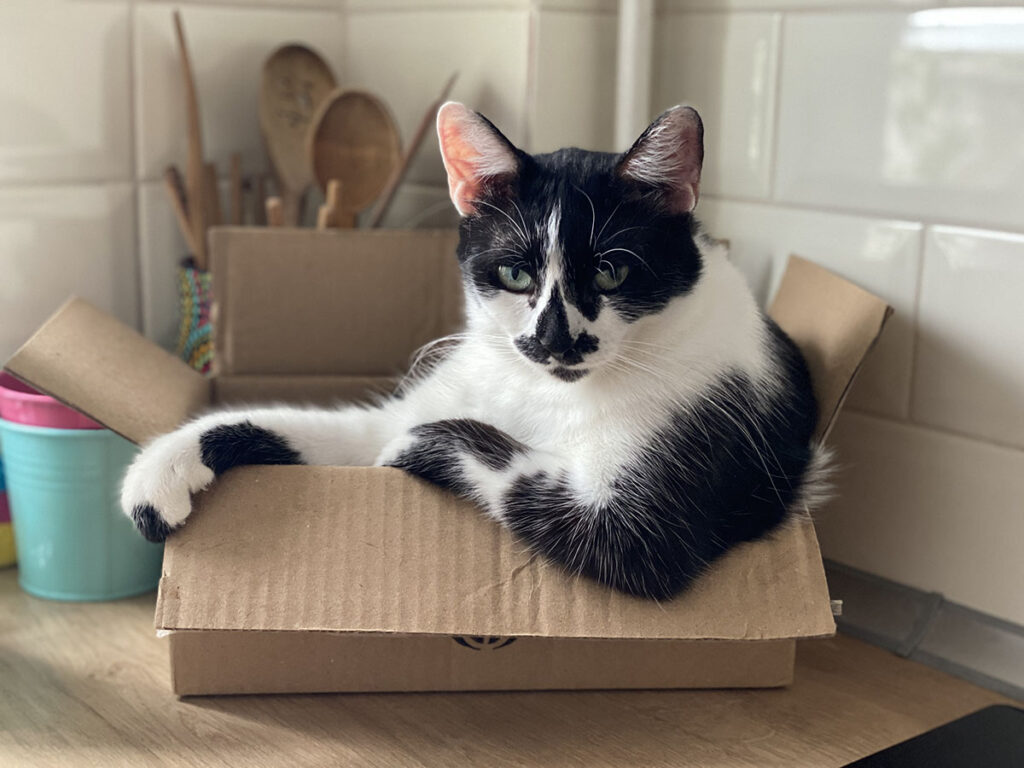
So I essentially put together my own version of Pangram’s test, taking one human-created image (of a cat), getting ChatGPT and Gemini to describe it to me, then asking those tools to recreate the image.
Here’s the image I started with:
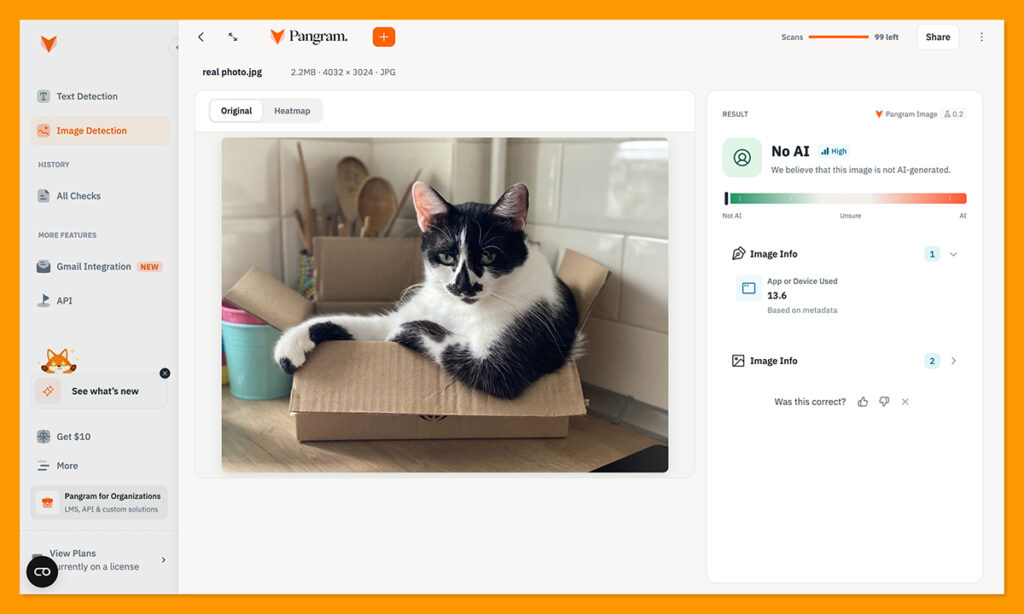
For a benchmark, I fed that image into Pangram’s image detector to begin with, and got the exact response I expected. Pangram told me it believed there was no AI involved in the image at all, which is a good start:
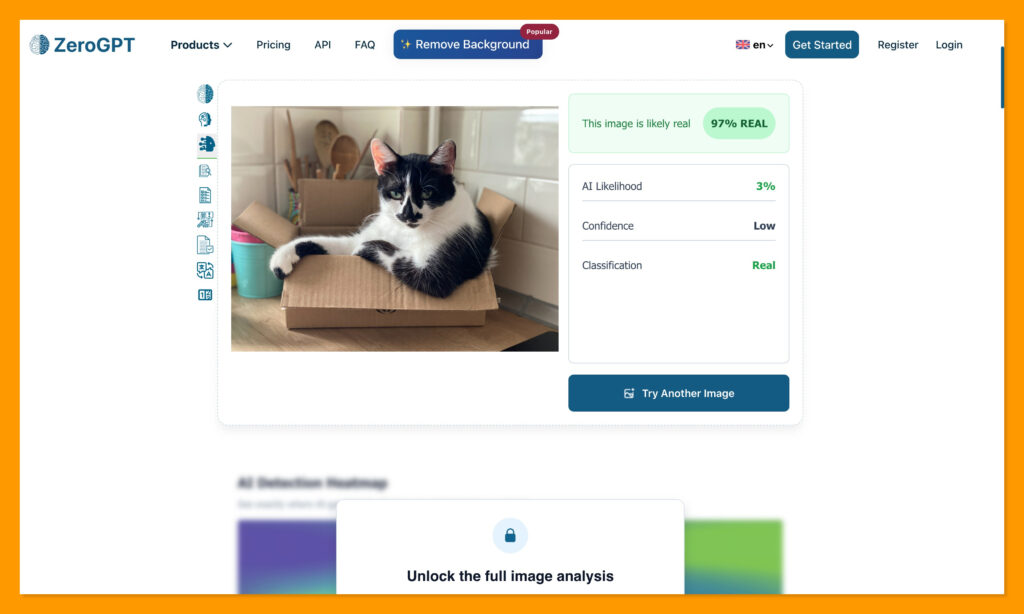
ZeroGPT gave me more or less the same result, although it did say there was still a 3% chance of the image being AI generated:
Then I went to ChatGPT, and Gemini to see what they could come up with.
The Pangram AI Image Tests
I wanted to give the bots the best chance of getting as close to that original as possible, so I put together this prompt with an LLM, after asking it to review the first photo:
“A photorealistic candid photograph of a black-and-white domestic shorthair cat relaxing inside a small open cardboard box on a wooden kitchen countertop. The cat is sitting comfortably with its front paws draped casually over the edge of the box, looking slightly off-camera with a calm, mildly curious expression. Distinctive black-and-white facial markings, pale green eyes, realistic whiskers, detailed natural fur texture.
Cozy everyday kitchen setting in the background, with glossy white subway tiles, a wooden utensil holder filled with wooden spoons, and a few colorful kitchen containers. Soft warm natural daylight coming from a nearby window, illuminating the cat from the side and creating gentle highlights on the fur.
Shot like a spontaneous smartphone portrait photo, close eye-level perspective, approximately 50mm equivalent lens, shallow depth of field, softly blurred background, natural exposure, subtle imperfections, realistic colors, no studio lighting, no artificial posing. The cardboard box should look slightly worn and bent from use.
Ultra-realistic photography, lifelike anatomy, highly detailed fur, authentic household environment, natural shadows, understated color grading, believable depth of field, candid domestic moment.”
The Results I Got with ChatGPT
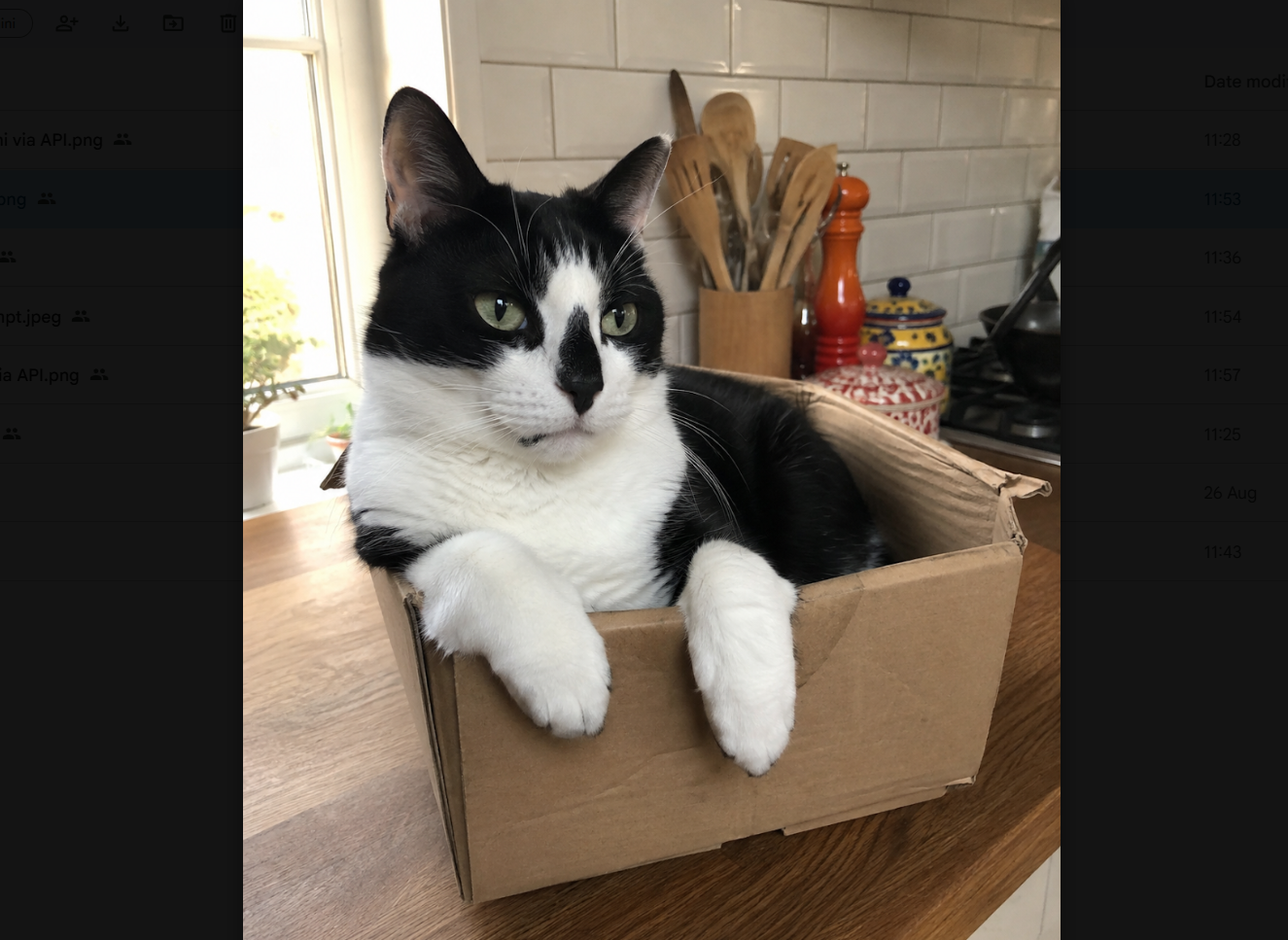
Starting with ChatGPT, as you can see, the result I got was actually pretty similar to the original photo, we can even see the utensils in the background.
Still, when I took it over to Pangram, this is what I got:
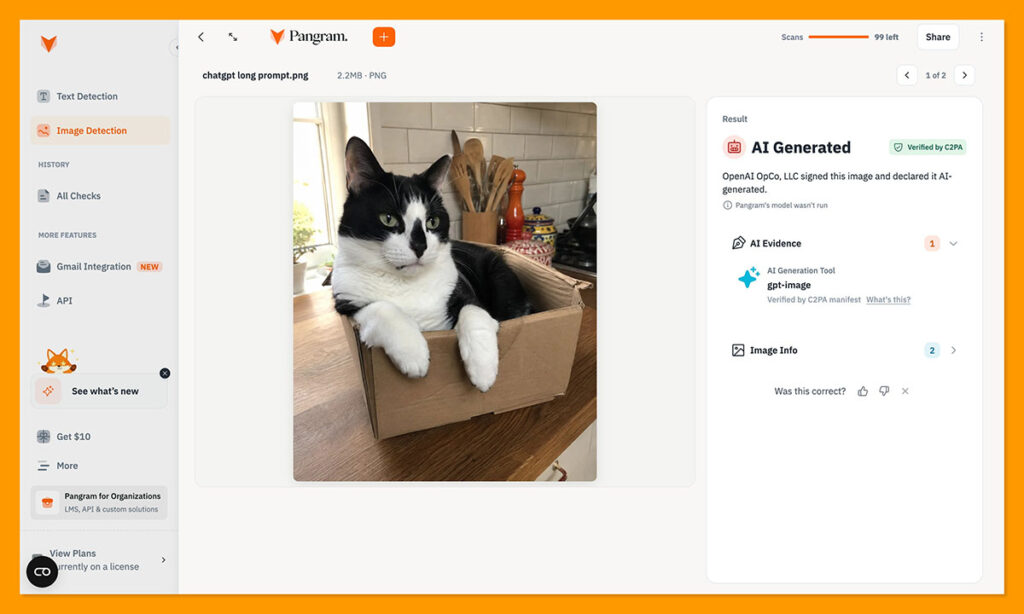
Pangram didn’t just detect the image was AI-generated, it actually found that the image had been signed by OpenAI, so there was no need to run the model in the first place.
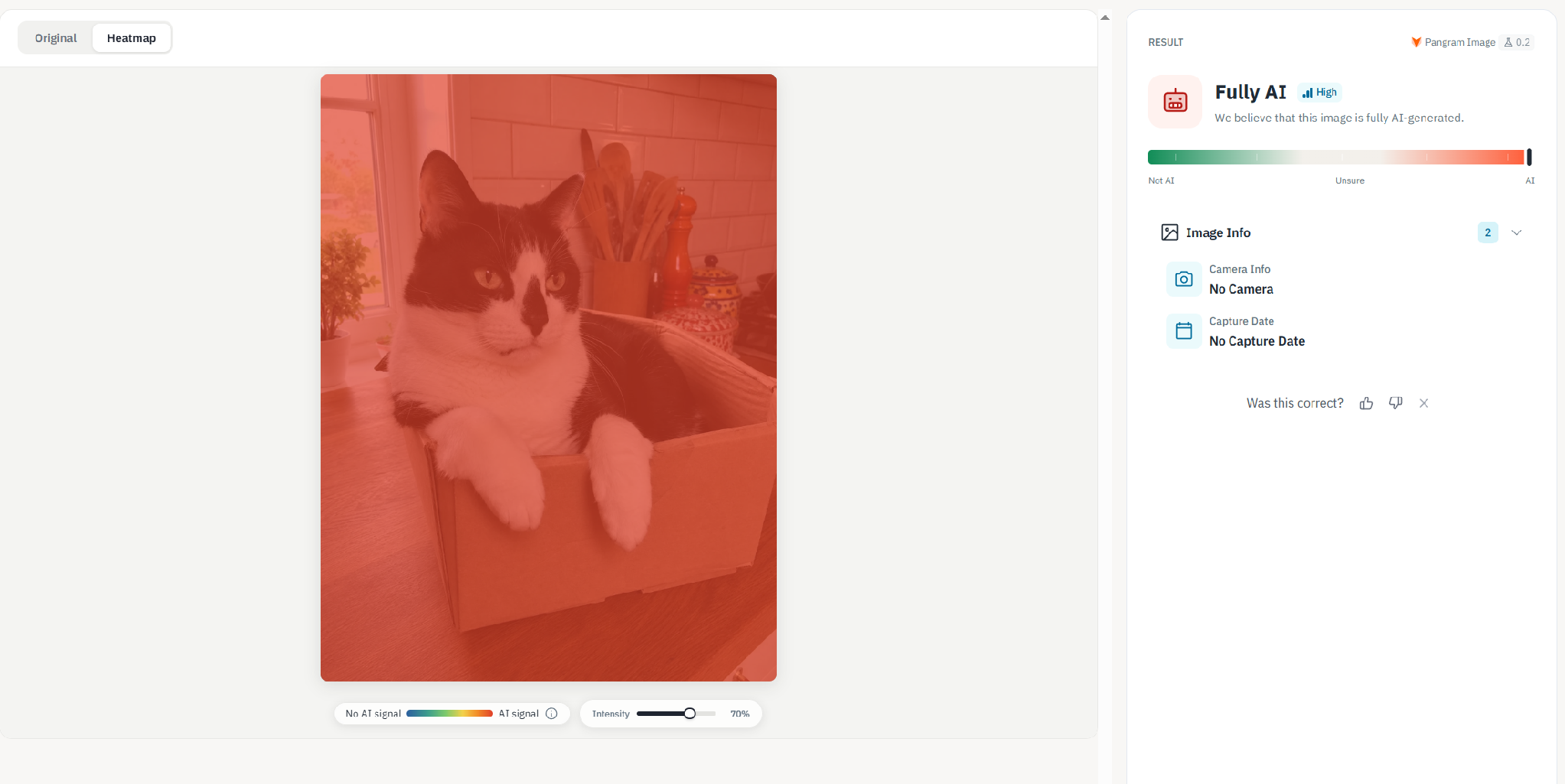
Since that didn’t give me much information on its own, I decided to get a little sneaky and use an “AI image humanizer” on the same picture, to see if it made any difference to the result. The tool removed the signature, but Pangram still clearly saw it was AI-generated:
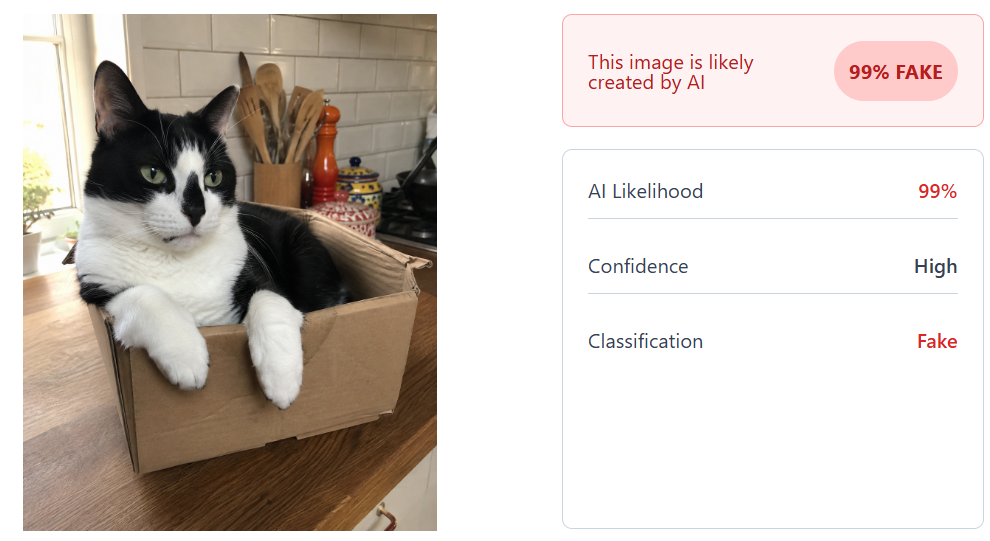
I tried the same trick with ZeroGPT, and the results changed completely. The result for the image with the AI signature Pangram had spotted got a 99% AI likelihood score:
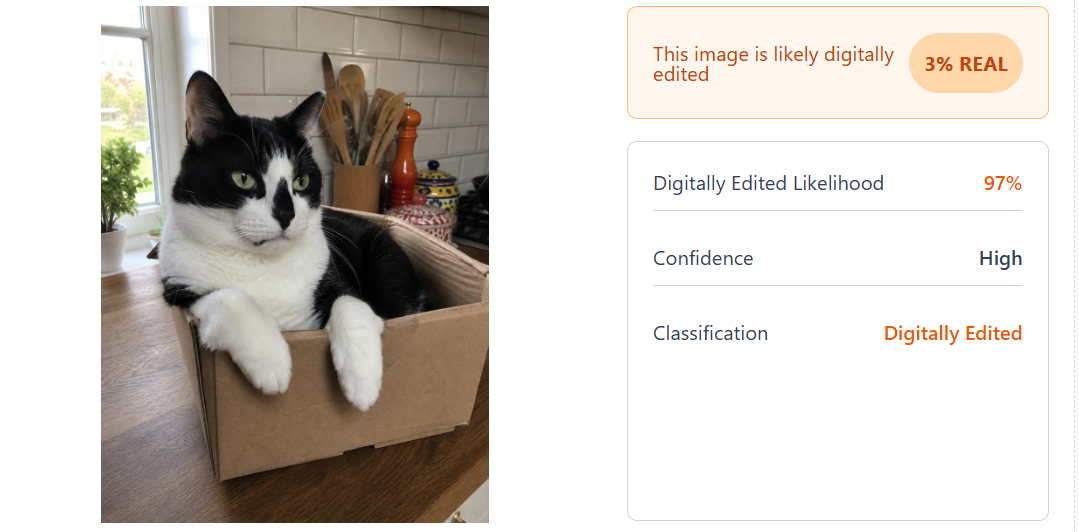
The image where I’d removed the watermark got a “97% of chance of being digitally edited” score, which is obviously a very different outcome.
The Results I Got with Gemini
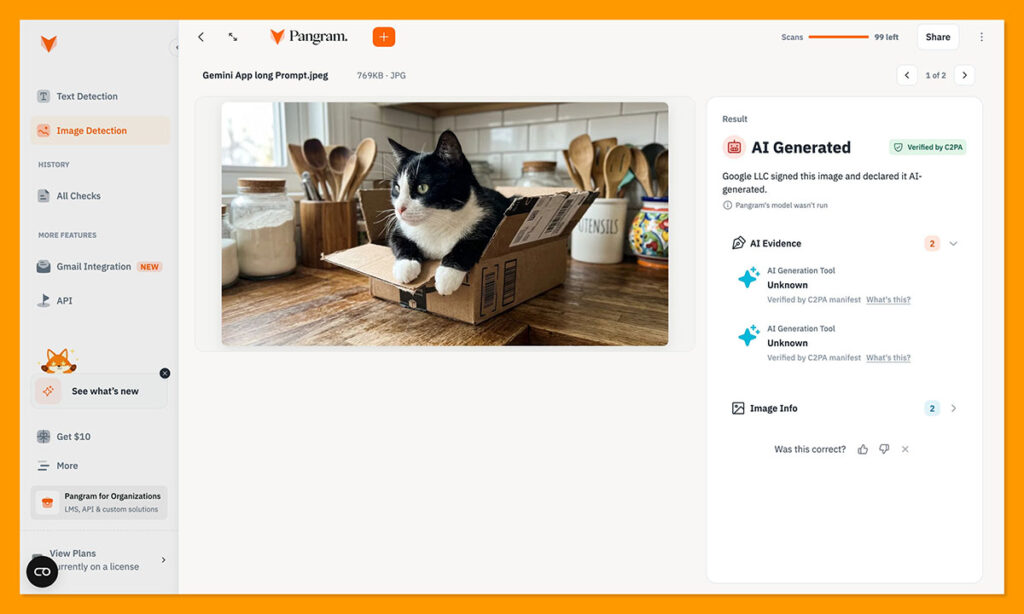
I decided to take two different approaches with Gemini, feeding the same prompt to the chat app, and the API tool, to see if I got different results. The Gemini app gave me this:
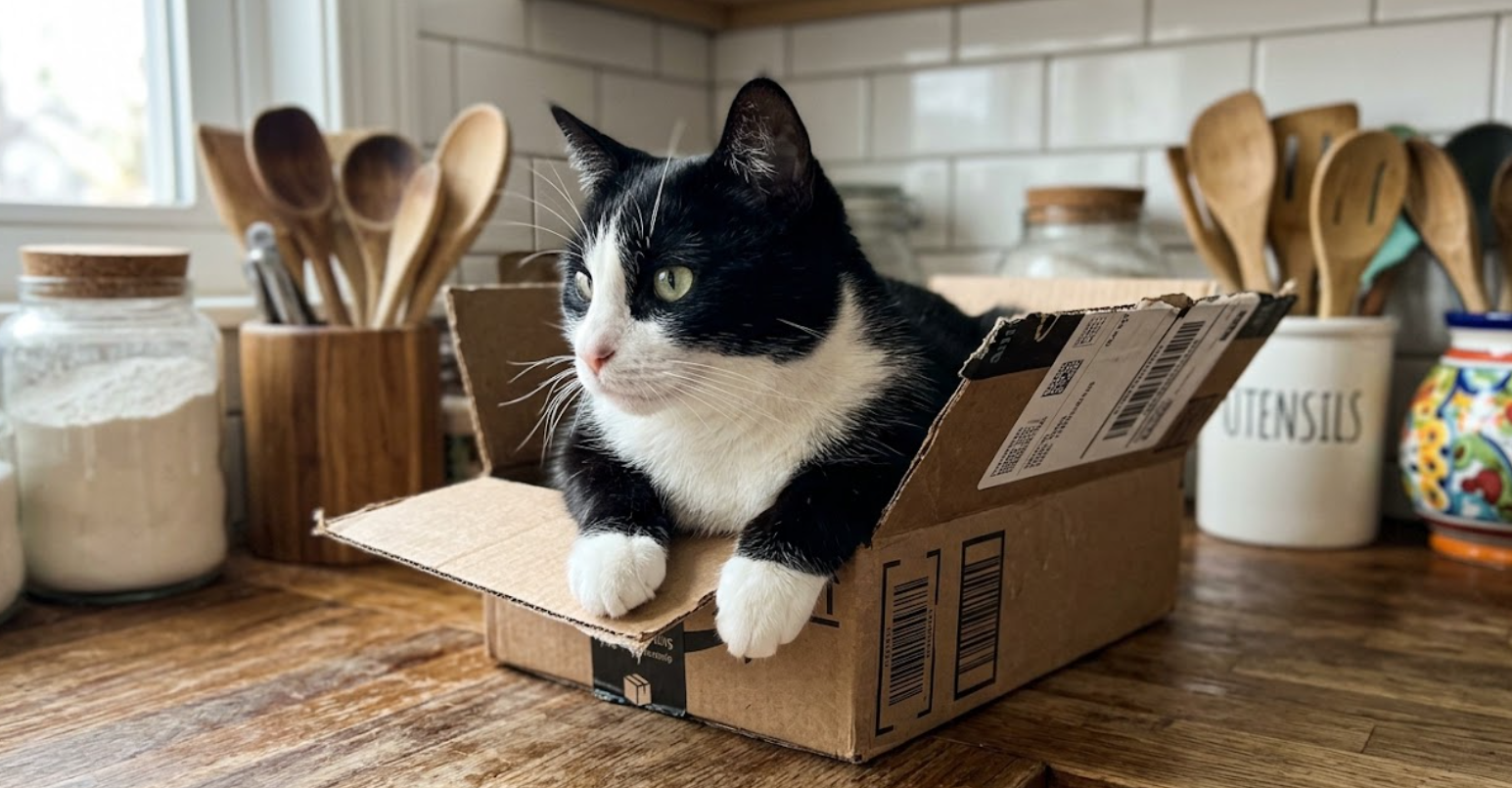
When I took this image to Pangram, I got the same response as before, Pangram didn’t bother to run it’s own model because it could instantly tell that it had been signed by Google LLC.
The API gave me this:
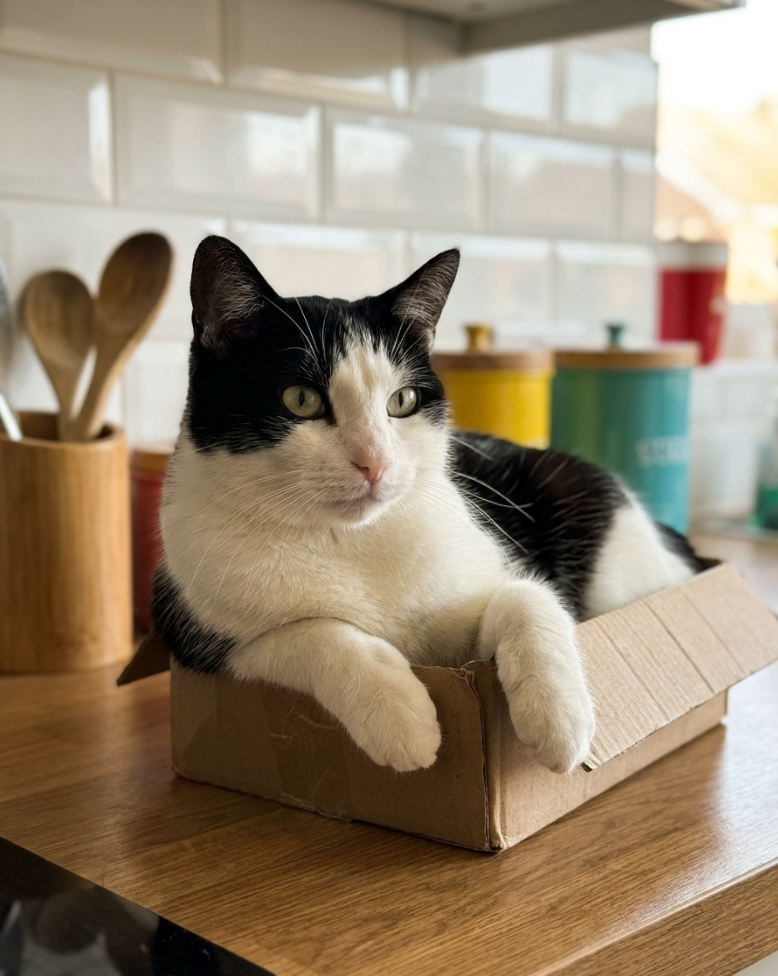
This time, Pangram did run its own model, clearly unable to find a signature on the API-generated output. It showed that the full image was generated by AI, indicating that not even one part of the visual came across as “human” produced.
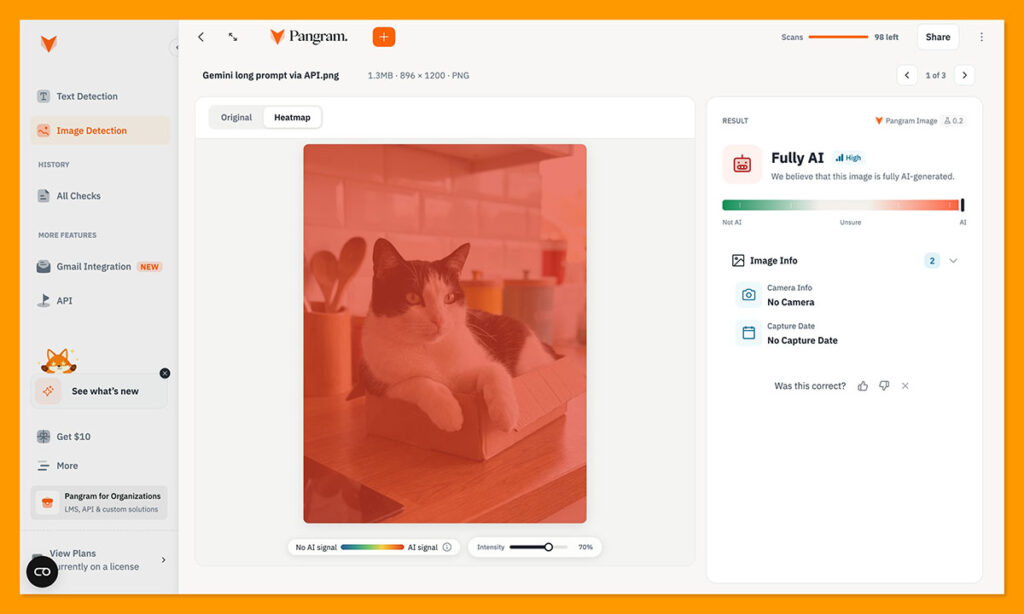
That was interesting for me because it showed that, clearly, different types of AI tools don’t leave the same fingerprints on images. There’s every chance another AI detector could see something produced by an API, be unable to find the signature, and classify it as human.
I wanted to see if that was the case, so I pasted the same image into ZeroGPT, and got a 97% “AI probability score” which is still good, just not 100%.
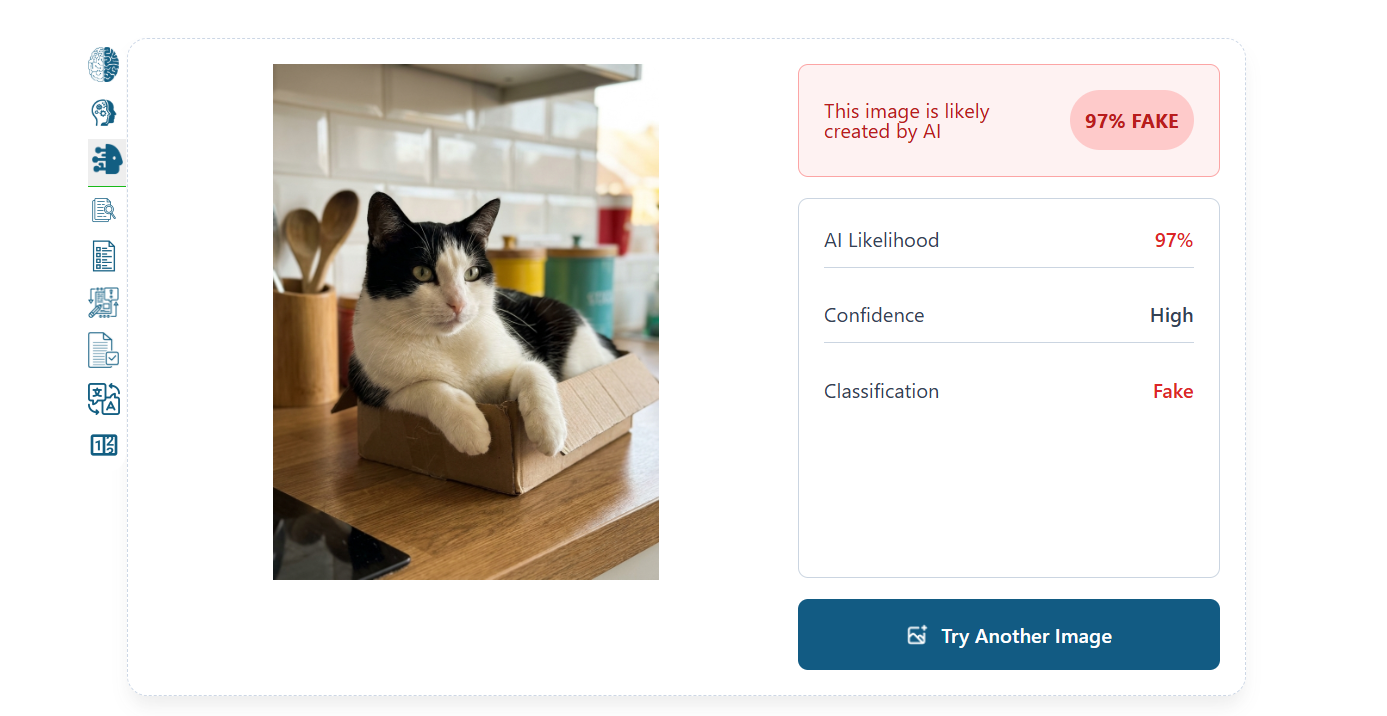
The Overall Results
Based on this relatively simple test, I think it’s clear that Pangram is surprisingly accurate at distinguishing between real and fake images. Of course, I wasn’t able to try a “hybrid” image to get a really good feel of how well the heatmap feature worked, since I’m not that great at producing visuals, but at least it got the obvious human, and AI scores correct.
I was also quite impressed by how easy the system was to use, and how quickly it produced a result, particularly when it told me that it didn’t need to run its model at all, because there was already an invisible signature hiding on a few of the pictures.
I was also quite happy that Pangram still detected AI in the image I’d removed the watermark from, rather than just assuming it was “digitally edited” instead.
Pangram Image Pricing: What Does It Cost?
Pricing is one of the more complicated parts of Pangram image right now, especially since the Image tool is still in research mode. The Free plan gets you 3 image scans per day, which is plenty if you just want to see how the whole thing works.
The Individual Monthly plan (which I currently use), gives you 100 image detection scans per month, alongside 300,000 words per month, extra plagiarism detection options, as well as all of Pangram’s integration options.
Then there’s the Professional Monthly plan for $65 per month, which lets you scan up to 500 images per month, and 1,500,000 words. You also get $200 credits for monthly API usage. Those prices might change as Pangram’s tool continues to evolve, but for now I think the plans are pretty good value for money, particularly if you’re running checks on lots of different types of media.
What’s Next for Pangram Image?
It’s early days for Pangram image at this point, so it’s worth mentioning that there’s more to come after the research preview period ends.
Pangram hasn’t revealed everything yet, but it says it’s already working on making sure the false positive rate can be as low as the one it’s achieved for its text model. Already, the false positive rate is quite low, but it still got a 0.16% result on one ReLAION test.
Additionally, Pangram has said that it’s X bot will soon be able to check images too, and the dashboard will be able to accept video files directly. Plus, the image function is headed for the Chrome extension as well, so you’ll have more places to use the tool. That could be very useful for anyone who tends to already use Pangram day to day to double-check anything suspicious they see on the web.
Is Pangram Image Trustworthy?
Pangram Image is still proving itself, even with the developer that built it. Even Pangram isn’t content to leave the tool where it is today, which I think is a good sign, even though in my tests, it performed incredibly well, especially compared to other, cheaper tools.
Pangram reminds users that it still has problems with investigating face swaps and deepfakes, and it can’t always manage every type of image, so it’s not completely perfect. Still, it performed really well for me.
Pangram managed to detect which images were AI and which were human every time I used it, even when ZeroGPT gave me uncertain scores, or tried to pass an AI image without an obvious signature off as simply being “digitally edited.”
I’d still treat it with caution and use your own judgement, just like you would if you were checking text for AI, but overall, I’d trust Pangram with a second opinion on an uncertain visual more than many of the other apps on the market today.

Comments 0 Responses