

Knowt is one of the most promising AI-powered study tools available right now.
Built around flashcards, spaced repetition, and automatic content generation, Knowt is designed to help students and educators save time while improving retention.
In this review, I’ll take a closer look at Knowt’s key features, AI capabilities, pricing, and real-world performance so you can see whether this free Quizlet alternative lives up to its reputation.
Why You Can Trust This Review
I spent more than 20 hours testing Knowt across multiple workflows. I created flashcard decks, uploaded PDFs and YouTube lectures, tested the AI summarizers, and explored both the free and paid plans.
I also compared Knowt directly with tools like Quizlet, Anki, and Zorbi to evaluate its strengths and weaknesses in a realistic academic setting.
The insights shared here are based on firsthand experience and verified information from Knowt’s product documentation, app listings, and help center articles.
Knowt Pros and Cons
| Knowt Summary | |
|---|---|
| Best For | Students using flashcards, PDFs, or YouTube lectures |
| Available Platforms | Web, iOS, Android, Chrome Extension |
| Price Range | Free to $119.99 per year |
| AI Tools | Flashcard generation, summarizers, chatbot |
Pros
- Free plan includes unlimited flashcards, notes, and core study modes
- AI can generate flashcards, summaries, and practice tests from videos and PDFs
- Chrome extension allows import from YouTube and Quizlet
- Simple interface with fast setup and onboarding
- AI assistant “Kai” available in paid plan for extra support
Cons
- Free plan includes limited AI usage that resets monthly
- Chrome extension does not support all sites or universal imports
- Ultra plan includes monthly upload limits for PDFs and videos
- No full customization of study algorithms like Anki
My Experience Using Knowt
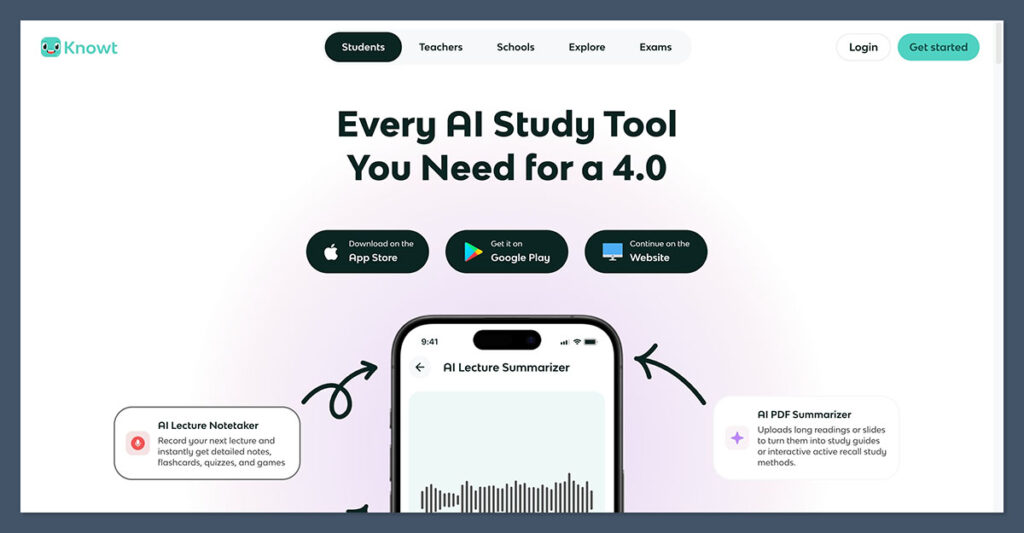
When I first signed up for Knowt, the process was straightforward. I didn’t need to provide payment information, and I was inside the dashboard within minutes. The layout is clean and modern, with clear calls to action like “Create Flashcards” or “Upload PDF.”
I appreciated the structured onboarding. Knowt offered immediate access to key features without locking anything important behind a paywall.
I started by testing flashcards, then quickly moved to the AI tools.
The Chrome extension was easy to install and provided access to both the YouTube summarizer and Quizlet importer. I was also able to use Knowt across multiple devices without any syncing issues.
Here is a breakdown of what I tested:
- Created five unique flashcard decks
- Imported existing Quizlet sets
- Uploaded three PDF documents for summarization and quiz creation
- Used the Chrome extension on two YouTube lectures
- Interacted with the Kai assistant to clarify flashcard errors
Flashcards and Study Modes
Flashcards are the foundation of Knowt. Whether you’re studying anatomy, foreign languages, or history, Knowt’s flashcard creation tools are intuitive and fast.
Flashcard Features
- Unlimited flashcards on the free plan
- Ability to add images and formatted text
- Organized by subject and topic folders
- Shareable with classmates
Knowt supports five primary study modes:
| Study Mode | Description |
|---|---|
| Flashcards | Classic front-and-back card view |
| Learn | Adapts to your performance to reinforce weak areas |
| Matching | Drag-and-drop style mini-games for memorization |
| Practice Test | Automatically generated quizzes based on your flashcards |
| Spaced Repetition | AI-determined intervals for long-term memory retention |
I found the Learn and Practice Test modes particularly effective. They combine a basic quiz format with adaptive logic to help focus study sessions where you’re weakest.
AI Features: Automating Your Study Workflow
Knowt markets itself heavily on its AI features. After testing each one, I believe this is what sets Knowt apart from other flashcard tools.
PDF Summarizer
The AI PDF tool allows you to upload a document and get a condensed summary, flashcards, and practice questions. This worked well for course syllabi, textbook chapters, and research papers.
In one test, I uploaded a 22-page psychology PDF. Within a minute, Knowt generated:
- A one-page summary
- 18 flashcards based on the text
- A 10-question practice test
This saved me over an hour of manual work.
Video Summarizer (via Chrome Extension)
The Chrome extension supports YouTube summarization. After opening a video lecture, I clicked the Knowt extension and selected “Summarize.” The tool then generated:
- Bullet-point summary of the lecture
- Flashcards on key topics
- Practice questions
This worked best on structured educational content, such as Khan Academy or university lectures. It was less accurate on casual or unscripted videos.
Kai: Your Personal Study Assistant
Kai is Knowt’s in-app chatbot. It can:
- Explain why you got a question wrong
- Clarify flashcard content
- Answer questions about uploaded materials
Kai is only available on the Ultra plan. While not a full tutor replacement, it’s helpful for reviewing concepts or getting additional context on study material.
Pricing and Plans
Knowt is one of the few tools that offers real functionality for free, which makes it ideal for students on a budget. The free plan includes flashcards, notes, and unlimited study modes.
| Plan | Price | Best For | Key Details |
|---|---|---|---|
| Basic | Free | Most students | Includes flashcards, notes, AI summaries with limits |
| Ultra (Monthly) | $19.99 per month | Short-term intensive use | Includes unlimited Kai, AI generation, teacher tools |
| Ultra (Annual) | $119.99 per year | Long-term users | Better value over time, same features as monthly |
It’s important to note that even the Ultra plan includes monthly limits on AI content generation. According to Knowt’s help center, Ultra users can upload:
- 100 PDFs per month
- 100 videos per month
Flashcards and notes remain unlimited.
How Knowt Fits Into Real Study Workflows
I tested Knowt in three different use cases. Here’s how it performed:
1. Migrating From Quizlet
I imported three old Quizlet decks using the Chrome extension. This worked smoothly as long as I was on the original Quizlet page. Importing by URL is not supported.
After importing, I could immediately use all Knowt study modes on those decks. I added images, rephrased cards, and ran a practice test. The workflow was seamless.
2. Studying From YouTube Lectures
I used Knowt’s Chrome extension on a YouTube biology lecture. The AI created a summary and 20 flashcards that accurately reflected the video’s content. This helped me review the lecture more effectively and cut out note-taking.
3. Exam Prep With PDFs
I uploaded two PDF readings from class and generated flashcards and practice questions. The summaries were clean and covered the major points. I then used Kai to clarify one concept I didn’t fully understand, and the explanation was helpful.
Teacher Tools and Classroom Features
Knowt also markets itself to educators. If you’re a teacher, you get access to more than 30 AI tools for lesson planning and classroom management.
Key features for educators include:
- AI-generated rubrics for grading
- Chat activities where students interact with Kai
- Progress tracking for students and class performance
- Assessment tools with auto-grading
Knowt also claims compliance with school data regulations and offers Data Processing Agreements (DPAs) for institutions that require them.
Is Knowt Right for You?
After testing Knowt across multiple scenarios, I believe it’s one of the best tools currently available for flashcard-based studying with built-in AI. The free plan offers a lot more than many paid apps, and the AI tools are genuinely helpful rather than just novelty features.
Knowt is a great fit for:
- Students who study with flashcards or need help summarizing long readings
- People looking for a free or low-cost Quizlet alternative
- Teachers who want to automate grading or assessment creation
It may not be the right choice if:
- You want advanced customization and tagging (like what Anki offers)
- You need unlimited AI usage on a free plan
- You’re concerned about browser extension compatibility or data tracking
Final Verdict
Knowt successfully combines flashcards, AI tools, and classroom support in one user-friendly platform.
The interface is modern and functional, the Chrome extension adds extra convenience, and the AI capabilities save a lot of time when preparing for exams or reviewing content.
The free plan is robust enough for everyday use, and the Ultra plan is reasonably priced for students who want unlimited AI access.
For both individual learners and educators, Knowt offers strong value and practical tools in a crowded edtech market.
If you rely on flashcards and want to cut down on study prep, Knowt is one of the best study platforms available right now.

Comments 0 Responses