

Genspark AI is positioning itself as one of the most advanced AI workspaces on the market. It combines automation, content creation, and real-world task execution inside a single platform.
After spending time testing its Super Agent features, I can confidently say this is far more than just another AI writing tool.
It’s a full workflow solution, capable of completing tasks like building pitch decks, running research, or even making phone calls.
In this review, I’ll walk through everything you need to know about Genspark AI — from pricing and features to the real pros and cons of using it as your daily productivity tool.
Why You Can Trust This Review
I’ve tested and reviewed dozens of AI tools across different categories, including content creation, marketing automation, research agents, and no-code platforms.
My goal is to help you find the tools that genuinely improve your workflow and cut down your time-to-output.
This review is based on real use of the platform and hours spent putting its features through practical tests, from research generation to phone call simulations.
Genspark AI Pros and Cons
| Category | Score |
|---|---|
| Best For | Task-based workflows and output delivery |
| Standout Feature | Super Agent with cross-model orchestration |
| Price Range | $0 to $249.99 per month |
| Free Plan Available | Yes |
| Rating | 4.6 out of 5 |
What I Like
✔️ Seamless automation of multi-step tasks like slide deck generation, blog content packs, and research briefs
✔️ Integration with real-world tools, including live phone calls made by AI
✔️ Uses multiple models behind the scenes for more accurate and tailored results
✔️ Offers a structured credit system, so you always know what each task will cost
✔️ Great for creators, marketers, and research-heavy teams
What I Dislike
❌ Many personal plans are not publicly visible without logging in
❌ Heavier reliance on credits for high-volume users
❌ Limited editing flexibility after output is generated
❌ Privacy policy includes voice call recordings, which could be sensitive for some users
My Experience With Genspark AI
Getting started with Genspark was quick. After setting up a free account, I was able to immediately test its core features. The interface is clean, and I liked that the onboarding pointed me directly to real use cases rather than general AI chat.
To understand how well the platform worked, I started with a few practical prompts:
- “Create a 10-slide investor pitch deck with speaker notes and a theme”
- “Research top ecommerce trends and generate a one-page summary with citations”
- “Generate a YouTube script, blog outline, and 5 Shorts hooks based on product-led growth”
Each task took less than 10 minutes to complete, and the quality of the results was surprisingly polished.
The output felt structured, like something a junior analyst or content assistant would produce — not a basic chatbot.
What Is Genspark AI?
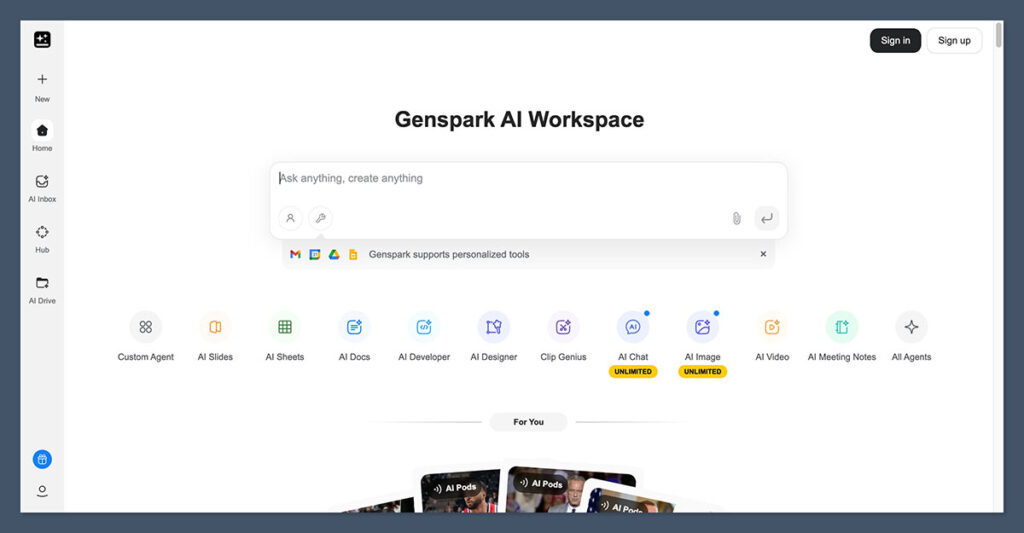
Genspark AI is a task-completion AI platform built around what it calls a “Super Agent.” Rather than asking you to do the thinking or structuring yourself, the system handles everything from research to delivery.
It’s aimed at people who need results, not just ideas or responses.
Unlike a traditional chatbot, Genspark routes your prompt to the right AI models and tools in the background. It then returns a complete asset — whether that’s a pitch deck, a blog outline, or a call transcript.
Use Cases for Genspark
You can use Genspark AI for:
- Structured research briefs
Useful for marketing teams, product managers, or founders. You’ll get a fully formatted document with source links and key insights. - Presentations and pitch decks
You can feed Genspark a short prompt or outline, and it will produce a full deck with speaker notes and consistent design. - Video scripts and content packs
From one idea, it can spin out different content formats like YouTube scripts, social captions, and short-form video hooks. - AI-powered phone calls
This feature is part of the “Call For Me” function. It uses a voice model to actually make real-world phone calls and follow your instructions. - Marketing campaigns
By combining visuals, text, and tone, you can create landing page copy, email campaigns, and promotional assets.
Genspark AI Pricing
Genspark AI offers both team and personal pricing tiers, though the personal plans are less transparent on the website unless you’re logged in. Here’s what I could verify and what’s widely reported by users.
Public Pricing (Team Plan)
| Plan | Monthly Cost | What’s Included |
|---|---|---|
| Team | $30 per seat | 12,000 credits per seat, admin controls, unlimited AI chat, multi-model access |
This plan includes enterprise-level controls, making it suitable for teams of 2 to 150 users. Unlimited chat means you can use the internal assistant without using up credits.
Reported Personal Plans
These are commonly reported by users and third-party reviewers:
| Plan | Monthly Cost | Annual Cost (Per Month) |
|---|---|---|
| Free | $0 | N/A |
| Plus | $24.99 | $19.99 |
| Pro | $249.99 | $199.99 |
The free plan is good for light testing, but most of the features you’ll want — like phone calls and presentation creation — are limited to the paid tiers.
Understanding the Credit System
Genspark uses a credit-based pricing structure to manage more resource-heavy tasks.
Here’s a breakdown of how credits work:
- Slide deck generation: 300 to 500 credits
- Research briefs: Up to 1,000 credits depending on length and depth
- Voice call (Call For Me): 1 credit per second of call time
- Content packs: Between 500 and 800 credits
The chat feature doesn’t consume credits, which is helpful if you’re just exploring or need quick feedback. Larger content tasks are where most credit usage occurs.
Testing Genspark AI in 15 Minutes
One of the best ways to see if this tool fits your workflow is to run a short, structured test. I did this myself using three basic prompts.
Here’s What I Tried
- Research Brief Prompt
“Research TikTok advertising trends and generate a 1-page brief with citations and a summary slide.”
Result: A fully formatted document with four cited sources and a one-slide takeaway deck. - Slide Deck Prompt
“Turn this outline into a pitch deck with 10 slides, speaker notes, and a tech theme.”
Result: Visually consistent deck with themed icons, basic diagrams, and full notes. - Content Pack Prompt
“Create a YouTube script, blog outline, and five Shorts hooks about product-led growth.”
Result: A complete content set, with format consistency and tone aligned across all assets.
If you try these types of prompts and see immediate time savings, Genspark is likely worth investing in.
Privacy Considerations
One of the standout features of Genspark is its phone call capability, but this is also where you need to pay close attention to privacy.
According to the platform’s privacy policy:
- Call transcripts may be stored for your reference
- Recordings can be saved if you enable the setting
- Your phone number is stored if you activate the “Call For Me” tool
While this feature is convenient, it may raise compliance questions depending on your location or industry. If you work in legal, healthcare, or other regulated fields, you’ll want to review this policy carefully before enabling voice tasks.
Real-World Performance and User Feedback
Genspark AI is still relatively new in its current form, but usage data and user reviews suggest it’s already proving valuable.
What the Data Says
- Over 300 companies use Genspark for marketing and research
- “Call For Me” has placed more than 120,000 real-world phone calls
- 60 percent of generated briefs are saved to the workspace or exported to Notion
- Users report 5 to 10 hours saved per week when switching from manual workflows
- Team users often see turnaround time reduced by 80 percent on content tasks
That’s a strong early track record for a tool built around automation and delivery, rather than interaction.
Who Should Use Genspark AI?
Genspark AI is best for professionals or teams who need structured, repeatable outputs and want to automate routine content or communication tasks.
Best For
- Marketers building content calendars, ads, and social packs
- Founders and operators creating investor decks or strategy docs
- Agencies producing repeatable formats like blog outlines and videos
- Teams needing to outsource phone tasks or appointment setting
Not Ideal For
- Developers looking for code or technical integrations
- Writers who want full creative control over every word
- Users with low-volume needs who don’t want to manage credits
If you’re spending hours on prep work for decks, research, or marketing content, this tool could be a serious time-saver.
Final Verdict: Is Genspark AI Worth It?
Genspark AI is more than a chatbot. It’s a functional assistant that takes your idea and delivers a usable result. With real multi-model orchestration, strong research outputs, and real-world phone integrations, it has positioned itself as a serious productivity tool.
The pricing is fair for what it offers, especially if you’re using it consistently. Just make sure to review your privacy needs before activating the call features.
If you’re running a business, working in marketing, or need a faster way to get research and content done, Genspark is worth testing.
Try the free tier first, then see if a paid plan makes sense once you understand your workflow.

Comments 0 Responses