

Singify is a browser-based AI music tool that brings together song generation, AI covers, and vocal splitting all in one platform.
It’s one of the few tools on the market where you can go from a blank idea to a finished track, without touching external software.
In this review, I’ll walk you through Singify’s features, pricing, and performance so you can decide whether it’s the right AI music tool for your creative needs.
Why you can trust this review
I spent time testing every feature on Singify, from generating original songs and remixing covers to cloning voices and using stem separation.
I explored both the free and paid plans, looked closely at Singify’s terms, and compared it with other top tools like Suno and Udio to see where it really stands out—and where it doesn’t.
Singify Pros and Cons
| Singify Overview | |
|---|---|
| Best for | Fast music creation with AI |
| Overall rating | Very Good |
| Score | 4.3 out of 5 |
| Ideal users | Content creators |
| Use cases | Making covers and demos |
| Workflow | All in one music creation platform |
| Free plan | Available |
| Paid plans | $8.99 to $29.99 per month |
Pros
- Full-length AI song generation (up to 4.5 minutes)
- Includes AI cover tools and voice cloning
- Stem splitting with 10-part instrument isolation
- No credit card needed to start
Cons
- Commercial rights only apply to paid plans
- Free output requires attribution and can’t be monetized
- No guarantee of copyright ownership
What Is Singify?
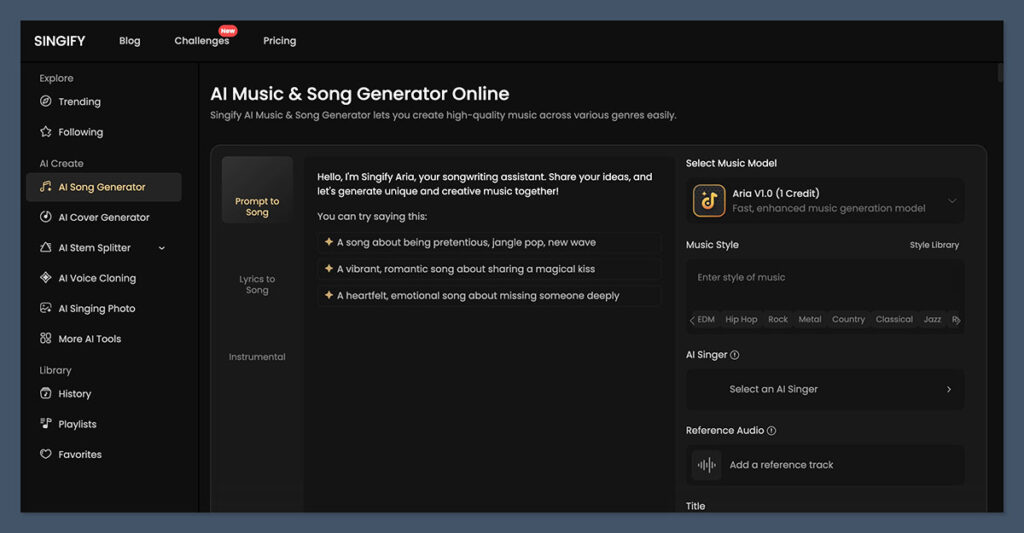
Singify is a web-based AI music platform created by FineShare. It combines multiple music tools into one interface, so you can:
- Generate full songs from lyrics or text prompts
- Clone voices or use prebuilt AI singers to create covers
- Remove vocals or split audio into instrumental stems
- Export your work in standard audio formats like MP3 and FLAC
This is particularly useful if you’re someone who creates a lot of content and doesn’t want to juggle between five different tools.
Singify’s clean interface and workflow simplify a lot of the technical process, letting you focus on creating.
My Experience Using Singify
Getting started was easy. I signed up using just my email and didn’t have to enter a credit card. The onboarding was light, but I was quickly directed to choose from three main workflows: create a new song, generate a cover, or process audio with vocal removal or stem separation.
I started by testing the AI song generator. I entered a short poem I had written, picked a pop genre, and selected an AI voice from the library. Within about 90 seconds, I had a complete track just over 4 minutes long.
Next, I tried cloning my own voice. I uploaded a short voice clip, and within a few minutes, Singify created a custom “AI singer” that I could use on covers or original songs.
It wasn’t perfect, but it captured the tone and phrasing well enough to be convincing for casual use.
I also tested the stem splitting tool by uploading a track from YouTube.
The system successfully isolated vocals, bass, drums, and even synths, making it ideal for remixing or creating backing tracks.
Singify’s Key Features
Let’s break down the platform’s main tools and what you can do with them:
| Feature | What You Can Do |
|---|---|
| AI Song Generator | Turn lyrics or text into full-length songs up to 4.5 minutes |
| AI Cover Generator | Recreate songs using AI voices or your own cloned voice |
| Voice Cloning | Upload a sample and create a custom AI singer |
| Stem Splitter | Remove vocals or isolate 10 different instrumental stems |
| Music Extender | Lengthen short clips by generating new sections |
| No Installation Required | Use everything directly in your browser |
| Export Options | Download songs in MP3 or FLAC formats |
Each feature works within a credit-based system, so you’ll need to manage your usage depending on the plan you’re on.
Singify Pricing
Singify uses a subscription model with tiered pricing based on credits and features. Here’s what each plan includes:
| Plan | Included Credits | Price |
|---|---|---|
| Free | 3 song credits, 1200 cover credits, 5 stem credits, 1 extender | $0 |
| Basic | 30 song credits, 120,000 cover credits, 12 cloned voices, 30 stem credits | $8.99/month or $71.99/year |
| Pro | 100 song credits, unlimited cover credits, 100 cloned voices, 100 stem credits | $16.99/month or $99.99/year |
| Enterprise | 200 song credits, unlimited cover credits, unlimited voices, 200 stem credits | $29.99/month or $251.88/year |
If you’re a serious content creator or planning to use generated music commercially, you’ll need one of the paid tiers.
That’s because only paid plans give you full ownership of your outputs.
Who Is Singify Best For?
After testing Singify extensively, here’s who I think it’s best suited for:
- Lyricists and Songwriters
If you often write lyrics but don’t have the skills or tools to produce a song, Singify helps you turn words into music fast. - Content Creators and Video Editors
Whether you’re working on a YouTube intro or a short video reel, Singify lets you generate background tracks quickly and cheaply. - Fans of AI Covers
The AI cover generator is fun and easy to use. If you’re interested in what a song might sound like in a different voice, this tool is a good entry point. - Musicians Who Need Stems
For practice, remixing, or karaoke use, the 10-stem splitter works well.
What to Watch Out For
Singify is great, but there are a few things that might trip you up if you’re not careful.
1. Commercial Use Limitations
You cannot monetize content made on the free plan. Here’s a quick comparison:
| Plan Type | Ownership Rights | Attribution Needed | Commercial Use |
|---|---|---|---|
| Free | Singify owns the content | Yes | No |
| Paid | You own the content | No | Yes |
This is clearly stated in Singify’s terms, but it’s easy to overlook. If you’re using tracks in client projects, ads, or monetized videos, make sure you’re on a paid plan.
2. Copyright and Voice Cloning Risks
Singify offers a library of AI voices, including some that resemble public figures or fictional characters. These are fun to play with, but using them in public-facing or monetized work could cause legal issues. The platform puts the responsibility on you to avoid impersonation or unauthorized use.
3. Credit Usage and Model Choice
Singify doesn’t always make it clear which AI model you’re using or how many credits it will cost. Some models use more credits but offer higher realism. If you’re budget-conscious, you’ll want to track this closely.
How Does Singify Compare to Other Tools?
Singify is part of a fast-growing group of AI music platforms. Here’s how it stacks up against popular alternatives:
| Feature | Singify | Suno | Udio | Moises |
|---|---|---|---|---|
| Song Generation | Yes, up to 4.5 mins | Yes, limited length | Yes, share-focused | No |
| AI Covers | Yes | No | No | No |
| Voice Cloning | Yes | No | No | No |
| Stem Separation | Yes, 10 stems | No | No | Yes, high quality |
| Free Plan | Yes | Yes | Yes | Yes |
| Commercial Use | Only on paid plans | No | No | Depends |
Suno is focused on quick text-to-music generation, making it great for discovering new melodies and short-form audio ideas. It lacks voice cloning and stem tools, but its simplicity and fun, social-first approach make it appealing for casual creators.
Udio is built around sharing AI-generated songs with a community, so it’s perfect for creators who want exposure and feedback. While it doesn’t include audio editing features or covers, it shines in making original short songs and discovering others’ work.
Moises is best known for its high-quality stem separation, making it a favorite among musicians and music teachers. It doesn’t offer song generation or covers, but it’s ideal for practicing, isolating tracks, and creating instrumentals from existing songs.
Singify stands out for bundling so many tools into one browser-based platform. While others like Suno or Udio focus on song creation, and Moises focuses on stems, Singify offers a bit of everything.
Final Verdict
Singify delivers a lot of value in a single tool. It’s one of the only platforms that lets you:
- Write a song from scratch
- Use AI singers or your own cloned voice
- Remix or isolate stems
- Export everything in usable formats
The free plan gives you a strong introduction to what’s possible, and the paid plans are reasonably priced for what you get.
That said, if you’re working on commercial projects or want legal clarity around usage, you’ll need to read the fine print and choose a paid tier.
If you’re looking for a fast, flexible, browser-based music tool that covers generation, covers, and audio editing, Singify is absolutely worth considering.

Comments 0 Responses