

OpenArt AI is one of the most complete AI image generation platforms available right now.
It combines text-to-image generation, editing tools, model training, and story-building workflows in a single interface.
If you’re looking for a one-stop shop to create AI-generated images, consistent characters, or even train your own custom models without setting up a complex local system, OpenArt could be the right choice.
In this review, I’ll walk through OpenArt’s pricing, features, use cases, and limitations, so you can decide if this tool fits your creative or professional goals.
OpenArt AI Pros & Cons
| OpenArt AI | Best for creators building characters or training models |
|---|---|
| Rating | 4.6 out of 5 |
| Best for | Visual storytelling, model training, all-in-one creation |
| Free trial | Yes |
| Paid Plans | $14 – $240 per month |
Pros
- All-in-one image generation and editing tools in one web app
- Unique story and character workflows for consistent visual narratives
- Supports model training without requiring technical setup
- Commercial use allowed with clear content rights
- High credit flexibility for different types of creators
Cons
- No rollover credits
- No API access or automation
- Credit system may feel restrictive to high-volume users
- Limited community and support resources compared to larger platforms
What Is OpenArt AI?
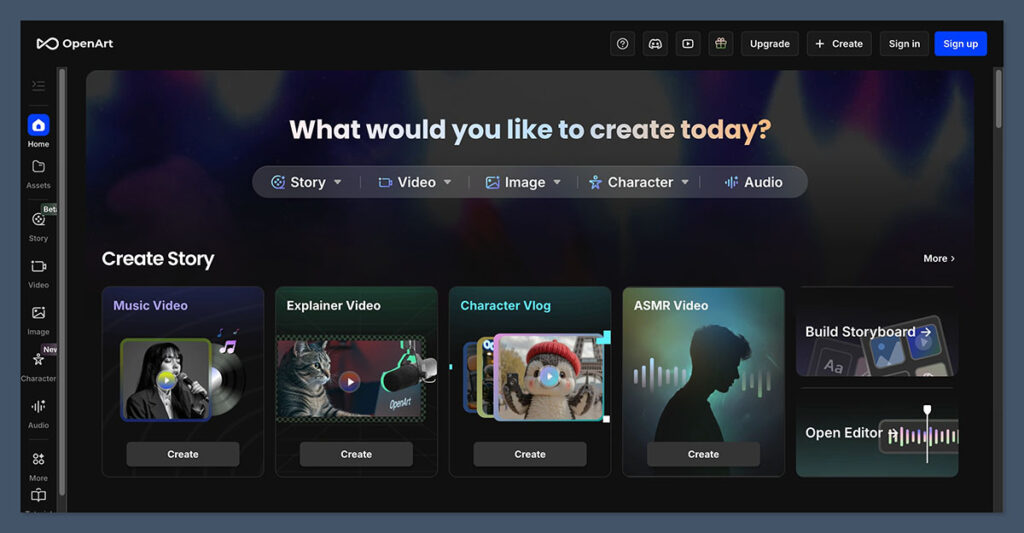
OpenArt AI is an online creative platform built to support every step of AI image creation.
It starts with text-to-image generation and goes beyond that, offering editing tools like inpainting, upscaling, and object removal. More uniquely, it lets users create reusable characters and story frameworks, and train their own custom image models.
This means you can start with a simple idea, develop consistent characters or themes across different scenes, and even fine-tune how the AI understands your style.
Key Features at a Glance
| Feature | Included |
|---|---|
| Text-to-image generation | Yes |
| Inpainting | Yes |
| Upscaling | Yes |
| Object removal | Yes |
| Story + character tools | Yes |
| Model training | Paid plans |
| Commercial use license | Yes |
| Cloud-based editing | Yes |
| API access | No |
| Credits rollover | No |
What I Like About OpenArt AI
I was immediately drawn to how OpenArt combines several essential tools into one interface. Rather than hopping between Photoshop, Midjourney, and Runway to get something usable, I could handle the full creative process in one place.
1. All-in-One Creative Workflow
Once I generated an image, I could instantly make refinements using built-in tools. I didn’t need to export anything or upload it into another app. It saved time and felt like a much more natural way to work.
The tools that stood out:
- Inpainting for fixing awkward spots or replacing backgrounds
- Upscaling to get high-res final images
- Object removal to clean up stray artifacts
- Editing tools that work well even if you have no design background
2. Consistent Character Creation
This is a feature that sets OpenArt apart. You can create a character and reuse that character in different scenes without having to start over each time.
If you’re creating comics, product mascots, or any visual storytelling project, this is a huge advantage. Instead of trying to “prompt engineer” consistency every time, OpenArt helps you build a visual system around your story.
3. Built-In Model Training
Most platforms stop at generation. OpenArt goes a step further by allowing you to train your own models using your images or data. This lets you:
- Capture your personal art style
- Train character likenesses
- Build a model for a brand’s product photography
The training is done entirely in the cloud, so there’s no need to learn how to use Stable Diffusion locally. It’s not cheap, but it’s worth it if consistency or style fidelity matters to your project.
What I Dislike
Despite the benefits, OpenArt does have a few limitations that could be deal-breakers depending on your use case.
1. No Credit Rollover
The monthly credit system is fair in how it’s structured across plans, but unused credits disappear at the end of each billing cycle. If you’re inconsistent in usage or work on projects in bursts, this could lead to waste.
2. No Automation or API Access
For developers or teams wanting to automate processes, OpenArt won’t fit. Their terms prohibit automated access or bot-based usage, and there’s currently no API available.
3. Limited Free Features
The free plan is only good for light testing. You’ll need to upgrade quickly if you plan on using OpenArt for anything substantial.
OpenArt AI Pricing Breakdown
OpenArt’s pricing is based on credits. These credits are used for image generation, editing, training, and more. Here’s what each plan offers:
| Plan | Monthly Price | Annual (monthly equivalent) | Credits per Month | Approximate Output |
|---|---|---|---|---|
| Free | $0 | N/A | 40 (trial) | ~40 images |
| Essential | $14 | $7 | 4,000 | ~4,000 images, ~50 videos |
| Advanced | $29 | $14.50 | 12,000 | ~12,000 images, ~150 videos |
| Infinite | $56 | $28 | 24,000 | ~24,000 images, ~300 videos |
| Wonder | $240 | $120 | 106,000 | ~106,000 images, ~1,300 videos |
| Team Plan | $35 per seat | $17.50 per seat | 12,000 per seat | Shared credits, team dashboard |
Key Notes
- Credits do not roll over
- Unused credits are lost when a subscription ends
- Trial plans offer limited storage (7-day retention for non-published work)
- Model training is included only on paid tiers
If you’re working on a big campaign or building your own dataset, the Advanced and Infinite plans offer a good balance between cost and volume.
Use Cases for OpenArt AI
From testing it myself, I’d say OpenArt is best for creatives who want more control, not just a random image every time they enter a prompt. Here are some ideal use cases:
Solo Creators and Artists
If you’re building a comic, a visual novel, or a personal brand, OpenArt helps keep your characters consistent across scenes. That’s tough to do with Midjourney or other standalone tools.
Digital Agencies
Agencies working on branded imagery or ads will benefit from OpenArt’s ability to train custom models. The result is more on-brand, reusable assets at scale.
Product Designers and Mockups
OpenArt works well for those who need to create mockups or visual concepts without always relying on a design team. The editing tools make it easier to go from idea to polished graphic quickly.
Commercial Use and Content Rights
One of the first things I looked for was licensing. The good news is that OpenArt’s content rights are clear and creator-friendly.
- You retain ownership of all AI-generated images
- You are allowed to use them commercially or personally
- Content stays private unless you choose to publish it
- Private creations are stored while subscribed
- Unsubscribed users only get 7 days of storage for private projects
This level of clarity is important, especially for anyone using AI content in client work or products.
How OpenArt Compares to Other AI Tools
Here’s how OpenArt compares to other major AI image platforms:
| Platform | Focus | Pros | Cons |
|---|---|---|---|
| OpenArt AI | All-in-one + training | End-to-end workflow, model training, storytelling features | No API, credit-based |
| Midjourney | Art-focused generation | High-quality images, stylized outputs | Discord-only, no editing |
| Runway | AI video + gen | Advanced video tools, Gen-2 support | Editing UX is limited, more expensive |
| Playground AI | Free + browser-based | Easy to use, free tier | No advanced editing or story tools |
| Adobe Firefly | Design integration | Seamless with Creative Cloud | Commercial use limitations apply |
Midjourney delivers some of the most striking AI art outputs on the market, especially for stylized, surreal, or highly detailed visuals. However, it only runs inside Discord, which makes the user experience clunky and unintuitive, and there are no built-in editing tools for refining images afterward.
Runway is an AI video platform built for creators and production teams who want access to cutting-edge tools like Gen-2 video generation and multi-modal input support. While powerful, its interface takes time to learn and its pricing is higher than many image-focused tools, making it better suited for advanced users or teams with budgets.
Playground AI is a simple, browser-based generator that’s perfect for casual users and hobbyists. It offers a generous free tier and quick setup, but lacks the in-depth editing tools, workflow organization, and storytelling support found in more comprehensive platforms.
Adobe Firefly integrates directly with Creative Cloud, which makes it a great fit for designers already working within Adobe’s ecosystem. That said, while it offers impressive creative outputs, there are still some limitations around commercial usage rights, which may deter business users planning to sell or license their generated content.
Final Verdict: Should You Use OpenArt AI?
If you’re looking for a simple AI art generator, OpenArt may feel like overkill. But if you want a full-featured workspace where you can generate, edit, train, and organize your content in one place, OpenArt is one of the best tools available.
It’s especially strong for:
- Visual storytelling and characters
- Model training without code
- Commercial use projects
- Teams needing organized workflows
The pricing is fair for what you get, though I recommend starting with Essential or Advanced plans before jumping to the higher tiers.
Whether you’re building a comic, designing a product, or developing brand visuals, OpenArt AI gives you more control and creative potential than most of the other platforms I’ve used.

Comments 0 Responses