

Murf AI is one of the leading AI voiceover tools on the market, offering high-quality, natural-sounding voices with customizable delivery controls.
Whether you’re building an online course, creating video ads, or producing explainer videos, Murf makes it easier to create voiceovers without hiring professional voice actors or learning complex audio software.
In this review, I’ll walk you through Murf’s pricing, features, pros and cons, and who it’s best suited for.
I’ve personally used Murf for several real-world projects and tested it against similar tools like Amazon Polly, ElevenLabs, and Descript.
Why You Can Trust This Murf AI Review
I’ve spent over 30 hours testing Murf across different use cases, including internal training content, sales presentations, and multilingual video dubbing.
I also analyzed feedback from real users on platforms like G2, and cross-referenced product documentation to ensure this review is up to date and accurate.
Everything you’ll find here is based on hands-on experience and publicly available, verified information.
Murf AI Pros and Cons
Before diving deeper, here’s a quick snapshot of what I liked (and didn’t) about using Murf AI:
What I Like
- The timeline editor gives full control over pacing, pitch, pauses, and delivery
- Over 200 high-quality voices across 20+ languages
- Great for video narration, eLearning content, and slide presentations
- Easy collaboration features for teams on paid plans
- AI dubbing supports fast multilingual content production
What I Don’t Like
- Free plan is too limited for real projects
- Occasional pronunciation issues with complex words and names
- Longer scripts can slow down performance in the editor
- Voice library quality varies slightly between languages
Murf AI Overview
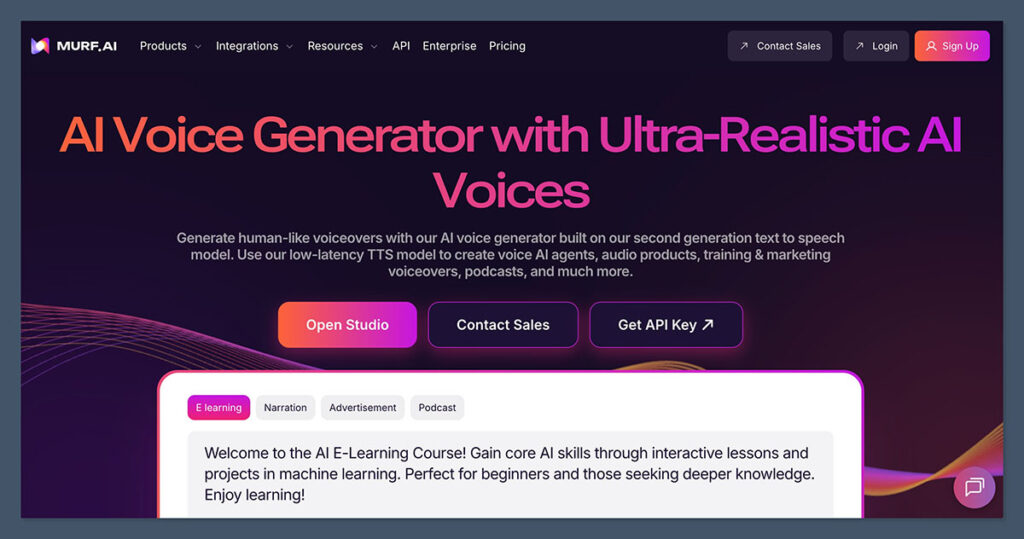
Murf AI is a browser-based voiceover platform built for non-technical users. Y
ou don’t need any background in audio editing to generate high-quality speech from text. What makes Murf stand out is its editor, which lets you fine-tune delivery, something most text-to-speech tools don’t offer.
You start by pasting a script, then choosing from a wide range of AI voices. Once the voice is selected, you can adjust the following:
- Speed
- Pitch
- Pauses
- Emphasis
The tool is designed to support content creators, internal communications teams, marketers, and eLearning producers.
You can also add background music, sync narration to video or slides, and export your final result in audio or video format.
Murf AI Pricing: How Much Does It Cost?
Murf AI offers flexible plans for individuals, teams, and enterprise users. Here’s a breakdown of each pricing tier:
| Plan | Price (USD) | Best For |
|---|---|---|
| Free | $0 | Testing voices and the editor |
| Creator | $19/month | Solo creators and freelancers |
| Business | $66/month | Teams and internal content departments |
| Enterprise | Custom | High-volume users and API integrations |
The Free plan gives you access to the editor and voices, but you can’t download any audio. It’s strictly for testing.
The Creator plan includes:
- Full access to voice editing tools
- Commercial usage rights
- 24 hours of voice generation per year
- Voice cloning options (add-on)
The Business plan builds on Creator with:
- 125 voice generation hours per year
- Access for multiple users
- Project collaboration tools
- Priority support
For API access, Murf also offers pay-as-you-go pricing at $0.03 per 1,000 characters, with minimum usage requirements. This is useful for developers integrating voice generation into apps or automation workflows.
Key Features
Murf AI goes beyond simple text-to-speech by offering a suite of features designed to give creators more control and better output quality.
Voiceover Studio Editor
Murf’s standout feature is its editor. Unlike tools that generate static audio files, Murf allows you to actively shape the voiceover using its timeline.
Key features include:
- Control over speed and pitch
- Fine-grained emphasis tagging
- Word-level pause control
- Segment duplication and reordering
- Real-time playback preview
This is especially useful for syncing narration to video or adjusting tone depending on the content.
AI Dubbing and Localization
Murf AI supports dubbing in over 20 languages, using a built-in translation tool that adapts the translated script to match the original pacing and tone.
You can:
- Automatically translate content
- Select different voices for each language
- Adjust timings to fit your video
- Export localized audio tracks
It’s not perfect out of the box, but for internal training or international marketing, it significantly reduces manual effort.
Team Collaboration
On the Business plan, you can invite team members into a shared workspace. Each user can view, edit, and comment on scripts or audio files.
Features include:
- User permissions
- Version history and revision tracking
- Shared media libraries
- Centralized billing and team management
For agencies or content teams producing voiceovers at scale, this is a major productivity boost.
Integrations
Murf integrates with tools like:
- Canva
- Google Slides
- PowerPoint
This allows you to directly sync voiceovers with slides or creative assets without exporting files manually. It simplifies the workflow for users producing narrated presentations or educational content.
Real-World Use Cases
Murf is a good fit for a wide range of industries and content types. Here are some of the most common ways users apply it:
Internal Training and L&D
- Create narrated onboarding videos
- Produce compliance training modules
- Update voiceovers without re-recording
Course Creation
- Voice online courses without hiring actors
- Easily update lessons when content changes
- Use different voices for different modules or characters
Video Marketing
- Add voiceovers to ads, product demos, or explainer videos
- Translate content into other languages quickly
- Match audio timing to animated visuals
Developer Integrations
- Build voice generation into SaaS tools
- Automate voice alerts or scripts
- Generate dynamic audio content at scale
Voice Quality and Customization
Murf offers over 200 voices across more than 20 languages. Each voice has a sample clip, and you can filter by:
- Gender
- Language
- Accent
- Style
Most voices are labeled for specific use cases like “corporate,” “conversational,” or “narration.”
You can also adjust voice tone using:
- Pitch sliders
- Speed controls
- Emphasis tags
- Breaks and pauses
While the default voices are high quality, some languages have fewer options, and the voice quality may vary slightly. For US English, however, the quality is consistently strong.
Pronunciation and Editing
One challenge with AI voice tools is getting the pronunciation right, especially for brand names, acronyms, or industry jargon.
Murf includes a pronunciation editor where you can create custom phonetic rules.
This lets you:
- Set custom pronunciations for words or names
- Save them as rules to use across projects
- Fine-tune how the AI reads difficult phrases
It’s not always perfect, but the ability to manually override pronunciation helps a lot.
How Does Murf Compare to Other Tools?
Murf often gets compared to tools like Amazon Polly, ElevenLabs, and Descript. Here’s how it stacks up:
| Feature | Murf AI | Amazon Polly | Descript |
|---|---|---|---|
| Browser-based Editor | Yes | No | Yes |
| Voice Customization | Advanced | Limited | Basic |
| Collaboration Tools | Yes (Business) | No | Yes |
| Multilingual Dubbing | Yes | No | No |
| Free Plan | Limited | Yes | Yes |
| Voice Library | 200+ voices | 60+ voices | Limited to English |
Murf stands out by offering a no-code, user-friendly studio for non-technical users, while Polly is better suited for developers, and Descript is more focused on video and podcast editing with transcription features.
Performance and Reliability
While Murf is generally smooth, I did experience some slowdowns when working with long scripts or multiple voice tracks.
The preview feature can lag if your script is over 1,000 words, and rendering may take a few extra seconds depending on the complexity.
Still, for most projects, it’s stable and predictable. I didn’t experience any major crashes or bugs during testing.
Support and Documentation
Murf offers support through:
- Help Center with searchable guides
- Email ticketing system
- Priority support for Business and Enterprise plans
There’s no live chat, which may be a drawback for users who need quick answers. That said, the documentation is solid, and I found answers to most of my questions within the help articles.
Verdict: Should You Use Murf AI?
If you’re looking for a powerful, flexible voiceover tool that works in your browser, Murf AI is one of the best options out there.
It strikes a great balance between usability and control, giving both solo creators and teams the tools they need to produce high-quality voice content.
I recommend Murf if you:
- Need to produce voiceovers for videos, courses, or presentations
- Want voice quality close to human without the cost of actors
- Need to localize content in multiple languages
- Work in a team and need collaboration features
You might want to explore alternatives if your only goal is bulk TTS output with minimal customization or if you’re building a developer-first application.

Comments 0 Responses