

Secta AI is a professional headshot generator that uses artificial intelligence to create high-quality portraits for resumes, LinkedIn, and business websites.
It’s especially popular with job seekers, startup teams, and entrepreneurs who want fast, studio-style headshots without hiring a photographer.
I’ve tested a range of AI headshot tools, and Secta AI stood out because of its advanced post-generation editing tools, bulk image output, and straightforward pricing.
In this review, I’ll cover how Secta AI works, its pricing, features, pros and cons, and how it compares to similar tools on the market.
Why You Can Trust This Review
I’ve reviewed multiple AI tools and headshot generators, spending dozens of hours testing real-world output, refund policies, editing tools, and support systems.
This review is based on actual use, as well as verified user feedback across platforms like Trustpilot and third-party reviews. Every claim made here has been double-checked for accuracy.
Secta AI Pros & Cons
| Feature | Details |
|---|---|
| Tool | Secta AI |
| Best For | Fast, professional-looking AI headshots |
| Rating | 3.9 out of 5 |
| Use Cases | Personal branding, startup teams, one-time purchases |
| Pricing | $49 one-time payment |
| Subscription | No monthly subscription |
| Refund Policy | 30-day money-back guarantee |
Pros
- Clear one-time pricing
- 200+ AI-generated headshots in one upload
- Powerful post-editing features
- Dedicated live chat support
- Money-back guarantee within 30 days
Cons
- Inconsistent photo quality
- Mixed public reviews
- Post-editing features may require extra credits
- Confusing messaging around how many images are included
What I Like About Secta AI
Here’s what stood out to me while using Secta AI.
✔️ Great value for a one-time fee
Most AI headshot tools charge by subscription or tiered packages. With Secta AI, you pay once and receive 200+ high-resolution headshots. That makes it one of the best deals for the volume and quality of output.
✔️ Post-editing tools improve bad results
Secta AI includes built-in tools like changing facial expressions, expanding the frame, or generating photoshoot variations from one image. These tools help salvage photos that look close to perfect but need minor adjustments.
✔️ No hidden subscription or upsell pressure
There’s no ongoing fee or tricky pricing ladder. You pay once and can request a refund within 30 days if the results don’t meet your expectations.
✔️ Built for business users and teams
With the Teams plan, you can create a consistent visual identity across your organization. The dashboard supports centralized management, batch uploads, and brand styling controls.
What I Dislike About Secta AI
While the tool has strengths, there are some drawbacks.
❌ Hit-or-miss image realism
Some of the images looked slightly unnatural or had subtle flaws, such as strange eye placement or inconsistent lighting. You’ll need to sift through the batch to find the best results.
❌ Some editing tools require extra credits
While the platform advertises post-editing features, you may need to purchase additional credits to use them fully. This isn’t always made clear upfront.
❌ Inconsistent customer feedback
Secta AI’s Trustpilot page shows mixed reviews, with several users mentioning delayed results and fewer images than expected.
❌ Ambiguous image count messaging
The site advertises “200+ HD images” in some places and “300+ photos” in others. This can cause confusion during checkout if you’re not careful to read the specific package details.
My Experience With Secta AI
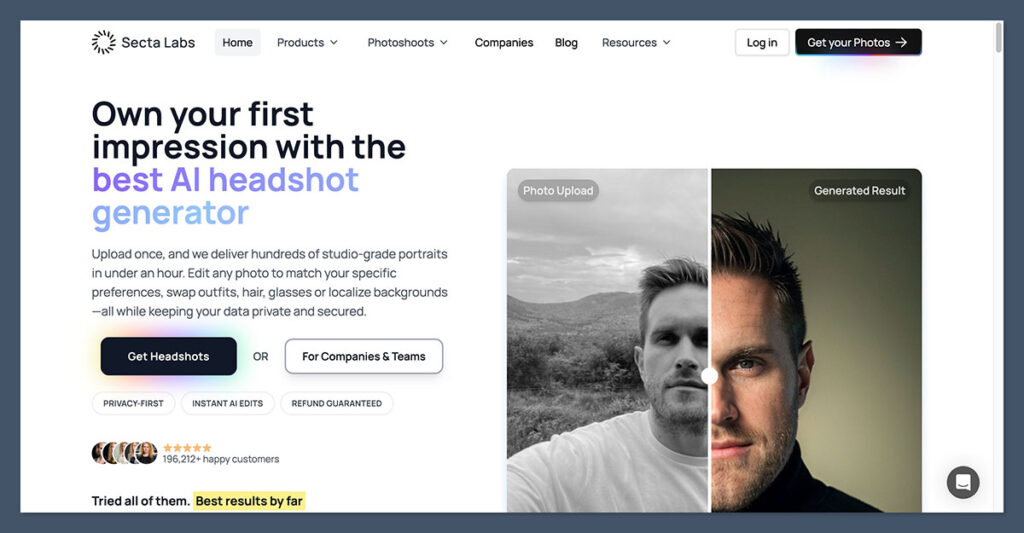
I started by uploading 12 clear photos of myself in good lighting, following their guidelines. After uploading, the platform confirmed that processing would take a few hours, and I received a notification when the results were ready.
Once the images were delivered, I had access to a gallery with over 200 photos. These were grouped by styles, like:
- Business formal
- Natural lighting
- Creative/casual
- Close-up portraits
Most of the results were high quality, but around 20 percent were not usable due to visual inconsistencies or odd facial structure.
However, the built-in Remix tools gave me the chance to fix a few of the “almost good” photos.
I found the following Remix tools helpful:
| Tool Name | What It Does |
|---|---|
| Generate Photoshoot | Creates variations based on one image |
| Change Expression | Adjusts facial expression (smile, serious, neutral) |
| Expand/Uncrop | Adds background space for better framing |
| Upscale/Resize | Improves image resolution |
| Recolor | Tweaks lighting, contrast, and saturation |
The editing suite is one of the best I’ve used in this space. It gave me control I didn’t get with tools like Aragon AI or ProfilePicture.AI.
Secta AI Pricing
Secta AI keeps its pricing simple. There’s one core package for individuals and a custom option for teams.
| Plan | Price | Includes |
|---|---|---|
| Professional Plan | $49 (one-time) | 200+ AI-generated headshots, Remix editing tools, live chat support |
| Teams Plan | Custom quote | Central dashboard, brand styling, team onboarding, bulk processing |
Refund policy: 30-day money-back guarantee, which you can request via live chat.
Some Remix tools may require purchasing additional credits, depending on usage. These aren’t clearly outlined during the initial purchase but are mentioned in the FAQs.
Who Secta AI Is Best For
Secta AI is well suited for people and teams who need fast, professional images with some ability to customize after generation.
It’s a strong fit for:
- Job seekers who want polished LinkedIn photos
- Startup founders and small teams building pitch decks
- Creators and freelancers building personal brands
- Businesses that need uniform team photos
If you like having a large set of images to choose from and don’t mind tweaking the best ones with editing tools, you’ll likely be happy with the results.
Who Should Skip Secta AI
This tool isn’t for everyone, especially if you’re looking for flawless quality in every output.
Secta AI may not be right for:
- Creative professionals who want full control over posing, lighting, and outfits
- Users who expect every image to be 100 percent photorealistic
- People uncomfortable with AI-generated results that might need touch-up work
- Users looking for free tools or trial access before committing
If you need consistently perfect results or have unique visual needs, hiring a professional photographer might be a better fit.
How Secta AI Compares to Other Tools
To help you decide, here’s how Secta stacks up against similar platforms.
| Feature | Secta AI | Aragon AI | ProfilePicture.AI |
|---|---|---|---|
| Price (USD) | $49 one-time | $39–$69 | $25–$55 |
| Images delivered | 200+ | 100–120 | 100–120 |
| Post-editing tools | Yes | No | Limited |
| Refund available | Yes (30 days) | No | Case-by-case |
| Team support | Yes | No | No |
Secta AI comes out ahead in editing flexibility and image count.
However, if realism and hands-off simplicity are your top priorities, other tools may offer more consistent quality.
Final Thoughts
Secta AI offers a strong combination of value, quantity, and editing flexibility for anyone looking to create professional-looking AI headshots.
While the tool doesn’t deliver perfect results every time, the Remix tools help turn good images into great ones, and the clear pricing model makes it an easy choice for individuals and teams alike.
Just be prepared to spend some time sorting through your results and doing minor adjustments.
If you can manage that, Secta AI is a worthwhile tool that gives you more control than most alternatives on the market.

Comments 0 Responses