




In our latest round of research in December 2025, we spent over 80 hours testing a new browser-based AI editing platform built for both casual users and professionals. This tool combines AI image and video generation, face swaps, batch background removal, and even 4K upscaling into a single web interface, no downloads required.
As part of our hands-on evaluation, we tested each feature one by one: generating videos from prompts, trying batch face swaps on multiple images, editing photos using different AI models, and removing backgrounds at scale. We also checked the quality of the platform’s outputs, the accuracy of its editing modes, and whether its credit-based pricing system offers value for money.
In this review, I’ll walk you through its pricing, performance, pros and cons, and who it’s best suited for. Whether you’re a solo creator, ecommerce seller, or digital agency looking for a visual AI tool, this guide will help you decide if this platform is worth using in your workflow.
Key takeaways
- This tool offers one of the most versatile AI face swap and video editing tools on the market today
- It runs entirely in the browser, with no required sign-up for many features like image upscaling or background removal
- Pricing is based on one-time credits (starting at $5.99), with no official subscription required, but there are some inconsistencies in the Terms
- AI photo editor includes multiple models, from Seedream 4K to Google Nano Banana
- The platform is ideal for creators, marketers, and ecommerce users, but suffers from occasional downtime and weak customer support
Feature Breakdown: What Can Remaker AI Actually Do?
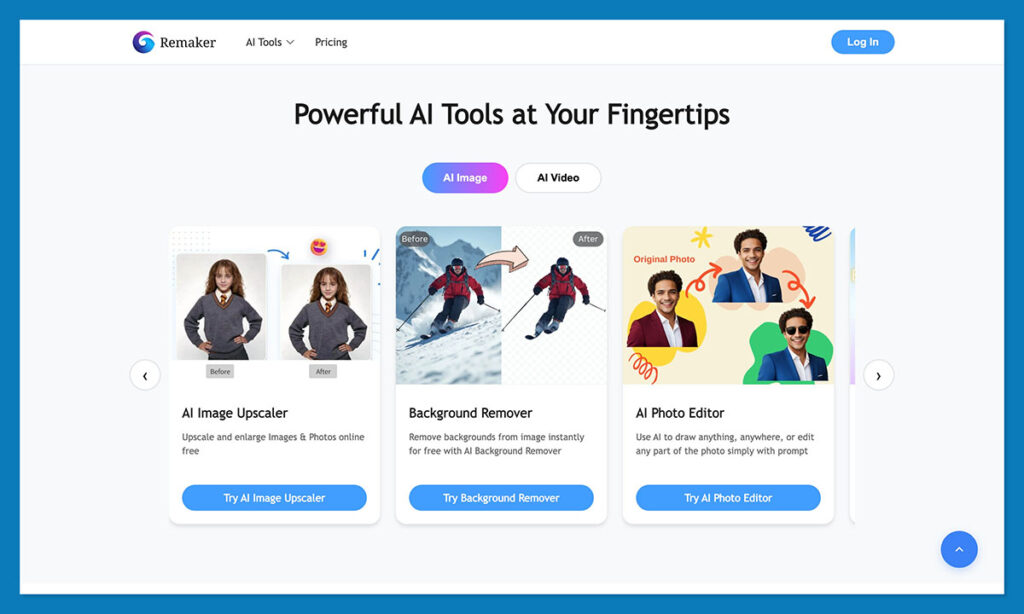
Remaker AI isn’t just a single-purpose tool. It offers a suite of AI-powered features with different use cases and credit requirements. Below is a breakdown of the platform’s key tools and what each one is capable of doing.
1. Face Swap Tool
Remaker AI’s Face Swap feature supports single image swaps, batch processing, and even video-based face edits. Unlike many deepfake-style apps that require downloads or signup, Remaker claims users can start swapping faces without creating an account and that downloads come watermark-free, which is notable.
Key highlights:
- Upload a photo or video and select a face to swap in.
- Supports single-face, multi-face, and batch face swap modes.
- Watermark-free downloads, though preview-only modes may differ in quality.
- Referenced internally as “FaceVary,” which might confuse new users due to inconsistent branding.
Use cases for this tool range from casual meme edits to influencer parody clips. It’s also gaining popularity among social media users who want to overlay famous faces onto viral GIFs or reels. While the UI is simple, batch tools make it useful for professional workflows like generating headshot variations.
2. AI Photo Editor: Prompt and Object Editing Modes
The AI Photo Editor tool allows users to modify existing images in two core modes:
- Prompt Edit Mode: Users type text instructions to change the image.
- Transform Object Mode: Users brush over areas to remove or repaint objects.
The system supports different models with varying credit costs, as detailed below:
| Model Name | Description | Credit Cost |
|---|---|---|
| ByteDance Seedream 4 | High-res 4K editing with detailed precision | 6 credits |
| Google Nano Banana | Better for consistent facial edits | 8 credits |
| Flux Kontext Dev | Budget-friendly image quality enhancement | 2 credits |
Not all editing modes require login. For example, “Transform Object” can be accessed without an account, while “Prompt Edit” needs user registration. That balance between flexibility and account creation allows for testing before committing to the platform.
3. Background Remover (Batch-Friendly)
Background removal is one of Remaker AI’s simplest but most scalable tools. It allows users to remove the background from images and export results in high-quality transparent formats like PNG or WebP.
Important capabilities:
- Batch process up to 50 images simultaneously.
- “No watermark, no signup” for both previews and downloads.
- Works well with JPEG, PNG, and WebP formats.
This tool is especially valuable for ecommerce sellers, print-on-demand businesses, or marketers dealing with repetitive product photos. Being able to edit images in batches with no login speeds up production workflows considerably.
4. AI Image Upscaler
This feature allows users to increase the resolution and sharpness of low-quality or compressed images. It promises to preserve original image details while removing blurriness and noise.
Top benefits:
- JPEG/PNG input support.
- Batch processing capabilities.
- Claimed improvements in sharpness, detail, and vibrancy.
Unlike typical filters, the AI Upscaler uses machine learning to infer what the image “should” look like at a higher resolution. This makes it suitable for enhancing social media assets or resizing old image libraries without degrading quality.
5. AI Video Generator
Perhaps the most resource-intensive feature, Remaker’s AI Video Generator lets users create short animated clips from text prompts or still images. While innovative, this tool uses credits quickly and has multiple pricing tiers based on model choice.
| Model Type | Cost per Clip (Approx. 5 sec) | Resolution Available |
|---|---|---|
| Remaker 2.0-Turbo | 11 credits | 480p, 720p |
| Remaker 2.0-Standard | 18 credits | 480p, 720p |
| Remaker 1.0-Turbo | 18 credits | 480p, 720p |
| Remaker 1.0-Pro | 30 credits | 480p, 720p |
| Remaker 1.0-Animation | 30 credits | 480p, 720p |
The platform prohibits NSFW content in prompts, and filtering seems moderately strict based on user reviews. For marketers and creators, this tool is useful for generating short story-based animations or stylised brand videos without hiring a motion graphics expert.
6. Video Enhancer
This tool allows users to upscale videos to 4K and applies enhancements such as better sharpness, more stable motion, and colour correction. Remaker AI keeps enhanced videos available for re-download for up to 30 days.
Feature list:
- 4K upscale support.
- Frame-by-frame motion and sharpness boost.
- Temporary cloud storage for downloaded results.
While not a substitute for professional-grade editing, it’s ideal for content creators or editors working with older videos, low-res camera footage, or user-generated content that needs polishing.
Pricing Structure: Credit-Based System With Some Confusion
Remaker AI uses a credit-based pricing model with a promise of no subscriptions, no time limits, and no hidden fees. According to its homepage, credits never expire, allowing users to buy and use them at their own pace.
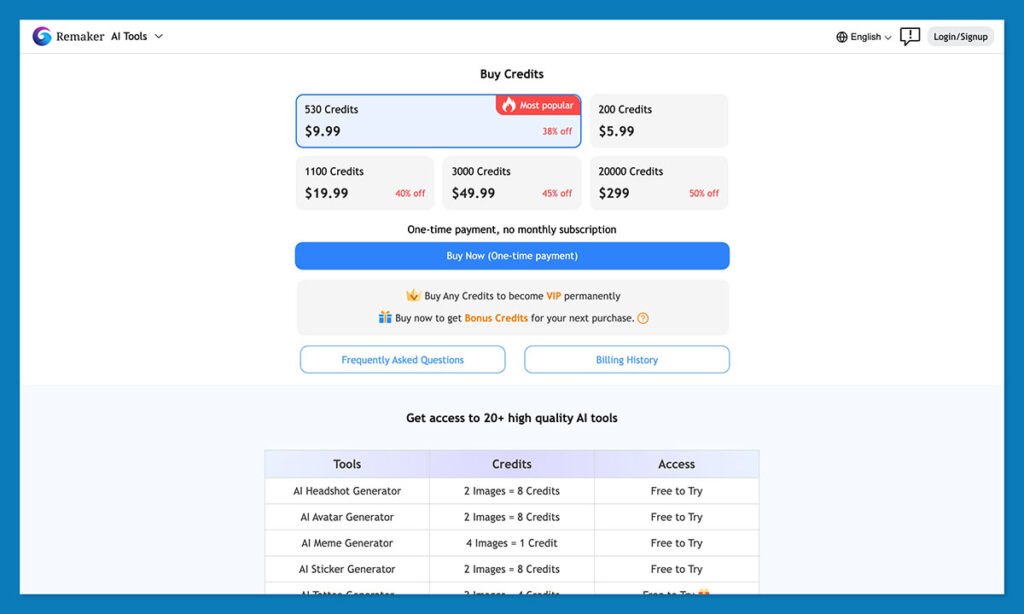
Here’s how credits are priced on the website:
| Credits | Price (USD) |
|---|---|
| 200 | $5.99 |
| 1,000 | $29.99 |
| 5,000 | $99.99 |
| 10,000 | $199.99 |
| 20,000 | $299.00 |
However, mobile users on iOS/Android report different pricing structures within the app:
| In-App Credits | iOS/Android Price |
|---|---|
| 150 | $4.99 |
| 200 | $9.99 |
| 450 | $17.99 |
| 1,000 | $34.99 |
This inconsistency between web and mobile can create confusion. Moreover, the platform’s Terms and Conditions mention auto-renewal and trial-based subscriptions, which contradicts the front-end claim of being “subscription-free.” This is something potential buyers should review before purchase.
Privacy, Trust, and Data Policy
When it comes to privacy, Remaker AI maintains a mixed bag of claims and real-world practices. For example, the Face Swap tool states that all uploads and generated content are deleted within 48 hours, which is a positive sign for users concerned about personal data or likeness misuse.
The general content policy bans the following:
- Harassment, bullying, or discriminatory uses.
- Generation of medical, legal, or misinformation content.
- Uploading or generating anything involving PII meant to harm individuals.
- Law enforcement or justice-system uses without permission.
Its browser extension privacy policy says it collects no personally identifiable information and doesn’t track IP, OS, or browser fingerprinting data. However, they leave open the possibility of future analytics tracking with anonymized stats.
The general site privacy policy, on the other hand, includes vague references to ad campaigns, third-party analytics, and advertiser data, which may be auto-generated or templated. Still, it’s worth reading for transparency.
Reputation and User Feedback
While the tool offers a promising feature set, the user feedback is inconsistent. G2 gives it generally positive feedback, calling out the tool’s variety and ease of use for basic visual editing tasks.
On the flip side, Trustpilot shows only six reviews, with an average rating of 2.5 out of 5 stars. Common complaints include:
- Site downtime, sometimes lasting hours or days.
- Features like the video generator failing intermittently.
- Poor or non-existent customer support, especially for billing or technical issues.
ScamAdviser gives Remaker a moderately positive “likely legit” rating but notes the domain’s WHOIS info is private and that some red flags exist, particularly related to uptime and support channels.
Who Is It Best For?
Remaker AI seems to be built for:
- Social Media Creators: People who need meme edits, GIF overlays, and face swaps quickly.
- Ecommerce Businesses: Especially those dealing with batch product edits, background removal, and upscaling.
- Casual Users: Who want to experiment with AI tools without paying a subscription or learning complex interfaces.
- Content Marketers: Who want to build short clips or visual assets quickly for ads, blogs, or reels.
However, for agencies and professionals, the inconsistent reliability and lack of support might be dealbreakers unless used as a supplementary tool.
Final Verdict: Is Remaker AI Worth It?
Remaker AI, offers a robust toolkit of image and video editing tools built around AI workflows. Its browser-based platform and flexible credit pricing make it attractive for casual users and semi-pro creators.
Tools like batch face swaps, AI photo editors, and 4K upscaling are useful and surprisingly fast when working properly.
However, users should be aware of system reliability, mixed policy language, and limited support infrastructure. The price-per-credit model works well if you use the platform occasionally but could become costly for high-volume needs.
If you’re looking for a lightweight, no-install visual AI editor that doesn’t force you into a monthly subscription, Remaker AI is worth trying, just test it with small credit packs first.

Comments 0 Responses